Land Management Software for Small Landlords Compared
Compare land management software for small landlords on screening, leases, rent collection and maintenance. Find the right fit with our checklist and matrix.

You've got a rent payment sitting in your inbox, an applicant waiting for screening results, and a repair request buried in a text thread. Your lease is in a folder on your laptop, your income and expenses live in a spreadsheet, and you're trying to remember whether the plumber ever sent an invoice. Managing 1 to 10 rental units without a full-time manager doesn't look like a major operation from the outside, but the administrative friction adds up quickly.
The right software shouldn't just give you more screens to click. It should replace scattered workflows with one dependable operating system for screening, leases, rent collection, maintenance, accounting, and communication. This comparison focuses on that practical standard, including where automation removes work and where a product digitizes paperwork you're still expected to manage manually.
Introduction Why Small Landlords Need Smarter Software Now
A tenant has paid through one channel, signed a lease stored somewhere else, and reported a repair by text. You then copy details between an application form, spreadsheet, email folder, bank account, and vendor conversation. For a DIY landlord, that work is the cost of managing 1 to 10 rental units. Each handoff creates another chance to miss a date, duplicate an entry, or lose the status of a request.
Choose software based on the workflow it replaces, not the number of buttons it offers. The practical question is: Which system removes repetitive handoffs while preserving my existing records?
Independent-landlord comparisons consistently emphasize online rent collection, tenant screening, maintenance coordination, accounting, and portfolio analytics, along with automated reminders, digital leases, vendor assignment, and built-in accounting. RentRedi's independent-landlord comparison reflects that practical feature set.
Migration deserves equal weight. Before subscribing, confirm whether the platform can import tenants, leases, balances, payment history, property details, and documents in usable formats. Then check whether it connects with your bank, accounting tools, screening provider, and communication channels. A polished dashboard is not useful if you must retype your history or keep parallel records.
AI earns its place only when it reduces labor. It should extract lease terms, classify maintenance messages, summarize applicant information, flag missing records, or draft routine replies. It should not merely turn a paper form into another screen that still requires manual review and follow-up.
The useful test: If a platform records a task but leaves every decision, reminder, and handoff to you, it is a digital filing cabinet, not an operational system.
Prioritize automation where delays create risk: applicant evaluation, rent collection, repair coordination, and financial recordkeeping. Small landlords need dependable workflows, practical integrations, and a migration path that does not turn setup into a second job.
What Land Management Software Means for Small Portfolios
You own six rental homes, but your software keeps treating them like parcels on a map. That mismatch creates work. Land management software usually serves land as a physical and geographic asset, with GIS mapping, geospatial visualization, ownership and acreage history, search, exports, alerts, and integrations with finance or document systems. Those tools fit large tracts, agricultural operations, infrastructure corridors, public land, and organizations with complex spatial records. Guideflow's review of land management capabilities explains this technical focus.
Small landlords usually need an operating system for rental relationships. The priority is whether an applicant can be screened, a compliant lease signed, rent collected automatically, and a maintenance request moved from tenant to vendor to payment without repeated data entry.
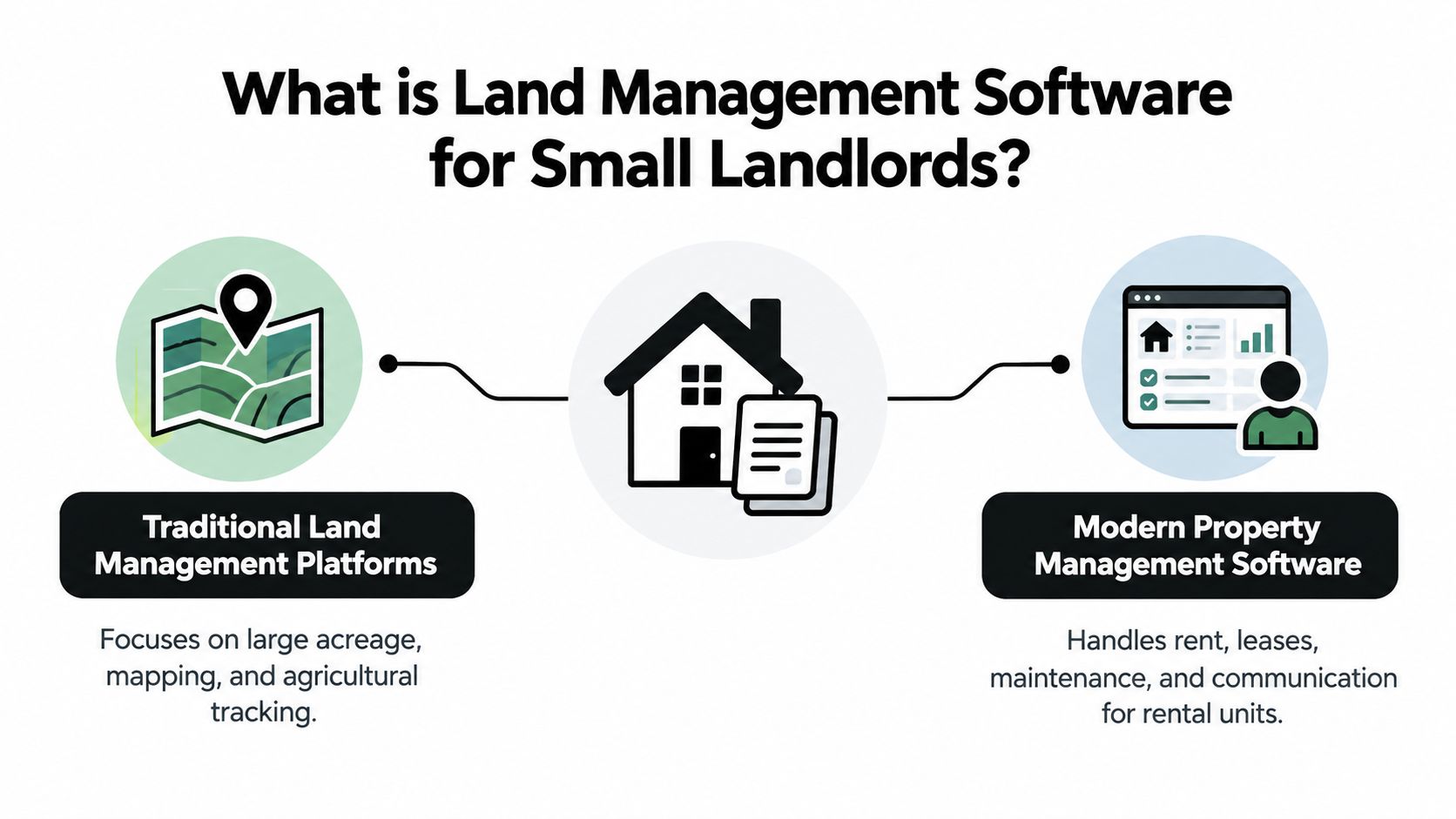
Use the asset to choose the category. A GIS-heavy system can map parcels and preserve ownership history while offering little help with monthly rent or tenant messages. A lightweight rental platform can handle leases and repairs but add little value for agricultural fields, easements, or extensive land inventories. If your asset is a rental relationship, prioritize tenant lifecycle automation and review VerticalRent's guide to what a property management system does.
Why cloud software became the practical default
Cloud tools have become operating infrastructure for property managers. U.S. property managers using cloud property management systems reached 72.4% in 2023, compared with 55% in 2020, according to the property management software adoption dataset from Gitnux. The same source reports 58.3% adoption among small firms managing fewer than 100 units in 2023. Small operators no longer need to treat software as an enterprise-only purchase.
Market estimates also show sustained expansion. One estimate values land management software at $2.14 billion in 2025 and projects $2.99 billion by 2030, implying a 6.7% CAGR. Another places the category at $2.1 billion in 2024 and nearly $3.8 billion by 2030, with a 9.8% CAGR. The definitions differ, so use these figures as market context rather than a buying argument. The Business Research Company's market report identifies North America as the largest regional market and says software represented 62.5% of market share in 2025.
For a small landlord, the recommendation is direct. Match the platform to the work you perform daily. Rental assets call for tenant, lease, payment, and maintenance workflows. Land assets call for GIS, ownership history, spatial search, and connections to technical systems. Choose workflow replacement, not a feature checklist.
Core Features Compared Screening Leases Rent and Maintenance
A platform can advertise every major feature and still leave you doing the work manually. Evaluate each capability by asking what happens after the initial record is created.
| Capability | What to Look For | Basic vs Advanced Signal |
|---|---|---|
| Tenant screening | Credit, criminal, eviction, income, and rental history data | Basic stores an application. Advanced combines compliant reports with risk context and readable summaries |
| Lease management | Local templates, required disclosures, e-signatures, renewal tracking | Basic stores a document. Advanced generates the right agreement and tracks its lifecycle |
| Rent collection | ACH and card payments, reminders, late fees, reconciliation | Basic accepts payments. Advanced automates notices and posts transactions to the ledger |
| Maintenance | Tenant requests, triage, vendor assignment, status updates, invoices | Basic logs work orders. Advanced routes issues and follows progress through payment |
| Accounting | Income and expenses, bank records, P&L, tax-ready reports | Basic exports data. Advanced maintains a property ledger and produces usable reports |
Screening should reduce uncertainty, not just collect forms
A basic application form gives you information. It doesn't help you evaluate it. Stronger screening connects FCRA-compliant credit, criminal, eviction, income, and rental history data with a consistent review process. AI can help by summarizing the record in plain English and flagging patterns for your review, but it shouldn't replace your legal responsibilities or judgment.
Ask whether the system explains its risk signals, keeps the underlying report accessible, and supports consistent criteria across applicants. A polished score without transparent inputs is less useful than a plain summary tied to verifiable records.
Lease generation needs local coverage
Lease software earns its place when it does more than insert names and dates into a generic template. Look for state and county-specific agreements, required disclosures, editable clauses, e-signatures, renewal reminders, and a clear document history.
A lease that looks professional but omits a local requirement creates false confidence. The platform should make compliance easier to manage, not encourage you to assume that automation equals legal advice.
Rent collection is where small efficiencies become recurring habits
Online payments through ACH or cards are only the starting point. The useful layer includes scheduled reminders, late-fee workflows, payment status visibility, receipts, and automatic posting to the property ledger. If you still copy payment information into a spreadsheet every month, the system hasn't replaced the workflow.
Check how transaction fees are handled, when funds become available, and whether failed payments trigger an actionable notification. A payment tool that forces you to reconcile every event manually may save a trip to the mailbox while preserving most of the administrative burden.
Maintenance must connect the request to the outcome
Maintenance is the clearest test of operational depth. A tenant should be able to submit a request with photos and details. The system should help classify urgency, ask useful follow-up questions, assign or recommend a vendor, record updates, and retain the invoice and completion history.
The distinction between a maintenance log and maintenance management software is explained in VerticalRent's maintenance management guide. The practical question is whether the platform manages the whole chain, not whether it has a “maintenance” tab.
The strongest signal: Automation reduces labor when it makes the next correct action obvious or executes it under your review. It adds clicks when it only turns an email, spreadsheet, or PDF into a new form.
Pricing Scalability and Total Cost for Growing Portfolios
A low subscription can still produce an expensive workflow. Total cost includes payment processing, screening, add-on modules, bookkeeping time, migration work, and the clicks required to keep records accurate.
Use market comparisons as pricing-shape benchmarks, not buying instructions. For example, one 2026 comparison lists an unlimited-unit model at $12 per month when billed annually, with automated reminders, screening, digital leases, vendor assignment, and built-in accounting. Verify current pricing directly with the vendor, then confirm which workflows are included and which services cost extra.
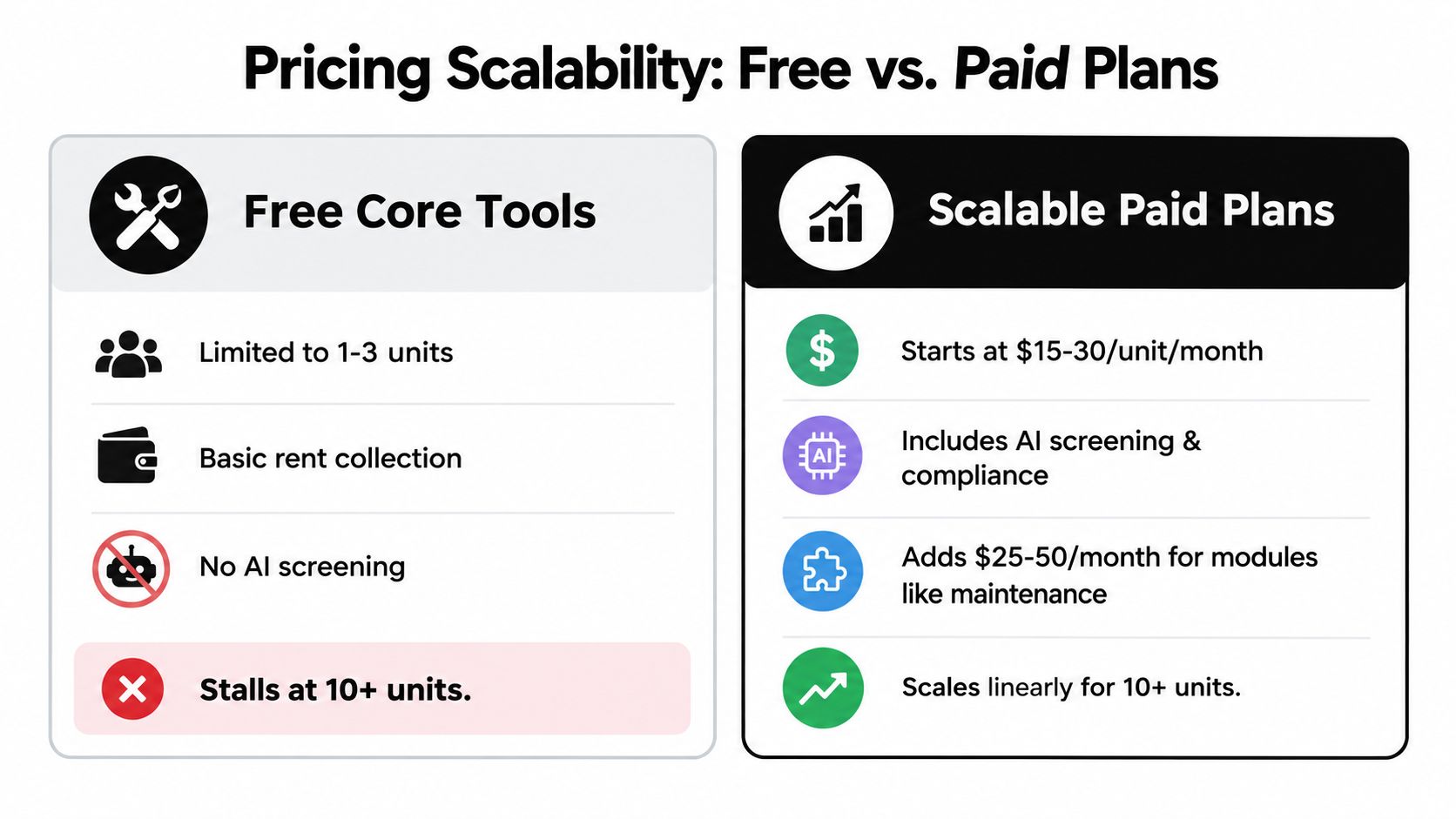
Compare the pricing shape, not just the entry point
Small-landlord plans usually follow one of four models:
- Free core access: A useful way to test a workflow, but automation, reporting, screening, or unit limits may restrict daily use.
- Per-unit pricing: Predictable for a small portfolio, with a bill that rises as you add properties.
- Unlimited-unit pricing: A strong fit for active acquisition, provided important workflows are not reserved for costly add-ons.
- Module-based pricing: A low base fee can grow quickly after adding maintenance, accounting, screening, or advanced reporting.
Ask for the cost of your complete operating process. Include application processing, screening reports, payment processing, premium support, accounting modules, and any fees divided between landlord and renter. Also ask whether the platform imports legacy records cleanly and connects with the tools you already use. A cheap system that traps data or forces duplicate entry can cost more than a higher-priced system that replaces the old workflow.
Calculate labor you'll no longer perform
Estimate the time spent chasing rent, checking statuses, retyping lease data, answering routine maintenance questions, and preparing tax records. Compare that workload with the subscription and transaction fees. AI earns its place when it classifies requests, extracts data, or prepares the next action for review. It adds little value when it merely converts paperwork into another form.
Free tools can suit a simple portfolio if you are willing to coordinate records manually. A paid tier earns its cost when manual work causes missed reminders, delayed repairs, inconsistent screening, or unreliable tax records. Review this guide to free landlord software before choosing between a free tool and a paid system.
Buyers Checklist How to Choose the Right Platform
A good demo can make every platform look efficient. Your job is to test the ugly parts, especially old records, failed payments, incomplete applications, vendor delays, and mobile use from a driveway or repair site.
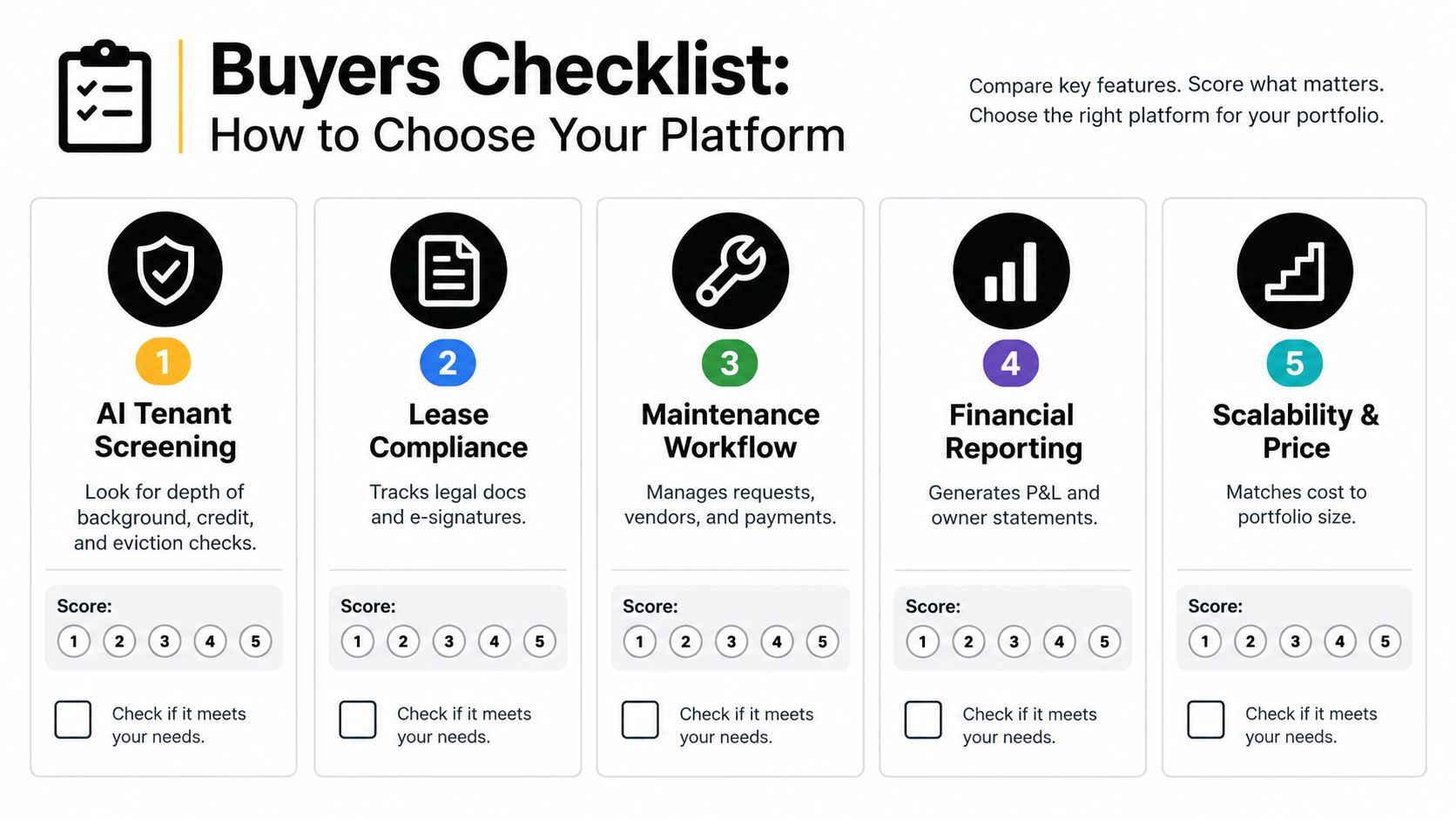
Start with workflow replacement
Score each platform against the following questions, using your own current process as the baseline:
- Screening depth: Does it support compliant credit, criminal, eviction, income, and rental history checks? Can it produce a readable summary while preserving the underlying reports?
- Lease coverage: Does it generate agreements appropriate to your location, support e-signatures, and remind you about renewals or missing documents?
- Payment automation: Can renters pay by ACH or card? Does the system send reminders, apply late-fee rules, record receipts, and reconcile transactions?
- Maintenance control: Can tenants submit photos and descriptions? Does the platform triage requests, assign vendors, track updates, and retain invoices?
- Financial reporting: Can you see income, expenses, property-level results, and tax-ready information without rebuilding the ledger in a spreadsheet?
A platform that scores well on records but poorly on handoffs will still leave you as the integration layer.
Test migration before you buy
Legacy data migration is where many software projects become more difficult than expected. Export a sample of your current tenant records, leases, balances, vendor contacts, and property expenses. Ask the vendor to show exactly how those records enter the system, which fields map cleanly, and what you'll need to correct by hand.
Interoperability matters just as much. Confirm whether the platform connects with your bank, document storage, accounting tools, payment processor, listing channels, and vendor workflows. Market analysis identifies high digitization costs, legacy migration, interoperability problems, and limited technical capacity as persistent adoption constraints, even as cloud, GIS, mobile, and AI capabilities expand. OG Analysis's market discussion supports treating implementation as a buying criterion, not an afterthought.
Use mobile testing as a deal breaker
Open the platform on your phone and complete real tasks. Upload a repair photo, approve a vendor, check whether rent arrived, search a lease, and send a tenant update. If the mobile experience is only a reduced dashboard, you'll return to texts and email whenever you're away from your desk.
Practical rule: Never approve software from a feature presentation. Approve it after testing one complete workflow from intake to completion.
Real World Use Cases Matching Software to Landlord Scenarios
A first-time landlord with one rental doesn't need a parcel database or an enterprise accounting suite. The priority is a short, dependable path from listing to application, screening, lease, payment, and maintenance request. A basic rent application may cover the first transaction, but it becomes frustrating if you must move applicant data into another system, create a lease elsewhere, and track repairs through text messages.
The side-hustle owner adding units needs a different threshold. At this stage, reminders and automated ledger entries matter more than an elaborate dashboard. The system should keep each property's transactions separate, make screening consistent, and reduce the number of decisions that require opening email, spreadsheets, and payment portals.
An out-of-state owner should prioritize maintenance intake, urgency triage, vendor dispatch, photo documentation, and tenant updates. A platform that merely records “leak reported” doesn't solve the problem. Useful automation asks for context, routes the request, keeps the tenant informed, and leaves a complete record for review.
The hands-on manager may care most about screening quality and lease compliance. AI summaries can reduce the time needed to interpret applicant information, but only when the manager can inspect the source data and apply consistent criteria. Automated lease generation can remove repetitive drafting, while local legal review remains necessary for unusual properties or complicated situations.
After your core workflows are stable, expand your operating habits beyond rent collection. Resources such as these top facility management practices for 2026 can help you think about preventive maintenance, vendor accountability, documentation, and repeatable property routines, even if your portfolio is much smaller.
A useful product test is to run the same scenario through every shortlisted platform: a new applicant, a signed lease, a scheduled payment, a failed payment, and an urgent repair. Watch where the system acts, where it asks for approval, and where it sends you back to manual work.
Our Recommendation for Independent Landlords in 2026
You inherit a six-unit property with tenant details in spreadsheets, leases in email, repair requests by text, and payments in a separate app. Replace that patchwork with a cloud property-management platform that connects the full operating workflow.
For independent landlords managing 1 to 10 units, choose software that combines compliant screening, location-aware leases, online rent collection, maintenance coordination, and accounting. Interoperability matters as much as the feature list. Confirm that the platform can import tenant records, lease terms, rent schedules, maintenance history, and ledger data without forcing a manual rebuild.
An AI-native system earns its place when it takes supervised action. Useful applications include plain-English screening summaries, payment reminders, maintenance triage, vendor routing, listing copy, and ledger updates. AI that merely rewrites a message adds clicks rather than removing labor. Keep approval controls for screening decisions, lease changes, payments, and unusual repairs.
A GIS-heavy enterprise platform fits portfolios centered on acreage, spatial records, ownership history, or large technical datasets. A basic rent app works if you only need payment collection and already have dependable systems for screening, leases, repairs, and accounting. Most small landlords need the middle option: one rental workflow with clear connections between records and tasks.
As discussed in the market context above, software represents a major share of category spending and North America remains the largest regional market, according to The Business Research Company's market report. Apply that direction at a smaller scale by centralizing records and automating handoffs.
Start with one property. Import its records, publish a listing, complete screening, sign a lease, collect an online payment, and verify the ledger entry. If the sequence works without duplicate entry, expand it.
VerticalRent offers independent landlords free core tools and scalable plans for screening, state- and county-specific leases, rent collection, maintenance triage, vendor dispatch, listings, and tax-ready ledgers. Visit VerticalRent to replace scattered paperwork with a connected workflow.
Put this into practice
VerticalRent tools related to this guide
Legal Disclaimer
VerticalRent and its authors are not attorneys, CPAs, or licensed legal or financial advisors, and nothing on this site constitutes legal, tax, or professional advice. The information in this article is provided for general educational purposes only. Landlord-tenant laws, eviction procedures, security deposit rules, and tax regulations vary significantly by state, county, and municipality — and change frequently. Nothing on this site creates an attorney-client relationship. Always consult a licensed attorney or qualified professional in your jurisdiction before taking any action based on information you read here.
Co-founded VerticalRent in 2011, growing it from nothing to 100k landlords and renters. Sold it in 2019, then re-acquired it in 2026 to make it better than ever.


