Property Management Automation Guide for Small Landlords
Learn property management automation for 1-10 units. Automate screening, leases, payments and maintenance to save hours and boost ROI.


Saturday morning starts with one text about a leaking sink. Then an applicant asks whether their dog is allowed. A tenant says the rent app didn't go through. You open your notes app, then your bank account, then a spreadsheet you meant to clean up last month. By noon, you're not managing property. You're managing interruptions.
That's the reason small landlords look at property management automation. It isn't because you want a flashy dashboard. It's because manual coordination keeps stealing your weekends. Every task feels small on its own, but the handoffs pile up. One missed message turns into a delayed repair. One copied number turns into a bookkeeping mess.
For small portfolios, automation works best when you stop thinking in features and start thinking in workflows. A workflow is the full path from trigger to completion. Rent becomes due. A reminder goes out. A payment posts. The ledger updates. A receipt gets logged. If any step still depends on you remembering to do it later, the process is only partly automated.
That shift is becoming standard across the industry. A National Apartment Association survey found that manual building access control dropped from 29% of respondents in 2023 to 19% in the next report, while the share of onsite tasks with some or full automation moved into the 70% range for nearly all tasks. The same report found resident-operations manual hours fell from 89 hours per month to 53 hours per month, and back-office manual hours for tasks such as maintenance requests, utility billing, and payment processing were 67 hours per month in 2023. That's a practical sign that automation is reducing routine workload, not just adding software layers (National Apartment Association automation survey).
A useful mental model is simple. Manual property operations mean you are the switchboard. Automated operations mean the system handles the normal path, and you step in only for exceptions.
Practical rule: If a task happens the same way most months, it should run on rules. Your attention should go to unusual cases, not repeated steps.
If you want a broader view of where this is headed, VerticalRent's take on the future of automated property management is a helpful companion read.
Introduction to Property Management Automation for Busy Landlords
A landlord with three units and a landlord with ten units often have the same problem. The second one just has more versions of it. More rent reminders. More invoices. More screening documents. More maintenance follow-up. The work doesn't scale smoothly when each step lives in a different app or a different part of your brain.
What daily life looks like before automation
Most DIY landlords don't struggle because the work is too advanced. They struggle because the work is fragmented.
You might collect applications in one place, draft the lease somewhere else, take rent through a bank transfer, and track repairs through text messages. That setup can work for a while. Then one renter asks for a receipt, another disputes a fee, and a contractor says they never got the address details.
A manual system usually creates three kinds of stress:
- Memory stress: You're trying to remember what still needs action.
- Data stress: The same tenant details get copied into multiple places.
- Timing stress: You only notice a problem after someone follows up.
What changes when workflows mature
Automation doesn't remove your judgment. It removes repeated handling.
Instead of checking whether rent arrived, the system can notify you only when payment fails. Instead of reading every maintenance message in real time, the system can gather the request, classify it, and route it to the right next step. Instead of retyping lease details, the system can pull the approved applicant data into the document flow.
That's a calmer operating model. You still make decisions, but you don't spend your day carrying information from one place to another.
Small landlords usually don't need more software. They need fewer handoffs.
The rest of this guide stays focused on that idea. Not feature checklists. Not abstract AI talk. Just the workflows that save time, reduce mistakes, and lower compliance risk when you manage a small number of units.
What Property Management Automation Really Means
Most landlords hear “automation” and think of reminders. A rent text goes out on the first. A late fee posts a few days later. Those are useful, but they're only one layer.
Real property management automation means the system handles a chain of actions from one starting event. It works like autopilot in a plane. The pilot still matters. But the pilot isn't manually adjusting every tiny movement for the whole flight.
The difference between features and workflows
A feature is one tool. A workflow is the path that tool is part of.
For example, an automated reminder is a feature. An end-to-end rent collection workflow is bigger than that:
- Rent becomes due.
- The tenant gets a reminder.
- The payment method runs.
- The payment records in the ledger.
- You get alerted only if something fails or needs review.
That's the distinction many landlords miss. A software page can list ten automation features and still leave you doing the most fragile parts by hand.
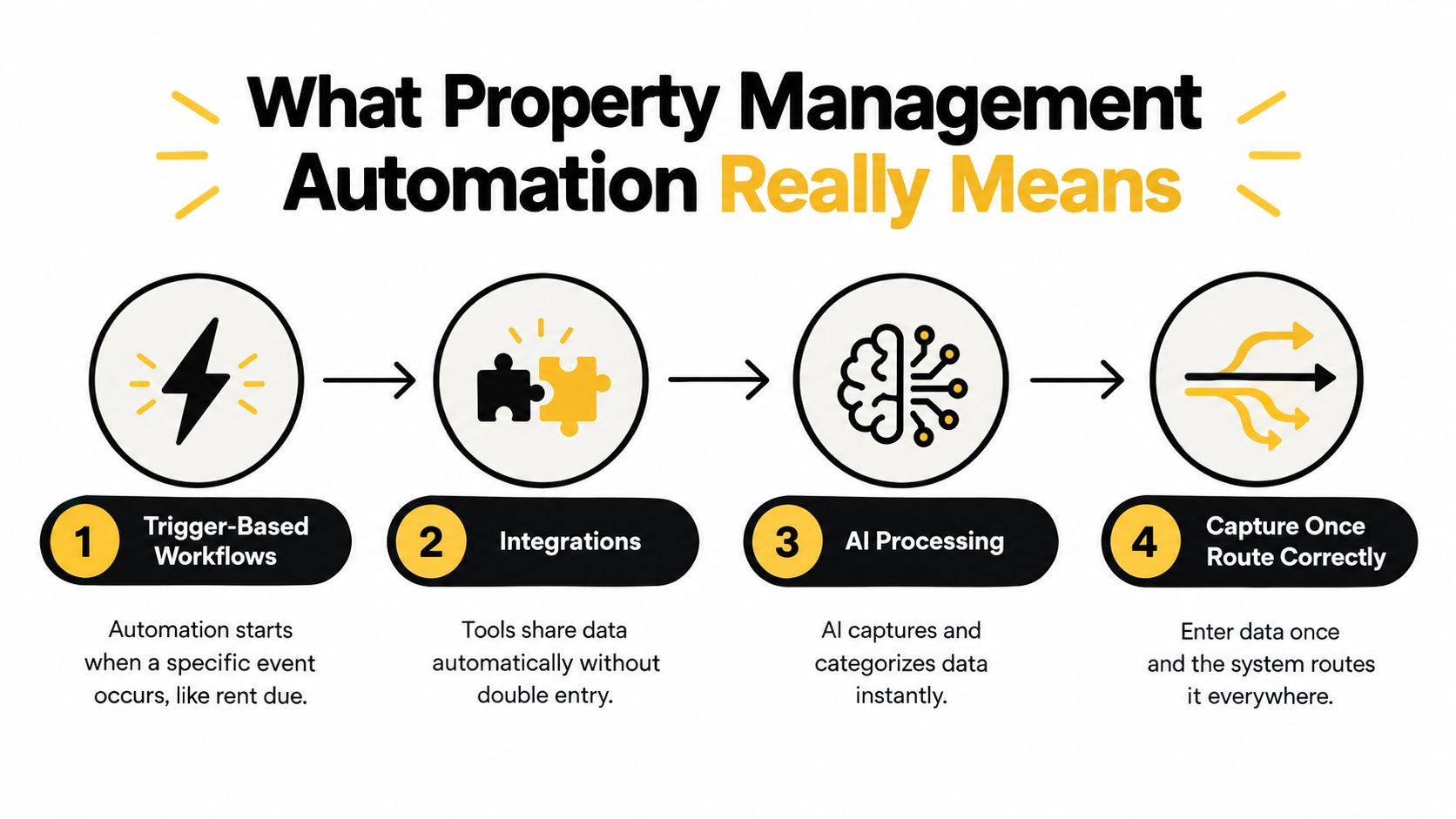
Capture once, route correctly
The cleanest systems collect data once, validate it immediately, then send it where it belongs. That matters because retyping creates compounding errors.
A recent explanation of property management data entry automation describes the core benefit clearly. Automated systems use integrations, trigger-based workflows, and AI document processing to capture data directly into system fields, which lowers error propagation because the data is validated at ingestion instead of being re-keyed across leasing, maintenance, and accounting systems (property data entry automation overview).
For a small landlord, that can mean:
- Applicant data flows into screening and lease drafting without repeated entry.
- Maintenance details move from tenant request to work order without copy-paste.
- Payment records post into bookkeeping without manual reconciliation notes.
Where automation usually breaks
The hardest part isn't starting automation. It's closing the last manual gaps.
Buildium's 2026 industry report says AI adoption rose from 20% in 2024 to 58% in 2025, yet only 8% of companies had fully automated any processes (Buildium 2026 industry report). That gap matters because it shows how easy it is to own tools without building complete workflows.
Common break points include:
- Approval bottlenecks: The software drafts something, but no one set review rules.
- Disconnected apps: Payment data lives in one system, lease records in another.
- Exception overload: Too many edge cases still come back to your inbox.
- Weak intake forms: Bad data enters early, then spreads everywhere else.
If you need human support around repetitive admin tasks while you tighten those handoffs, some landlords also look at property management virtual assistant services to help document current processes before automating them.
For a basic foundation on how these systems are structured, this overview of a property management system is useful context.
Five Workflows Every Small Landlord Should Automate
If you manage a small portfolio, you don't need to automate everything at once. Start where the work repeats, where mistakes spread, or where tenant response time matters. Those are the places where workflow maturity pays off fastest.
Screening and application review
This workflow starts when a renter submits an application. In a manual setup, you chase documents, compare names across forms, and keep notes in email threads. The risk isn't just wasted time. It's inconsistency.
What should be automated:
- Application intake: Standardized forms collect the same fields every time.
- Document gathering: The system prompts the applicant for missing items.
- Screening flow: Credit, criminal, eviction, and rental history checks run through the same review path.
What stays manual:
- Final decision-making: You still review edge cases and handle adverse action obligations properly.
- Policy consistency: You decide criteria in advance and apply them evenly.
If you want lease drafting support after approval, tools such as an AI Contract Generator can help with document assembly, though landlords still need to verify that the final lease language fits local requirements.
Lease generation and signing
Lease automation is not just about e-signatures. It's about reducing re-entry.
A stronger workflow pulls approved applicant details into the lease, uses the correct template, adds required disclosures, sends the document for signature, then stores the final file where you can find it later. The part that stays human is review. You still need to confirm the term, rent amount, pet terms, and any local addenda.
Rent collection and payment logging
Rent collection is one of the easiest workflows to improve because it happens on a predictable cycle. The best setup reduces reminders, payment chasing, and bookkeeping cleanup.
What should happen automatically:
- Rent reminders
- Autopay or tenant-initiated digital payments
- Late fee rules where legally appropriate
- Ledger entries and receipts
One option in this category is VerticalRent, which handles online rent collection by ACH or card, automates reminders and late fees, and logs transactions into an income and expense ledger with Schedule E reporting support.
If you want a deeper tactical look at that process, VerticalRent's guide to automating rent collection and getting paid on time shows the moving parts clearly.
Maintenance intake and dispatch
Maintenance is where many landlords feel the most daily friction because the workflow often starts in chaos. A text message arrives with half the details. You ask follow-up questions. You contact a vendor. The tenant asks for an update. You become the relay point.
Automation works best when the request enters through a structured form, gets triaged, then routes to the right next action. According to an industry benchmark cited in search results, automated maintenance intake can reduce average response time from 18.4 hours to 4.8 hours, a 74% reduction, and labor cost from $34.50 per request to $4.80 per request by removing repetitive coordination work (maintenance automation ROI benchmark).
The big savings in maintenance usually don't come from doing the repair faster. They come from removing phone tag, duplicate messages, and unclear handoffs.
Bookkeeping and tax-ready records
This workflow matters because bookkeeping mistakes are quiet until they aren't. You may not notice a missing category or duplicate entry until tax prep or an owner review.
A healthier process automatically records income and expenses, categorizes recurring items consistently, and keeps a ledger tied to each property. You still review exceptions, especially for unusual charges, reimbursements, or owner contributions.
Which workflows to automate first
| Workflow | Manual Pain Point | Automation Payoff |
|---|---|---|
| Screening | Incomplete applications and inconsistent review notes | Cleaner intake and more consistent decision support |
| Lease generation | Re-entering tenant details and hunting for templates | Faster document prep with fewer drafting errors |
| Rent collection | Chasing payments and updating records manually | More reliable collection flow and cleaner ledger entries |
| Maintenance | Phone tag, missed details, and delayed dispatch | Faster routing and fewer coordination steps |
| Bookkeeping | Spreadsheet drift and end-of-year cleanup | Better record consistency and easier reporting |
Your Implementation Roadmap and Checklist
The fastest way to make automation feel like extra work is to switch everything at once. Most small landlords do better with a phased rollout. One workflow. One set of rules. One round of tenant communication. Then the next.
Start with an audit, not a shopping spree
Before you compare software, track your own repetitive work for a couple of weeks.
Write down:
- How often the task happens
- How long it takes
- Where data gets copied
- Where mistakes or delays usually start
That gives you a baseline in your own operation. It also shows which problem is operational, and which one is really a policy problem. Automation can route tasks well, but it can't fix unclear rules.
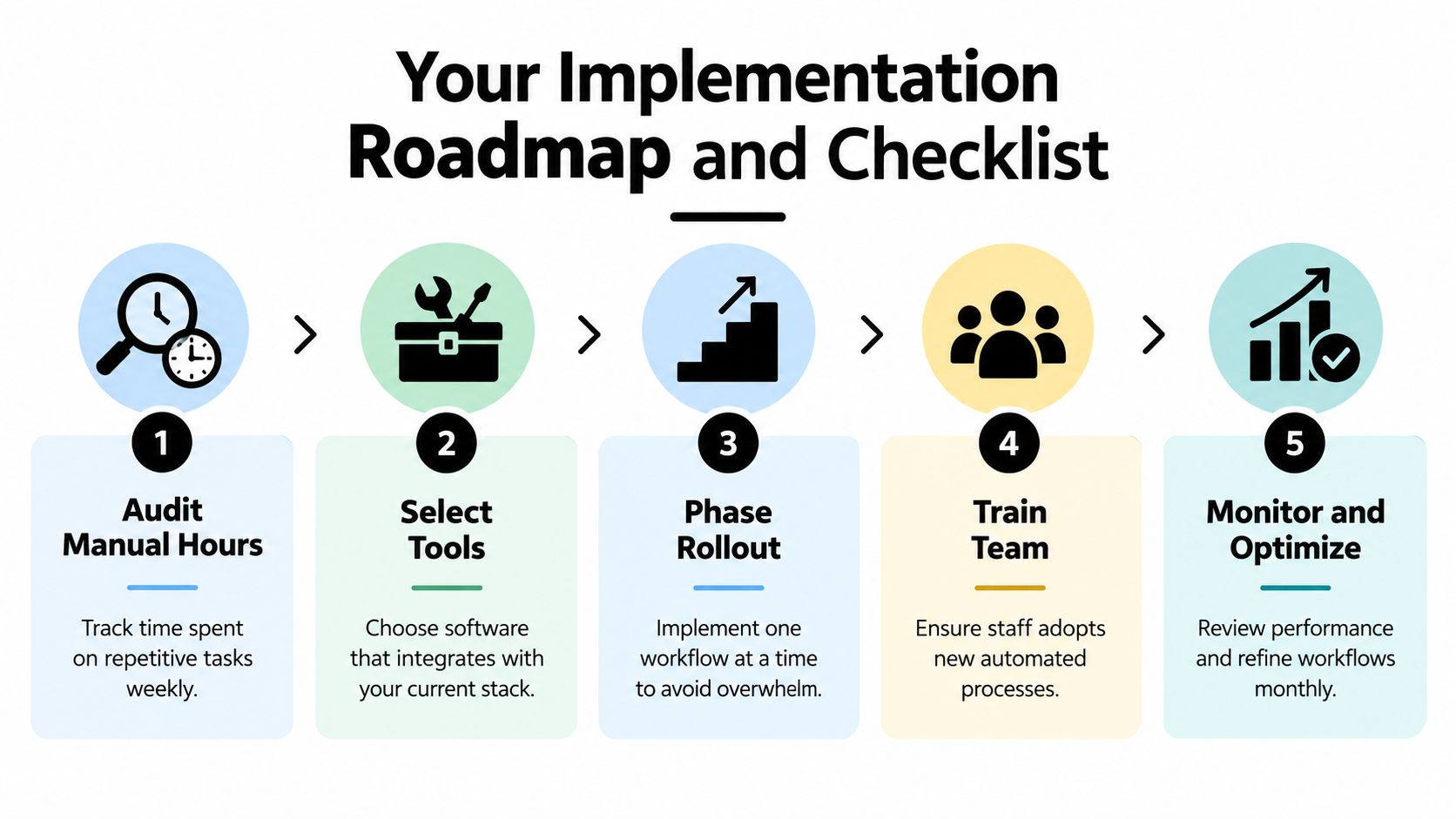
Build one lane at a time
A practical sequence for 1 to 10 units often looks like this:
- Rent collection first: It's recurring and easy to observe.
- Maintenance intake next: It reduces interruptions quickly.
- Applications and screening after that: Better once your intake rules are clear.
- Lease generation and storage: Add after applicant data is flowing cleanly.
- Bookkeeping cleanup: Tie the earlier workflows into your reporting process.
Don't just ask whether a tool has a feature. Ask whether it completes the full handoff. A listing tool, for example, should reduce duplicate posting and keep your lead flow organized. An application system should also handle fee collection cleanly and move approved data into the next stage without re-entry.
Checklist for rollout
Use this as a practical pre-launch list:
- Consolidate your stack: Fewer systems usually mean fewer broken handoffs.
- Define trigger rules: Decide what starts each workflow and what counts as an exception.
- Clean your source data: Old tenant names, addresses, and rent amounts should be corrected before migration.
- Set up vendor details: Maintenance routing only works if contact information is complete.
- Prepare tenant messaging: Tell renters what's changing, when, and how they should use the new process.
- Test with one real scenario: Run a sample application, sample payment, or sample maintenance request before going live.
- Keep a manual fallback: If a payment method fails or a signer gets stuck, you need a backup path.
Here's a short walkthrough that pairs well with that checklist:
Avoid over-automation
Some tasks should stay partly manual. Screening decisions need review. Lease terms need verification. Sensitive payment disputes need a human response. The goal isn't zero touch. It's the right touch in the right place.
Guardrail: Automate the repeatable path. Keep judgment for exceptions, compliance questions, and disputes.
Measuring Time Saved Costs Cut and ROI
If you can't measure a workflow, you'll end up judging it by feel. That's risky because automation often feels busy during setup and helpful later. You need a simple way to tell whether the system is reducing work and improving decisions.
Start with a before-and-after baseline
Pick a small set of metrics and track them the same way every month. For small landlords, four are usually enough:
- Manual hours per month
- Response time per inquiry or request
- Cost per repeated process
- Error or exception count
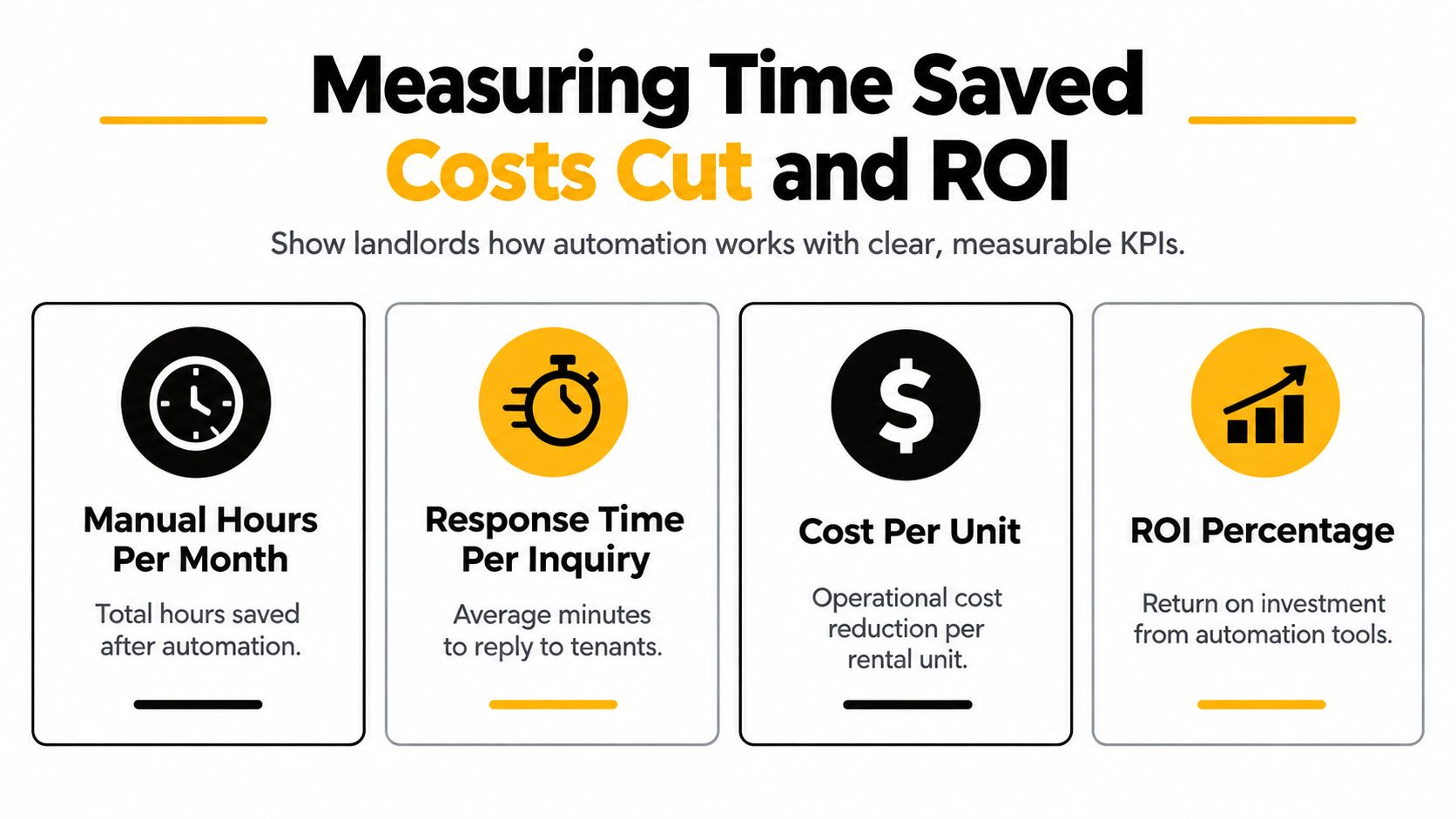
You don't need complex analytics. A notebook, spreadsheet, or built-in reporting screen is enough if you use it consistently.
What good measurement looks like
For maintenance, track the time from request submission to first response, then the number of requests that required manual follow-up because details were missing. For rent collection, track how many payment issues needed personal intervention. For leasing, track how often you had to fix lease details because application data didn't flow correctly.
The point is to measure friction removed, not just activity completed.
The software market's scale shows why disciplined measurement matters now. One market estimate put property management software at USD 6.53 billion in 2026 and projected USD 9.93 billion by 2031, implying 8.74% CAGR, while another estimate placed the market at US$4.1 billion in 2026 and forecast US$7.6 billion by 2033 at 9.2% CAGR. The estimates differ, but both point to a large, expanding category rather than a niche toolset (property management software market projections).
A simple ROI habit
At the end of each month, ask:
- What manual task happened less often?
- Which errors stopped repeating?
- Where did compliance confidence improve?
That third one matters. Time saved is valuable, but better records, cleaner audit trails, and more consistent decisions often matter just as much. For a DIY landlord, ROI isn't only labor reduction. It's also fewer avoidable surprises.
Common Pitfalls Compliance Risks and How to Avoid Them
Automation can reduce workload. It can also speed up a bad process if you aren't careful. That's why convenience and trust should be treated as separate questions.

Where landlords get exposed
One risk area is screening. Fast decisions feel efficient, but small landlords still need consistent criteria, clear records, and proper handling of disputed information. If an automated score becomes a black box, you may move faster while understanding less.
Another risk area is self-service leasing and showings. Recent industry coverage highlights ID-verified self-showings, automated screening, and AI-driven renter discovery as growing trends, but often treats them as feature lists rather than risk-management systems. That same coverage also points to rising AI use and growing attention on voice AI, predictive maintenance, and stack consolidation, while leaving practical questions about fraud, fair-housing risk, and trust less explored (property management software trends for 2026).
Practical guardrails
Use automation with rules that are visible and reviewable:
- Keep written criteria: Screening should follow the same documented standards every time.
- Review exceptions manually: Edge cases need human judgment, not automatic rejection.
- Verify identity steps: Any self-showing or remote approval flow needs reliable verification checks.
- Audit lease templates regularly: State and county requirements can change.
- Monitor payment disputes: A fast payment workflow still needs a process for reversals, failed transfers, and tenant questions.
Fast workflows are helpful only when you can explain how a decision was made and what happens when the data is wrong.
The biggest mistake is assuming more automation always means less risk. Sometimes it means the opposite. A small landlord usually needs fewer moving parts, clearer rules, and deliberate review points.
Putting It All Together With Real Examples and Next Steps
A mature workflow for a small landlord feels quiet.
A listing goes live. An applicant submits their information through a structured form. Screening runs through the same process every time. Approved details move into lease drafting without retyping. Rent reminders go out automatically. Payments post into the ledger. A maintenance request arrives with photos and enough detail to route correctly. You only step in when the case is unusual, incomplete, or sensitive.
That's the right frame for property management automation. Not “Which features can I turn on?” but “Which workflows can run start to finish without me carrying data between steps?”
A simple decision test
When you evaluate any tool, ask these three questions:
- Does it remove repeated handling?
- Does it reduce the chance of bad data spreading?
- Does it leave a clear audit trail when something goes wrong?
If the answer is no, you may be buying a feature instead of improving an operation.
What to do first
For most landlords with 1 to 10 units, the practical first move is to choose the workflow that causes the most repeated interruption. Often that's rent collection or maintenance intake. Get one lane working well. Then connect the next lane.
Small portfolios don't need enterprise complexity. They need dependable systems, fewer handoffs, and enough structure to keep one missed message from turning into three more tasks.
If your current setup still depends on memory, copy-paste, and weekend catch-up, that's the signal. Start with one workflow. Tighten it. Measure it. Then build from there.
VerticalRent gives independent landlords one place to handle screening, state-specific leases, online rent collection, maintenance routing, and ledger-based reporting without stitching together a pile of separate tools. If you want to turn scattered tasks into connected workflows for a small portfolio, visit VerticalRent.
Put this into practice
VerticalRent tools related to this guide
Legal Disclaimer
VerticalRent and its authors are not attorneys, CPAs, or licensed legal or financial advisors, and nothing on this site constitutes legal, tax, or professional advice. The information in this article is provided for general educational purposes only. Landlord-tenant laws, eviction procedures, security deposit rules, and tax regulations vary significantly by state, county, and municipality — and change frequently. Nothing on this site creates an attorney-client relationship. Always consult a licensed attorney or qualified professional in your jurisdiction before taking any action based on information you read here.
Co-founded VerticalRent in 2011, growing it from nothing to 100k landlords and renters. Sold it in 2019, then re-acquired it in 2026 to make it better than ever.


