How to Use Reminders for Rent Collection and Tenants
Learn how to use reminders for rent, maintenance, and lease follow-ups as a landlord. Practical setup, timing, and messaging strategies inside.

Tuesday morning is when a reminder system proves its value. Three rent transfers are missing, two tenants have sent explanations, and a vendor still hasn't confirmed tomorrow's repair window. If you manage several units, manually typing each nudge turns a recurring process into a weekly interruption. The better question isn't whether to send reminders. It's how to use reminders as behavioral design, with the right trigger, channel, timing, and wording for each rental task.
Reminder systems have a substantial evidence base beyond property management. A review covering 31 randomized controlled trials and 11 systematic reviews found that reminders worked across settings, with manual reminders reducing missed attendance by 39% of baseline and automated reminders by 29% of baseline (systematic review of reminder systems). Those findings don't mean every landlord should send more messages. They show that a clear, well-placed prompt can change behavior, while poor timing and excessive frequency can create friction.
The Rent Week Most Landlords Lose to Manual Chasing
By Tuesday morning, rent week can feel less like a collection process and more like an inbox triage exercise. One tenant says the bank transfer is pending. Another missed the due date because the portal notification went to an old email address. A third has paid, but you haven't matched the transaction to the correct unit.
The work multiplies because every message starts from scratch. You look up the tenant's name, check the amount, confirm the due date, write a polite sentence, add payment instructions, and remember to follow up if nothing changes. Do that across several units and the task consumes the exact hours you meant to spend on maintenance, bookkeeping, or vendor coordination.
The recurring moments that need a system
Rent is only one of the predictable points where a reminder can prevent reactive communication. The same pattern appears when:
- Vendors owe an update: A maintenance request sits open because nobody has asked for a status confirmation.
- A lease anniversary approaches: The renewal conversation starts late, leaving little time to discuss terms or prepare a listing.
- An inspection is scheduled: A tenant receives the original notice but forgets the access window.
- A payment is overdue: The first message is vague, so the tenant doesn't know whether to pay, explain a delay, or contact you.
A reminder becomes useful when it gives someone a specific next action at a moment when they can take it. A generic “friendly reminder” often creates another question. A message that identifies the unit, amount, date, and payment path removes that question.
Practical rule: Every automated nudge should answer three things, what happened, what needs to happen next, and when.
The operating principle is simple. Cadence and copy work together. A well-written reminder sent after the tenant has already moved on may fail, while a plain message delivered during an active decision window can succeed. For landlords building a more predictable rent process, this guide to automating rent collection and getting paid on time is a useful reference point. The system should handle routine prompts, while you reserve personal outreach for exceptions that need judgment.
Turning On the First Reminders Inside Your Rental Platform
Set up the first reminders as a small operational checklist, not as a feature tour. You're trying to cover the moments that repeatedly require attention, then remove anything that duplicates another message.
Start with the rent workflow. Enable a pre-due reminder, a due-date notice, and a late or grace-period follow-up if your platform supports those stages. VerticalRent's product guidance describes automated rent reminders sent three days before rent is due and again on the due date, along with templates for pre-due, due-date, grace-period, and late notices (automatic rent collection setup). Use the platform's available fields to include the tenant name, exact amount, due date, late-fee information where applicable, and a direct payment route.
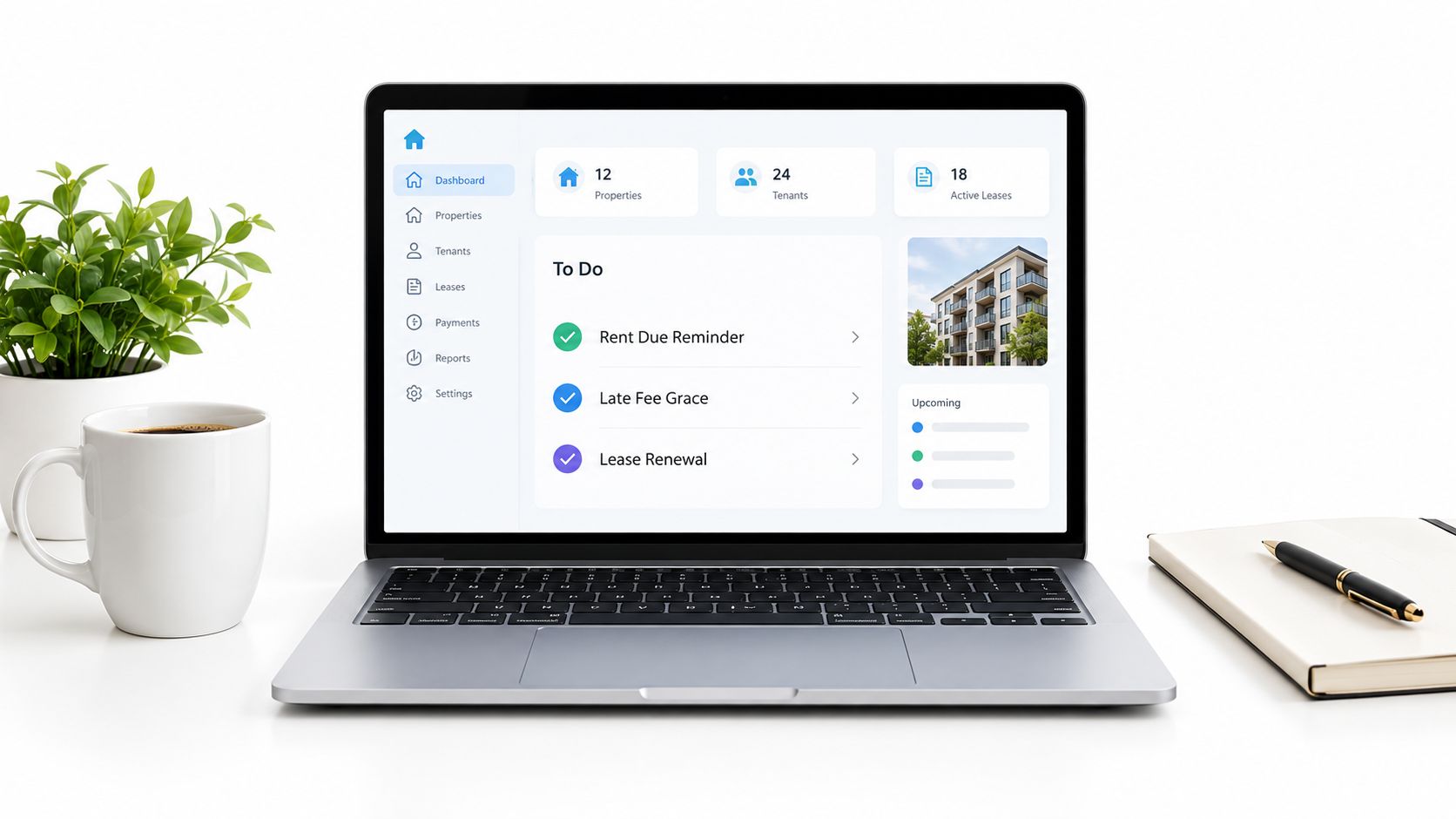
Change the defaults before tenants see them
Review the sender name first. A tenant is more likely to recognize a message from a clear property or management identity than from an unfamiliar system label. Then check the delivery window, timezone, and whether the reminder fires before the due date, on the due date, or only after a missed payment.
Add the lease cycle next. A renewal reminder should create enough room for a real conversation, not merely announce that the lease is nearly over. Set a first prompt well before the decision becomes urgent, then use later follow-ups only if the tenant hasn't responded or signed.
Maintenance needs a different trigger. Turn on an acknowledgment after submission, a status prompt when the request remains open, and a completion follow-up after the work is marked finished. The tenant should know that the request entered the system, who owns the next step, and how to report that the repair remains unresolved.
Before activating anything, read each message as a tenant would. Can they identify the property, the task, and the action without opening another app? If not, fix the copy before you adjust the automation. The next decisions are channel and timing, because the same message can perform differently depending on where and when it arrives.
Choosing Email, SMS, or In-App for Each Reminder Type
Channel choice should follow the tenant's likely behavior, not the landlord's preferred software. SMS is useful for short, time-sensitive prompts. Email gives tenants a durable record for instructions, amounts, addresses, and policy details. In-app notifications make the most sense when the required action already happens inside a rental portal.
Evidence from appointment reminders supports a cautious preference for text in some short-term workflows. One review reported an average no-show rate of 2.43% across 1,193 appointments, with SMS at 1.90%, email at 2.68%, and phone calls at 3.49% (review of appointment reminder methods). That comparison comes from appointment settings, not rent collection, so treat it as directional rather than a promise about tenant payments.
| Channel | Best Use Case | Tenant Response Behavior |
|---|---|---|
| Payment instructions, lease terms, renewal details, maintenance summaries | Easy to search and reread, especially when the message contains several details | |
| SMS | A short rent nudge, arrival window, or immediate confirmation request | High-salience and quick to scan, but easy to resent if overused |
| In-app | Paying rent, updating a maintenance ticket, signing a renewal | Strongest when the tenant is already expected to complete the action in the portal |
Match the message to the action
Use SMS when the tenant needs to make one quick decision, such as opening a payment link or confirming access for a technician. Keep it short and identify the unit or task so the recipient doesn't have to guess why you're contacting them.
Choose email when the tenant may need to reference the message later. Lease renewal terms, payment instructions, inspection details, and maintenance summaries belong in a durable channel. You can still include a direct action button or portal link, but the email should stand on its own.
Use in-app notifications for actions that require authentication, documentation, or a status change. A tenant who needs to upload a repair photo or sign a renewal is already better served inside the portal than by a text that sends them elsewhere.
For recurring SMS workflows, a practical repeating text message guide can help you understand the mechanics. The operational judgment remains yours. Don't place every reminder on every channel. Urgent and short goes to SMS, reference material goes to email, and portal work stays in-app.
Why Timing Matters More Than the Wording You Pick
Landlords often rewrite the subject line when they should inspect the schedule. A more polished sentence won't rescue a reminder that arrives after the tenant has finished making the decision, left work, or mentally filed the task as tomorrow's problem.
Research on reminder timing makes that trade-off clear. In a 2025 study, goal reminders increased a productivity index by 0.08 standard deviations only when they arrived during the regular working period, while late reminders had no effect (study on reminder timing). The lesson applies to rental workflows even though the setting differs. Send the prompt when the recipient can act, not merely when your scheduler is available.
A randomized tax-compliance study found that one text reminder per week improved compliance, while increasing the frequency to two texts per week reduced effectiveness (research on reminder frequency and wording.pdf)). More contact can signal urgency, but it can also train people to ignore the first message.
Build cadence around the trigger
For rent, begin with a soft pre-due prompt, follow with a clear due-date message, and reserve escalation for an actual missed payment. Don't create a string of generic notices that all say the same thing.
| Reminder Type | First Send | Follow-Up | Frequency Cap |
|---|---|---|---|
| Rent | Before the due date | On the due date, then only after a missed payment | Keep the sequence short and event-based |
| Maintenance | Immediately after submission | When the request remains open or the appointment changes | One message per meaningful status change |
| Lease renewal | Early in the renewal decision window | Follow up as the deadline approaches | Stop after signing or a clear response |
| Vendor appointment | After booking | Before arrival and when the window changes | Avoid duplicate tenant and vendor alerts |
Maintenance reminders should follow the work cycle. Confirm the request after booking, send a status update if the job stalls, and provide a completion summary after the visit. For landlords refining working appointment reminders, the important principle is not adding touches. It's tying each touch to a change in responsibility or timing.
Check the tenant's timezone, normal work hours, and likely payment routine. A universal morning send may be convenient for you but poorly timed for someone commuting or working overnight. Review every active rule periodically, then cut reminders that don't change behavior.
Writing Reminder Copy Tenants Actually Open and Act On
Generic copy fails because it makes the tenant do the interpretation. “Your rent is due soon” doesn't state the amount, the date, the unit, or the action. “Your maintenance request has been received” confirms a system event but doesn't tell the tenant who is responsible for the next step.
Write each message around one verb. Pay, confirm, sign, upload, reply, or reschedule. Add the information that lets the tenant complete that action without searching through old messages.
Use concrete details instead of polite fog
For rent, replace a vague notice with a complete instruction:
- Before: “Friendly reminder that rent is due.”
- After: “Your rent for Unit 4B is due Friday. Pay in the portal, or reply if anything has changed.”
For maintenance:
- Before: “Your maintenance request has been received.”
- After: “Alex from Cool Air visits Wednesday from 10 a.m. to noon for your AC tune-up. Confirm or reschedule by replying to this text.”
For renewal:
- Before: “Your lease expires soon.”
- After: “Your lease ends April 30. Review and sign the renewal in your portal before March 15, or reply with your questions.”
The examples work because they identify the event, the deadline, and the next action. If a specific dollar amount is appropriate and verified in your system, include it. If a late fee or policy applies, state it accurately and avoid language that sounds threatening or ambiguous.
Copy test: Remove the greeting and read only the action sentence. If the tenant still knows what to do, the message is probably clear enough.
Keep each channel within its natural shape
SMS should stay brief enough to scan without scrolling through a long explanation. Email can carry more context, but it still needs the action near the top. In-app notices should send the tenant directly to the screen where they can pay, sign, upload, or respond.
Use a fallback contact when silence would create a problem. “Reply to this text” is more useful than “contact management,” provided someone monitors the reply route. Also review language for deliverability. A spam trigger words checker can help identify email phrasing that may deserve a second look, but don't replace necessary rental information with vague wording to make a message sound softer.
For more examples focused on the payment cycle, review rent payment reminders. Specificity builds trust because the tenant can verify the message immediately.
Three Real Scenarios Where Reminders Change the Outcome
The most useful reminder designs begin with the failure you're trying to prevent. A late payment, an abandoned repair request, and a missed vendor visit each require a different sequence because the person, trigger, and next action differ.
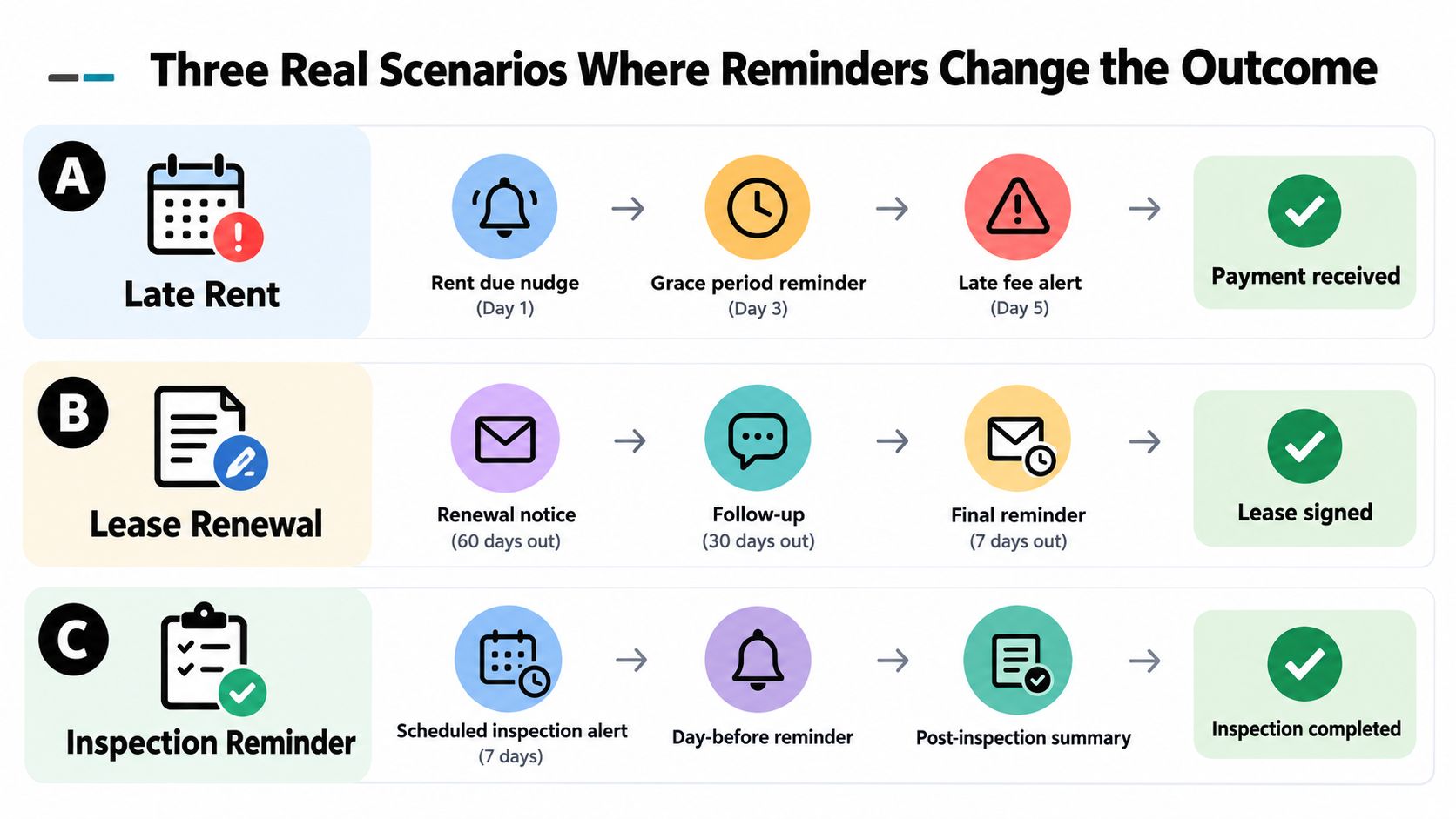
Scenario one, payment follows the tenant's routine
A tenant's paycheck arrives after the usual rent due date. A static notice sent on the first creates a predictable late-payment exchange, but it doesn't address the tenant's actual payment window. The landlord shifts the nudge to a time shortly after that income event, includes the portal path, and avoids sending repeated generic warnings.
The stack is straightforward:
- Pre-payment prompt: Identify the upcoming amount and link to the portal.
- Decision-window prompt: Send the action message when the tenant normally has funds available.
- Exception follow-up: Contact the tenant personally only if payment remains missing.
The improvement comes from matching the trigger to behavior, not from making the copy more forceful.
Scenario two, a repair stops at acknowledgment
A tenant reports a leaking toilet on Monday. The platform confirms receipt, but no one assigns the next action, so the request remains open and the tenant sends another message asking whether anyone is coming.
A better sequence acknowledges the request, asks for or confirms access information, and sends a status update if the ticket remains unresolved. After completion, the tenant receives a summary and an easy way to report that the leak continues. The reminder stack follows ownership, not arbitrary calendar dates.
Scenario three, a contractor misses the appointment
An HVAC contractor fails to attend a scheduled visit. The tenant waited during the agreed window, while the vendor assumed the appointment had changed. The landlord sends a confirmation to both parties before the visit and a short arrival-window message on the day.
That sequence creates two opportunities to catch a mismatch. If either person replies that the time no longer works, the landlord can reschedule before the tenant loses time. The goal isn't to flood both inboxes. It's to make the appointment visible to everyone who must act.
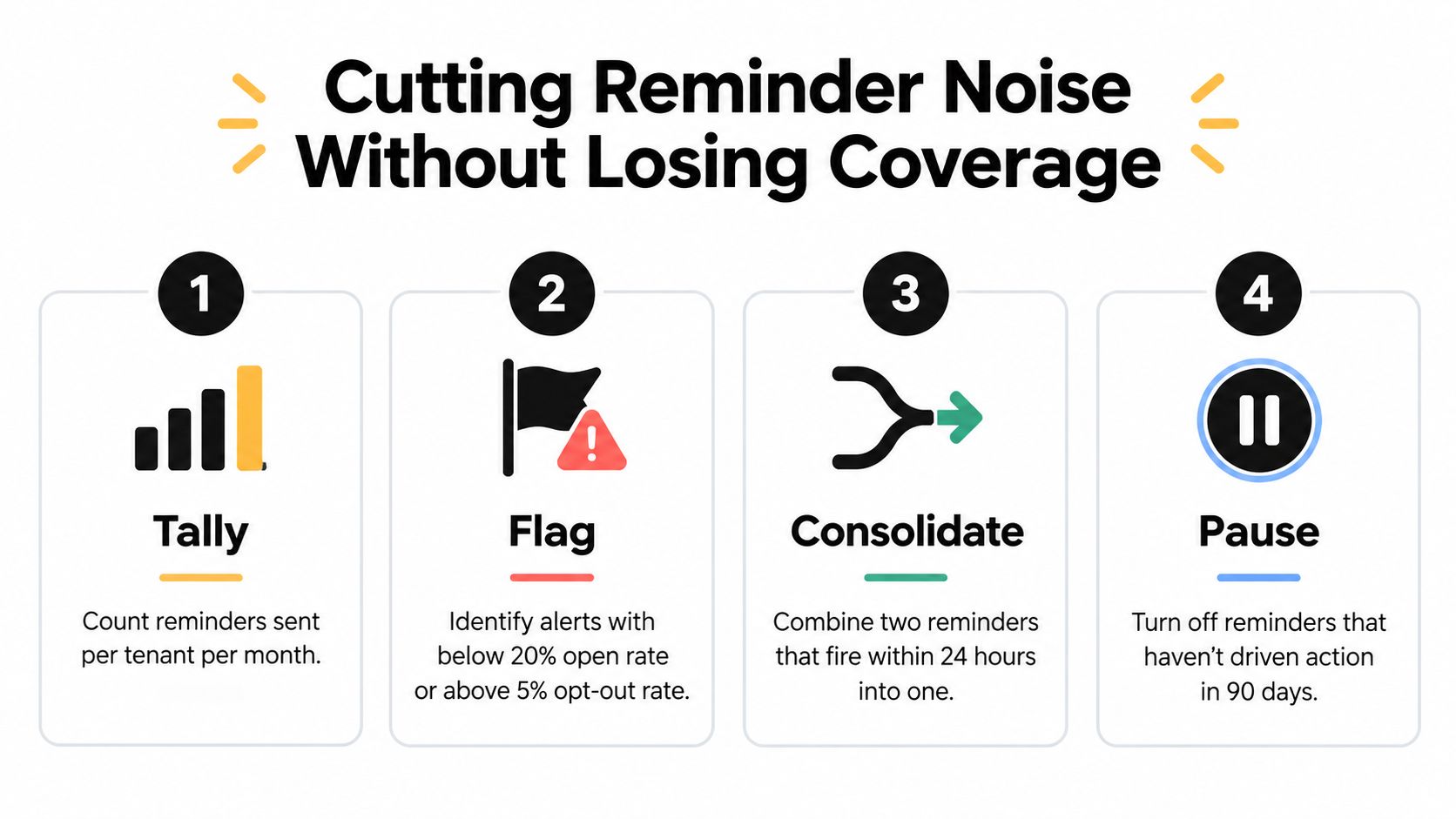
Cutting Reminder Noise Without Losing Coverage
Adding another alert is the easiest response to a missed task, but it's rarely the best first response. Users can disable notifications when alerts feel overwhelming or unhelpful, and a 2025 report cited by The Guardian described that pattern across 28 countries (research discussion of notification overload). For landlords, alert fatigue can make an important late-payment or access message less visible.
Start with an inventory instead of a new automation. Record the trigger, channel, cadence, owner, and last review date for every reminder. Then ask whether each message corresponds to a real business moment, such as rent due, an open maintenance ticket, an inspection, or a lease decision.
Run a practical noise audit
- Tally active messages: Count how many reminders each tenant receives across email, SMS, in-app notifications, and phone workflows.
- Flag weak alerts: Identify messages with a below-20% open or response rate over the review period, but don't treat that threshold as universal evidence of failure. Check whether the channel can measure opens reliably.
- Consolidate overlap: If two reminders communicate the same action close together, combine them into one clearer message.
- Pause unproductive rules: Turn off alerts that haven't produced a meaningful response, then watch for missed coverage before deleting the underlying workflow.
The verified evidence points toward restraint. A broad appointment-reminder review found that 97% of 29 studies reported improved attendance, while the weighted mean relative reduction in non-attendance was 34% from baseline. Manual phone reminders reduced non-attendance by 39%, compared with 29% for automated reminders (appointment reminder evidence review). Automation scales, but a personal call can be appropriate when the payment, access issue, or appointment carries higher urgency.
Replace noise with a deliberate escalation path. A short text may outperform a polished email when the process is already clear, while a personal conversation is better when the tenant's situation needs context. VerticalRent supports online rent collection with automated reminders and late-fee workflows, plus maintenance requests and vendor dispatch, so independent landlords can place those recurring events in a trackable system rather than rebuilding them manually.
If you're still chasing rent, repair updates, or renewal decisions one message at a time, set up the recurring triggers first and audit the wording next. Visit VerticalRent to review how its rent collection, automated reminders, maintenance requests, and vendor workflows can fit a smaller rental portfolio.
Put this into practice
VerticalRent tools related to this guide
Legal Disclaimer
VerticalRent and its authors are not attorneys, CPAs, or licensed legal or financial advisors, and nothing on this site constitutes legal, tax, or professional advice. The information in this article is provided for general educational purposes only. Landlord-tenant laws, eviction procedures, security deposit rules, and tax regulations vary significantly by state, county, and municipality — and change frequently. Nothing on this site creates an attorney-client relationship. Always consult a licensed attorney or qualified professional in your jurisdiction before taking any action based on information you read here.
Co-founded VerticalRent in 2011, growing it from nothing to 100k landlords and renters. Sold it in 2019, then re-acquired it in 2026 to make it better than ever.


