Property Management Software for Owners: A Buyer's Guide
Compare property management software for owners: must-have features, AI screening, rent collection, compliance checks, and a 1-10 unit evaluation checklist.


You own three units, and your phone already feels like a front desk. A tenant texts about a leaking sink, another asks where to mail a check, and you're hunting through email for a lease you signed months ago. Property management software for owners exists for that exact pileup, but it only helps if you know which parts matter, which parts create risk, and which parts you can safely ignore.
Why Owner-Focused Software Fits Small Portfolios
The leak is never the whole problem. It's the follow-up text, the plumber's number saved under the wrong name, the receipt you'll need at tax time, and the rent check sitting in a drawer because depositing it slipped your mind.
That scattered routine is common because most owners aren't institutions. The Census Bureau's 2018 Rental Housing Finance Survey, summarized by Pew Research counted nearly 20 million rental properties, and individual investors owned approximately 14.3 million of them, equal to 71.6% of all rental properties. In plain terms, the typical owner is a person with a small number of units doing most jobs alone.
A Different Job Than an Enterprise Manager Has
Enterprise systems assume a leasing office, a bookkeeper, and someone to run training. You likely have evenings, a laptop, and a phone. Software built for owners has to work without an implementation project, so setup, tenant communication, and recordkeeping need to be plain enough to handle between other jobs.
That doesn't mean it should be simplistic. You still screen applicants, sign leases, collect rent, coordinate repairs, and keep records that hold up months later. The difference is who does the work. A good owner-focused tool handles the repetitive parts while you keep the decisions.
A useful test: If a tool needs a training budget before you can collect your first rent payment, it was probably built for a larger operation than yours.
What You're Actually Buying
You're not buying a nicer spreadsheet. You're buying fewer loose ends. One place holds the tenant, the lease, the balance owed, the repair history, and the paperwork behind each decision.
You'll judge that promise in stages. First, understand how the pieces connect. Then check the five core features, follow real workflows for one to ten units, look hard at AI explainability, and weigh cost, scale, and compliance before you move any records.
Start with a simple question about your own week. How many rental tasks live only in your texts, memory, or inbox right now? If the answer makes you uneasy, you're the owner this category was built for.
How Owner-Focused Software Works as a Digital Back Office
Think of the software as a small back office behind each rental. It doesn't meet tenants at the door or turn a wrench. It files the application, prepares the lease, tracks the money, and keeps the repair conversation where you can find it later.
Most owners understand the value once they follow a single unit through a full cycle. The listing goes up, an applicant applies, you screen and approve, both sides sign, rent starts, a repair comes in, and every payment lands in a ledger. It's one story, not seven disconnected errands.
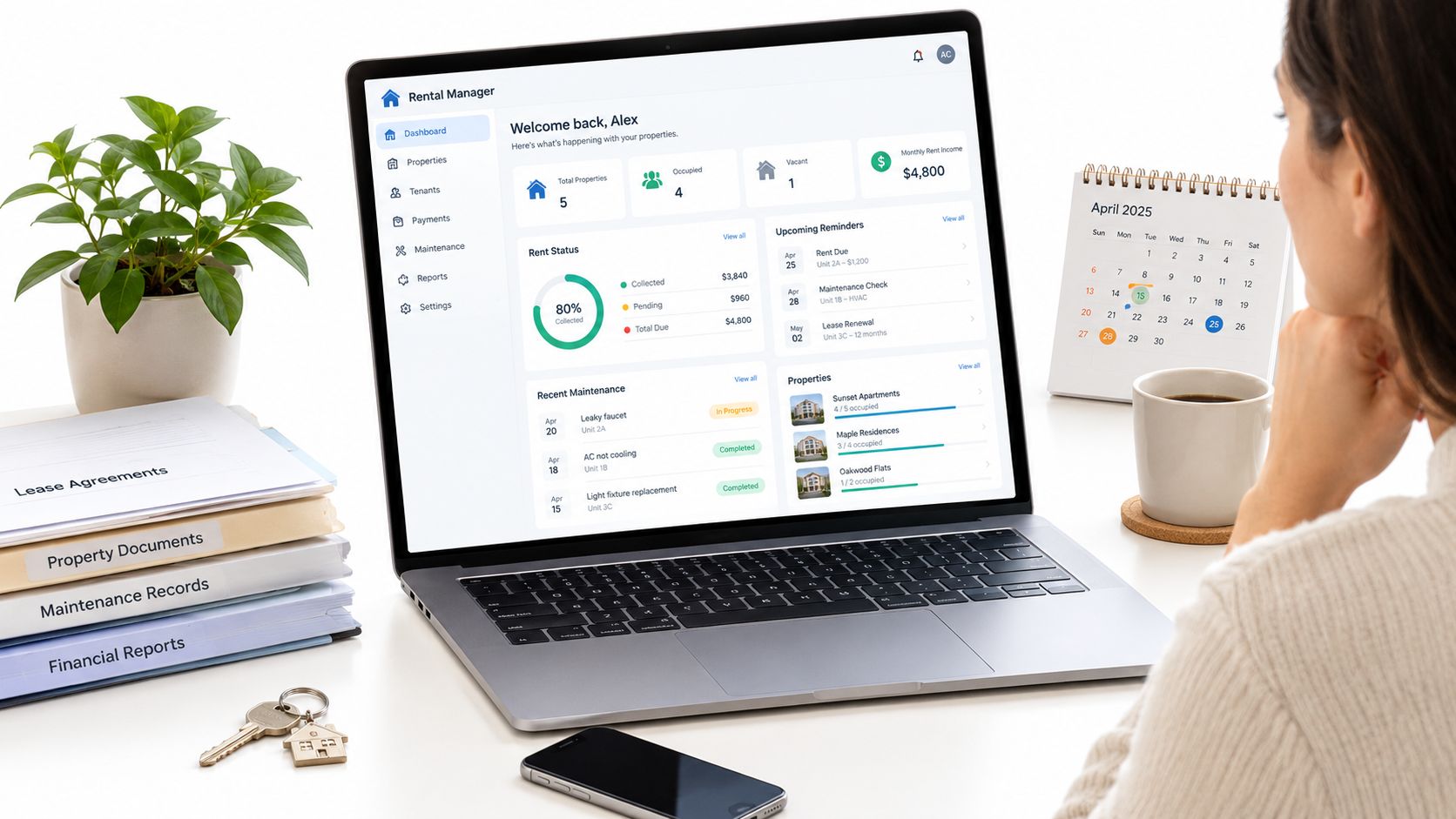
A dashboard view helps you see that story at a glance, with documents and dates attached to the right property.
One Property Record Under Everything
The key idea is a shared property record. The application, lease, rent charges, and work orders all point to the same unit. When a tenant asks, "Did you get my payment, and what about the sink," you don't open three apps to answer.
Compare that with a spreadsheet setup. Rent lives in one tab, expenses in another, the lease sits in email, and maintenance lives in texts. Each piece may be accurate on its own, but nothing checks the others, so a missed charge or a lost receipt stays hidden until it becomes a bigger problem.
- Listing and application: The unit details carry forward, so you're not retyping the address and rent amount.
- Lease and move-in: Signed terms become the source for charges, due dates, and deposits.
- Rent and repairs: Payments and work orders post against the same occupied unit.
- Ledger: Money in and money out stays tied to that property from the start.
Where Rent Collection Fits
Rent is the rhythm that keeps the back office honest. Charges appear on schedule, tenants pay online, and partial or late payments show up as exceptions instead of surprises. If you want a plain look at how a tenant portal handles that side, you can simplify rent collection with online payments and compare the flow with your current check routine.
Integration matters more than any single headline feature. A screening tool that can't hand off to a lease, or a payment tool that can't talk to your ledger, just moves the shoebox onto a screen. The back office earns its keep when each step feeds the next one without your copying details by hand.
Must-Have Features From Screening to Accounting
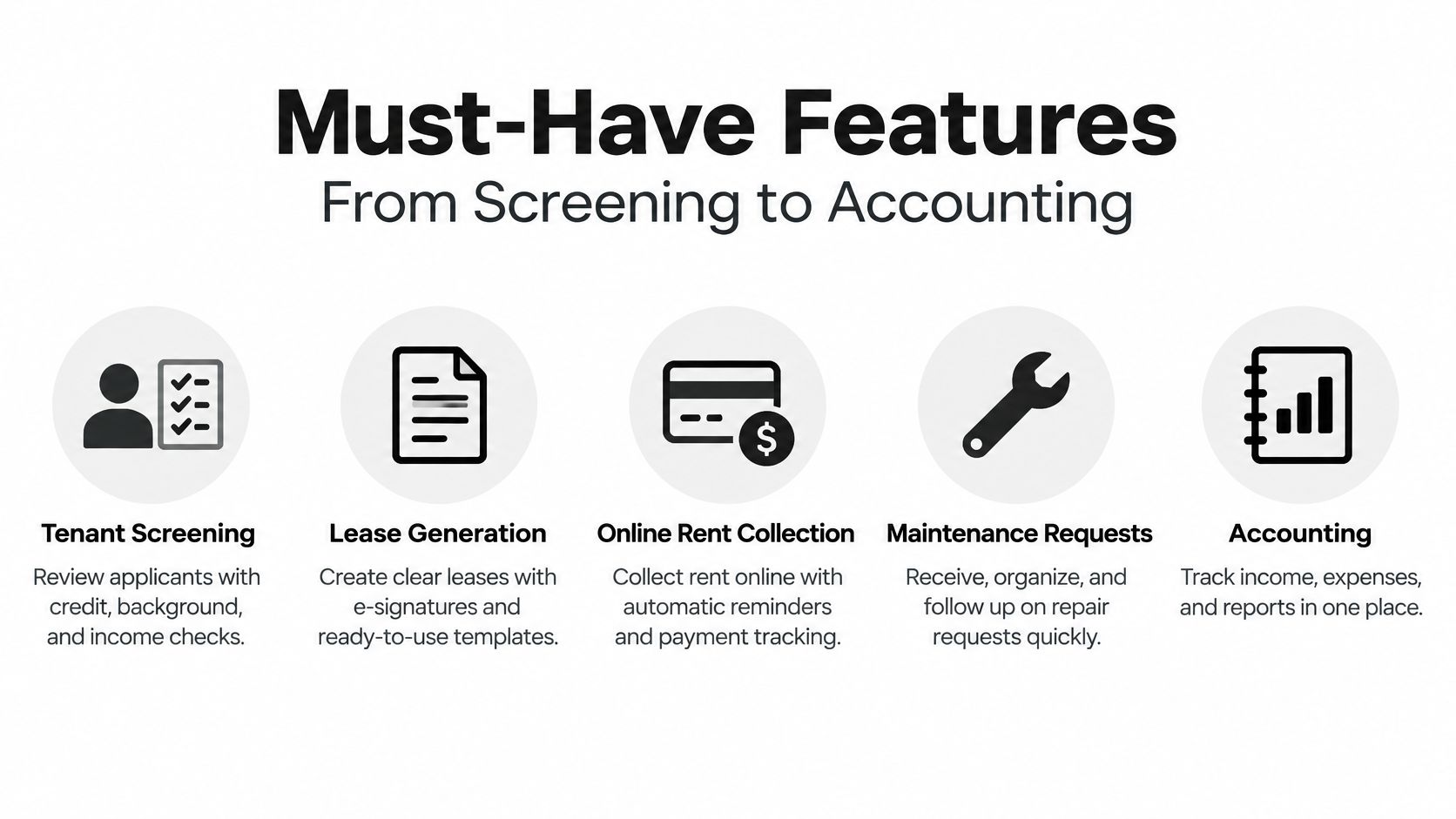
Five features do most of the work for a small portfolio. Judge each one by what it records, not by how polished the sales page looks. A feature that saves ten minutes today but leaves no record can cost you hours later.
This checklist sums up those five areas before you look at each one in practice.
The Five Non-Negotiables
Tenant screening comes first. Look for credit, criminal, eviction, and rental history information, plus configurable criteria tied to your written policy. You should be able to see what was checked, when it was checked, and why you decided as you did. Deeper guidance on comparing tenant screening tools can help you separate useful detail from a bare pass or fail score.
Lease generation is next. Templates should reflect your state and county, support e-signatures, and store the signed copy with the unit. A generic form you found online won't update itself when local rules change, and it won't feed due dates and charges into your system.
Online rent collection matters because rent stayed manual long after other bills moved online. A 2016 Federal Reserve Bank of St. Louis research report found that checks at 42%, cash at 22%, and money orders at 16% dominated rent payments, and only 16% of households paid rent electronically through methods tied to a checking account. ACH or card payments with automated reminders and clear late-fee rules remove much of that chasing and reconciling.
Maintenance requests should start with the tenant. The tenant submits the issue, ideally with photos, and you track status, vendor, and completion in one thread. A request that lives in text messages is easy to forget and hard to prove later.
Accounting ties it together. You need a ledger organized by property, with categories you can review monthly and reports you can hand to a tax preparer. Every entry should link back to a lease charge, receipt, invoice, or bank event.
Useful Extras You Can Judge Later
Listing syndication, AI-written listing copy, and roommate matching can help fill a vacancy. They don't replace clean screening, a sound lease, reliable payments, tracked repairs, or property-level books. Get the foundation right first, then pay for extras only when they solve a problem you have.
Real Workflows for Portfolios of One to Ten Units
Features sound tidy in a list. Real life is messier. Take Maya, who owns one house with a long-term tenant, and Jon, who owns a fourplex where one unit turns over most years. Both need the same records, but Jon feels every gap four times as often.
Maya mainly wants rent to arrive without a monthly nudge and repairs to stay findable. Jon also juggles applications, staggered lease dates, and two vendors who need different instructions. A system that works for both has to stay simple at one unit and stay organized at four.
Following One Repair All the Way Through
On a Tuesday night, Jon's tenant in Unit C submits a request through the portal. Water is pooling under the kitchen sink, and she attaches a photo. That photo matters more than it seems, because it shows the problem before anyone opens a cabinet.
The software sorts the request as urgent but not an emergency. Active water can damage flooring, so it shouldn't wait a week, but nobody needs a midnight call if the shutoff valve holds. Jon approves a plumber within a spending limit he set in advance, and the tenant picks an access window inside the same thread.
Faster dispatch isn't the finish line. A closed repair with no invoice, photos, or payment record is still an unfinished job.
The plumber replaces a worn supply line and notes the work performed. Jon checks a completion photo, approves the invoice, and the payment posts to Unit C in the ledger. Months later, that expense already sits on the right property line, ready for tax reporting instead of buried in a bank statement.
Maintenance deserves that much structure. A landlord statistics compilation from Baselane reported that 38% of landlords identified property upkeep as their biggest challenge, while 41% of tenants said landlords addressed issues within 48 hours and 75% said issues were handled within a week. Speed counts, but tenants and owners judge the whole experience, including updates and follow-through.
What Changes in Your Week
For Maya, the change is mostly quiet. Reminders go out, rent posts, and she checks a short exception list instead of her whole bank account. For Jon, the change is visibility across units, so a vacancy, a late payment, and an open repair don't compete inside one inbox.
Both still make judgment calls. Jon decides whether a vendor earned repeat work, and Maya decides whether a small drip can wait for a scheduled visit. The software's job is to document those calls, keep approvals clear, and carry the cost to the correct property without extra typing.
How AI Adds Value Without Replacing Your Judgment
AI can read faster than you can on a busy evening. It can summarize an application, sort a maintenance request, draft listing copy, and flag a missing receipt. Those are real time savers, especially when you're the only person on staff.
Here's a look at how an owner might review that kind of summarized information at her desk.

The trouble starts when a summary turns into a verdict. A single AI risk score can look settled and objective, even when you can't see which records drove it or whether those records were complete. If you can't explain a denial in ordinary words, you don't really have a decision process yet.
A Risk Signal Is Not a Legal Criterion
HUD guidance on applicant screening states that the Fair Housing Act applies regardless of whether screening uses technology, and landlords remain responsible for discriminatory outcomes even when a third-party screening provider is used. Outsourcing the report doesn't outsource the responsibility.
Rules also vary by place. New York City's Fair Chance for Housing Act took effect on January 1, 2025, sharply limiting how landlords may use criminal-record information and requiring individualized assessment rather than automatic rejection. A flag that's usable in one city may be restricted in another, so location-aware guidance matters.
This short video offers another angle on reviewing automated help before you act on it.
What a Defensible System Stores
Ask any provider what its system keeps for each applicant. You want the written screening policy, criteria, thresholds, weighting logic, data sources, report timestamps, and your approval or override. You also want a clear path for an applicant to dispute inaccurate or irrelevant information.
- Policy in plain view: State which credit, criminal, and eviction records matter and how far back they're considered.
- Relevant inputs only: Limit screening to information tied to tenancy obligations.
- Stale or incomplete records flagged: Don't let a thin file decide an outcome.
- Explanation trail kept: Preserve the reasons behind any adverse decision.
Used that way, AI behaves like a careful assistant. It gathers, sorts, and points out gaps, while you apply a published policy consistently. That combination supports applicant disputes, internal consistency checks, and fair-housing risk review far better than an opaque score.
Evaluating Cost, Scale, and Compliance Before You Buy
Don't compare tools by their longest feature list. Compare them against the same five questions, and write down the answers. A cheap plan that can't produce clean property records may cost more at tax time than a slightly pricier one that can.
| Criterion | What to Check | Why It Matters |
|---|---|---|
| Total monthly cost | Base price, per-unit tiers, screening and payment add-ons | The headline price often excludes the tools you'll use most |
| Scale headroom | Ease of growing from one to ten units | You shouldn't need to migrate after adding a second property |
| Compliance support | FCRA-based screening, adverse-action steps, stored criteria | You remain responsible for outcomes, so records must be reviewable |
| Bookkeeping depth | Income and expenses reported per property, linked receipts | This is how your books match tax reporting and property profitability |
| Migration support | Import tools for units, tenants, and balances | Clean starting data prevents months of patching errors |
Why Bookkeeping Belongs on the Shortlist
Tax rules turn bookkeeping into a buying criterion, not an afterthought. IRS Publication 527 on residential rental property explains that owners report rental income, expenses, and depreciation separately for each property on Schedule E and should retain records supporting those entries if questioned.
So look past a single portfolio cash balance. Each entry should carry the property and unit, the tenant or vendor, the payment method, and a link to the receipt, invoice, lease charge, or bank event. Corrections should be added as new, timestamped entries rather than editing history, which preserves an append-only audit trail.
Practical controls make that model usable. You want monthly bank reconciliation, an exception queue for unmatched or uncategorized items, and receipt attachment for vendor payments. Partial payments and reversals should stand out, and late fees or repair costs shouldn't be netted against rent.
One Example Scored Against the Same Framework
VerticalRent is one option you'd score this way. Its core tools are free, with paid tiers you can check against its published pricing details before you assume the free level fits your portfolio. Screening includes credit, criminal, eviction, and rental history data with AI risk scoring and plain-English summaries, leases are state and county specific, and rent collection runs by ACH or card with automated reminders and late fees.
Its income and expense ledger outputs Schedule E reports, which maps to the bookkeeping row above. That's a fit for DIY owners who want automation without hiring staff. Larger operations with dedicated teams may need broader enterprise controls, so score your own must-haves rather than copying anyone else's conclusion.
Migrating Your Records and Choosing Your Next Step
Migration goes best as a short, ordered cleanup. Rushing tenants into a new payment system before balances are right creates confusion you'll spend weeks unwinding. Move the records first, then the money.
A Sensible Migration Order
- Export your rent roll first. Confirm each tenant, unit, rent amount, lease end date, and deposit held.
- Gather signed leases and contact details. Check for duplicate tenant records before you import anything.
- List open maintenance items. Carry the status and vendor notes, or open repairs will vanish into old texts.
- Bring over last year's expenses. You need a usable history for reports, not just balances from today forward.
- Reconcile opening balances. Fix gaps before the first automated payment goes out.
Most platforms provide an import path for properties and units, and the guidance on importing landlord properties and units shows the kind of fields you'll typically prepare. Run old and new records side by side for one billing cycle. That overlap feels tedious, but it catches a missing deposit or a duplicated tenant while the fix is still small.
Your Decision Path This Week
Write down your must-haves from the five feature areas. Score two or three options against cost, scale, compliance, bookkeeping, and migration help. Then test screening and rent collection on one unit before moving the rest.
That single-unit test tells you more than a demo. Set up one property, run one lease, one rent payment, and one repair request through it, and check where every record lands. If you can find the repair cost on the right property line without digging, you're looking at a system you'll keep using.
Set up one property in VerticalRent and run one lease, one rent payment, and one repair request through it before you commit to any platform. You'll see clear screening records, ACH or card collection with reminders, tracked maintenance, and a property-level ledger in one place, which makes the comparison with your current texts and spreadsheets honest and quick.
Put this into practice
VerticalRent tools related to this guide
Legal Disclaimer
VerticalRent and its authors are not attorneys, CPAs, or licensed legal or financial advisors, and nothing on this site constitutes legal, tax, or professional advice. The information in this article is provided for general educational purposes only. Landlord-tenant laws, eviction procedures, security deposit rules, and tax regulations vary significantly by state, county, and municipality — and change frequently. Nothing on this site creates an attorney-client relationship. Always consult a licensed attorney or qualified professional in your jurisdiction before taking any action based on information you read here.
Co-founded VerticalRent in 2011, growing it from nothing to 100k landlords and renters. Sold it in 2019, then re-acquired it in 2026 to make it better than ever.


