Property Management Software Features for Small Landlords
Discover the essential property management software features for small landlords.


Most guides treat property management software features like a buffet. They tell a landlord with a few units to buy everything: advanced accounting, enterprise reporting, complex lease administration, layered permissions, predictive analytics, and a dozen integrations. That advice confuses feature volume with useful control.
A landlord managing 1 to 10 units doesn't need the same system as a large operator with dedicated leasing, accounting, compliance, and maintenance teams. The right software should collect rent reliably, document decisions, reduce repetitive communication, coordinate repairs, and keep financial records organized. Everything else has to earn its place.
The category has become mainstream. One industry report says 72% of U.S. property managers used property management software in 2026, compared with 58% in 2020, while approximately 35 million residential properties were managed with software globally as of 2023 (industry adoption data). That growth makes sense, but it also creates a buying problem. Small landlords now face platforms designed for portfolios far larger than their own.
Your job isn't to find the longest feature list. It's to identify the smallest set of tools that removes the most manual work and protects you from avoidable mistakes.
Why the Standard Feature Checklist Fails Small Landlords
The standard checklist usually includes online rent collection, tenant screening, maintenance, leasing, accounting, resident portals, reporting, and communication. Those features are useful. The problem starts when vendors bundle them with workflows built for organizations that have separate departments, approval chains, and complex property structures.
A five-unit landlord doesn't need a commercial lease abstraction engine because a marketing page calls it “scalable.” You probably don't need multi-tier staff permissions when you're the person approving applications, paying vendors, and reconciling the bank account. You need clear records, dependable automation, and fast access from a phone.
Feature bloat has a real cost
Software bloat costs more than the subscription. It adds setup time, confusing menus, unnecessary configuration, and training for tasks you may never perform. A platform can technically support your portfolio while still making routine work slower.
Cloud adoption has pushed property management software toward remote access, automation, and real-time visibility. Recent market forecasts place the global category at $3.6 billion in 2025, with projected growth to $5.9 billion by 2033 at a 6.4% CAGR, while another forecast places it at $6.53 billion in 2026, growing to $9.93 billion by 2031 at an 8.74% CAGR (market forecast overview). These projections describe a growing market, not a reason for you to buy every module.
Practical rule: If a feature doesn't reduce a recurring task, improve a compliance record, or give you a decision you couldn't make before, treat it as a cost.
Match the tool to the portfolio
For 1 to 3 units, prioritize rent collection, lease documents, screening, maintenance requests, and a simple income-and-expense ledger. For 4 to 10 units, add stronger vendor coordination, recurring workflows, inspection records, reporting, and an easier way to manage multiple leases at once.
The evaluation question should be specific: What do you currently do by text message, spreadsheet, calendar reminder, or memory? Those are the processes software should replace. Don't pay for enterprise controls until your portfolio creates an actual need for them.
Core Features That Protect Your Investment
The essential property management software features are the ones that protect cash flow and create defensible records. For a small landlord, that means online payments, automated lease workflows, compliant screening, document storage, and maintenance documentation. These functions should work together rather than sit in disconnected modules.
Start with rent collection. A useful payment system should support ACH, debit, and credit-card payments, along with resident autopay, recurring charges, automated reminders, and rule-based late fees (rent collection software mechanics). The value isn't merely convenience. The system applies the same reminders and payment rules consistently, which removes the awkward personal interaction of chasing rent and reduces the chance that a missed follow-up becomes a recurring delinquency.
Build a reliable payment workflow
A practical workflow looks like this:
- Set the lease terms: Enter the rent amount, due date, recurring charges, grace-period rules, and late-fee terms.
- Invite the resident: Give the tenant a portal where they can select an available payment method and activate autopay.
- Automate reminders: Let the platform send due-date prompts without requiring you to remember each lease.
- Apply rules consistently: Configure late charges according to the lease and applicable law. Don't use automation to bypass legal requirements.
- Reconcile the record: Confirm that deposits, fees, and adjustments appear in the property ledger.
The next protection layer is digital leasing. Advanced leasing modules can combine FCRA-compliant credit, criminal, eviction, identity, and income checks with state-specific lease generation, audit trails, and e-signable documents across all 50 states (screening and leasing capabilities). A generated lease won't replace legal advice, but a jurisdiction-aware template is safer than copying an old document and hoping every disclosure still applies.
Treat maintenance as evidence, not just communication
Maintenance software matters because it creates a timeline. A tenant submits the issue, photos and descriptions remain attached to the request, vendors receive the assignment, and invoices or completion photos stay with the unit history.
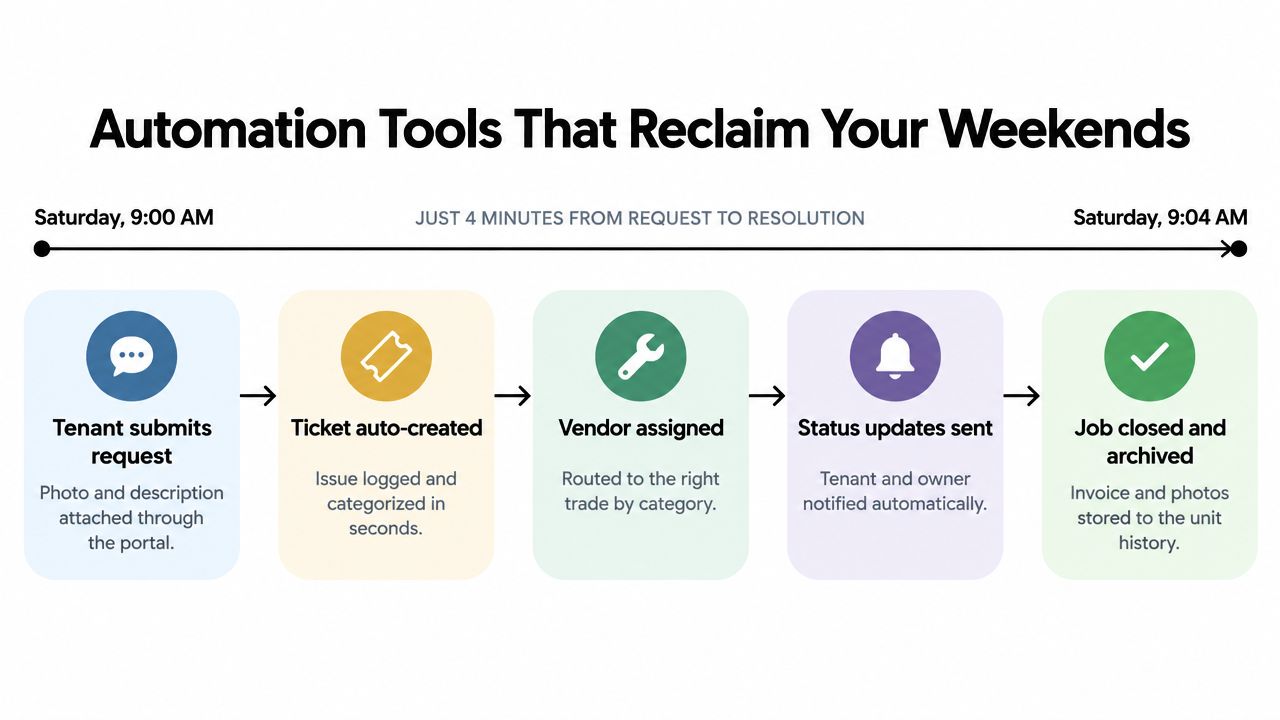
That record helps you distinguish an emergency from a cosmetic request, track response activity, and understand recurring problems at a property. Choose the system that makes documentation automatic. If recording the repair takes more effort than handling it, you won't keep accurate records.
Automation Tools That Reclaim Your Weekends
Automation only saves time when it removes a handoff. A reminder that still requires you to check a spreadsheet isn't automation. A maintenance portal that forwards a tenant's text without categorizing it hasn't solved the workflow. For a small portfolio, look for tools that move a request from submission to resolution with minimal owner intervention.
Maintenance is the best place to test this. Require tenants to submit requests through a portal, with a description and photos. The system should create a ticket, classify the issue, assign or recommend a vendor, send status updates, and archive the final invoice. You still make judgment calls, especially for urgent repairs, but you stop acting as the message relay between every participant.
Automate the ledger while transactions are fresh
Accounting automation should capture income and expenses as they happen. Tag rent deposits, application income, repairs, insurance, utilities, supplies, and owner contributions at the transaction level. Then review exceptions instead of rebuilding the year from bank statements.
Your platform should export an income-and-expense ledger in a format you and your tax professional can use for IRS Schedule E reporting. Don't assume a polished dashboard means the underlying export is accurate. Create a test transaction, categorize it, export the report, and compare it with the categories your tax process requires.
A resident portal also reduces administrative friction. Tenants can submit requests, review payment history, access documents, and receive updates without sending separate messages. Explain the portal clearly during move-in, then use it consistently. If you answer maintenance questions by text while the official ticket remains empty, you've created two records and preserved the original problem.
Choose automation with a human override
Good automation routes routine work. It doesn't remove your responsibility. You should be able to pause a late-fee rule, reassign a vendor, correct a transaction, override a screening workflow when legally justified, and see an audit trail of what changed.
For a practical overview of workflow design, review property management automation workflows. The useful test is simple: after setup, does the platform reduce messages and duplicate entry, or does it create another dashboard you must monitor?
Evaluating Advanced and AI-Driven Capabilities
AI labels are everywhere, but small landlords should judge AI by the action it completes. A feature that summarizes a document, sorts a maintenance request, or categorizes a transaction can be valuable. A feature that produces a clever score without showing its inputs or allowing review can create more risk than savings.
Separate useful intelligence from expensive theater
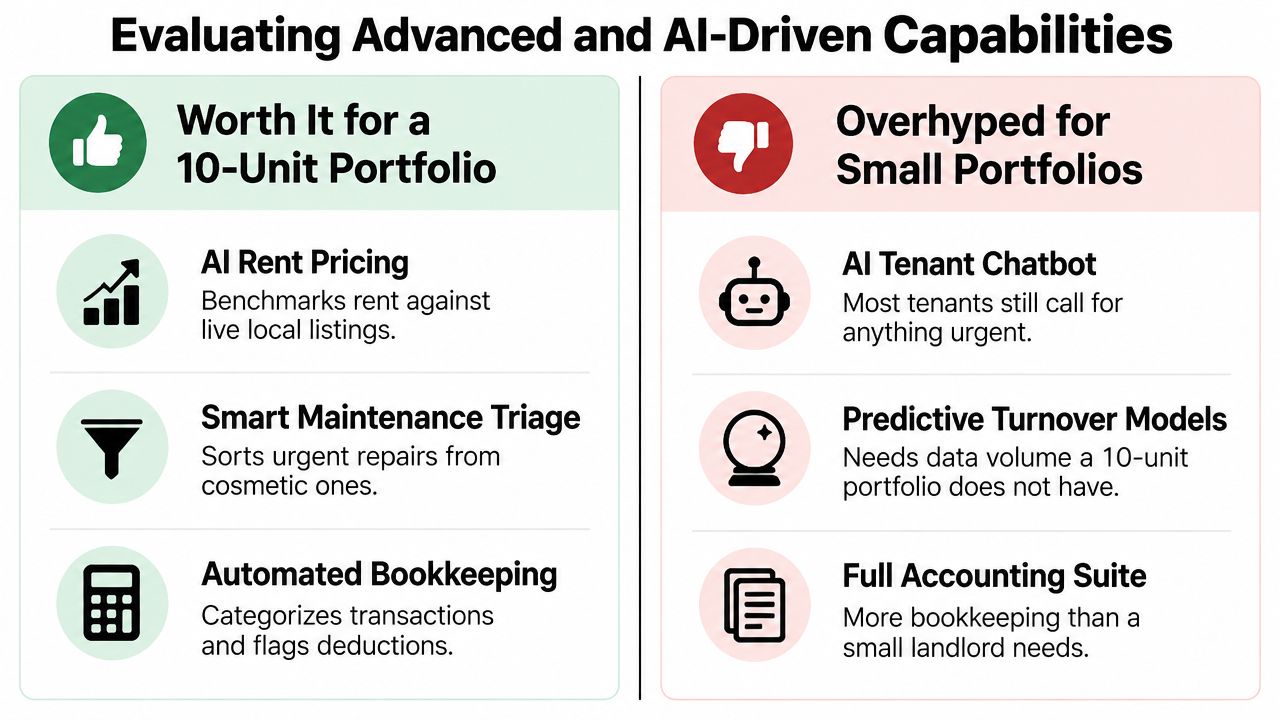
AI rent pricing can help you compare your asking rent with current local listings, provided you verify the suggested price against the unit's condition, location, amenities, and legal constraints. Smart maintenance triage can separate urgent issues from routine requests and send the right category to the right vendor. Automated bookkeeping can categorize transactions and flag items for review.
Those tools assist decisions you already need to make. They don't require an enterprise data warehouse to provide value.
By contrast, a tenant chatbot that handles basic questions may be unnecessary if residents still call when a leak, lockout, or heating failure needs immediate attention. Predictive turnover models can also be excessive for a small portfolio because the system has limited property-specific history to analyze. A full accounting suite may contain capabilities that create more configuration work than your rental business requires.
The best AI feature is the one that completes a boring task while leaving you a clear record to inspect.
Audit the inputs and the boundaries
Ask vendors how an AI tool reaches its recommendation. Can you see the source data? Can you correct an incorrect category? Does the system explain a screening summary in plain English without replacing the underlying report? Can you turn off an automated action?
Risk scoring deserves particular scrutiny. If software ranks applicants, you need consistent criteria, transparent documentation, and a process that supports fair housing obligations. Read AI risk assessment guidance for rental decisions before treating any score as a final answer.
Listing-copy generation is a lower-risk use case. It can help produce clear, search-friendly descriptions, but you still need to verify property facts, avoid discriminatory language, and remove claims the unit cannot support. Use AI to accelerate drafting, not to outsource judgment.
Tenant Screening and Compliance Safeguards
Screening is not just a background-check button. It is a regulated decision process that affects housing access, so the software must help you apply a consistent policy and preserve evidence of how you applied it.
Look for screening that combines credit, criminal, eviction, identity, and income information through FCRA-compliant workflows. The system should identify the applicant, generate a standardized report, record consent where required, and retain an audit trail. Standardization matters because DIY searches produce inconsistent results and make it harder to explain why one applicant received different treatment from another.
Make your policy visible before you screen
Write the approval criteria before reviewing applicants. Define acceptable income verification, credit considerations, rental history requirements, occupancy rules, and how you handle incomplete information. Apply the same policy to every applicant for the same property.
A software report can support your process, but it doesn't make a discriminatory policy lawful. Avoid using protected characteristics, proxies for protected characteristics, or vague personal impressions as screening criteria. If you take an adverse action, follow the applicable notice requirements and retain the supporting documentation.
Lease generation is the second safeguard. State-specific templates can auto-populate jurisdictional disclosures and produce e-signable documents, which is more reliable than editing a lease copied from a different state. Still, review every generated document. Local rules can change, and unusual property arrangements may require a lawyer's advice.
Keep the complete record
Store the application, consent, screening report, communications, decision, lease, amendments, payment history, inspection evidence, and maintenance correspondence in one organized record. Access controls should prevent accidental edits while allowing you to retrieve documents quickly.
Compliance also includes the condition of the property at move-out. If you're unsure what a professional turnover service typically covers, this guide to what a tenancy clean includes provides useful context for documenting cleaning expectations and separating cleaning work from damage claims.
The practical standard is defensibility. If a tenant, regulator, attorney, or court asks why you made a decision, you should be able to show the policy, the source records, and the timeline without reconstructing the story from scattered email threads.
A Practical Evaluation Checklist for Small Portfolios
Don't choose software from a feature grid. Test it with a realistic property, lease, applicant, payment, maintenance request, and expense. A live workflow reveals friction that a sales demo hides.
Run the same test in every platform
Ask each vendor to demonstrate the following:
- Application money: How are application fees collected, split, and deposited? Who pays processing costs, and when does each party receive funds?
- Screening records: Can you access the full report, consent record, decision notes, and adverse-action documentation?
- Lease accuracy: Does the system generate state- and county-specific documents, and can you edit, sign, store, and retrieve them?
- Payment behavior: Can you test ACH and card payments, autopay, reminders, recurring charges, late-fee rules, refunds, and failed-payment handling?
- Maintenance routing: Can a tenant submit photos, can you triage the request, can a vendor receive it directly, and does the final invoice remain attached?
- Accounting exports: Does the ledger export match the categories and reporting format your tax professional expects?
- Data portability: Can you export tenants, leases, transactions, documents, and maintenance history in usable formats?
Use the same sample records for every demo. Then score each workflow by setup effort, recurring owner effort, documentation quality, compliance support, and total cost. A platform that needs fewer clicks but produces weak records isn't a bargain.
Use a portfolio-size filter
| Feature Category | 1-3 Units (DIY) | 4-10 Units (Scaling) | Evaluation Question to Ask |
|---|---|---|---|
| Rent collection | Online payments, reminders, autopay | Recurring charges, late-fee rules, payment reporting | Can I configure lease-specific rules without manual work? |
| Screening | Standardized reports and consent records | Consistent workflows across multiple vacancies | Can I apply one written policy and retain an audit trail? |
| Leasing | State-specific templates and e-signatures | Template management and renewal tracking | Does the document workflow reflect my jurisdiction? |
| Maintenance | Tenant portal and request history | Triage, vendor assignment, status updates | Can the request move from submission to archived invoice? |
| Accounting | Income and expense ledger | Multiple properties, exports, reconciliation | Does the export support my tax and bookkeeping process? |
| Reporting | Rent status and basic property view | Delinquency, expenses, vacancy, vendor reporting | Which report will I use every month? |
| Access control | Secure owner account and document storage | Limited permissions for helpers or contractors | Do I actually need multiple roles today? |
For documentation practices, see property management compliance documentation. If a vendor can't answer these questions directly, don't let a discount or an impressive dashboard make the decision for you.
Building a Sustainable Property Management Tech Stack
A sustainable stack starts with the workflow that causes the most pain. If rent collection consumes your attention, launch payments and reminders first. If maintenance dominates your week, start with the tenant portal, triage rules, and vendor records. Don't migrate every historical note before the core process works.
Clean your existing tenant and property data before importing it. Standardize names, lease dates, balances, recurring charges, vendor contacts, and document labels. Keep an export of the original records, then verify the migrated data against your bank and current leases.
Roll out the change in stages. Invite current residents to the portal, explain exactly where payments and requests belong, and give vendors one dispatch channel. For owners who still handle too many calls, a practical guide to property manager phone automation can help identify which conversations should be routed, documented, or automated.
VerticalRent combines FCRA-compliant screening, AI risk scoring, state- and county-specific lease generation, online ACH and card rent collection, automated reminders and late fees, maintenance triage, vendor dispatch, and IRS Schedule E reporting for independent landlords. Use it as one candidate in your evaluation, and judge it against the workflows and questions above.
Export your current records, choose one workflow to automate this week, and test the result with a real lease or maintenance request before expanding the rollout. That approach keeps the technology manageable and ensures every new feature earns its place.
If you want a focused system for screening, leasing, rent collection, maintenance, and financial records without unnecessary enterprise complexity, review VerticalRent and compare its workflows with your current process. Start with the task that consumes the most time, test the automation, and expand only when the recordkeeping and workload improvements are clear.
Put this into practice
VerticalRent tools related to this guide
Legal Disclaimer
VerticalRent and its authors are not attorneys, CPAs, or licensed legal or financial advisors, and nothing on this site constitutes legal, tax, or professional advice. The information in this article is provided for general educational purposes only. Landlord-tenant laws, eviction procedures, security deposit rules, and tax regulations vary significantly by state, county, and municipality — and change frequently. Nothing on this site creates an attorney-client relationship. Always consult a licensed attorney or qualified professional in your jurisdiction before taking any action based on information you read here.
Co-founded VerticalRent in 2011, growing it from nothing to 100k landlords and renters. Sold it in 2019, then re-acquired it in 2026 to make it better than ever.


