Online Tenant Portal: What It Is and How It Works
Learn what an online tenant portal is, the core features independent landlords need, how rent collection and maintenance actually work, and what to look for.


Sarah manages two duplexes alongside a full-time job. At 9 p.m., one tenant is texting about a leaking faucet, another is asking whether rent went through, and a lease renewal is buried in an email thread. None of these tasks is difficult alone. Together, they turn a small rental portfolio into a second shift.
An online tenant portal can bring those loose ends into one secure place. Renters use it to pay rent, submit and follow maintenance requests, retrieve documents, and message the landlord. Owners get a record of what happened, when it happened, and which unit or lease it concerns.
The technology isn't automatically useful just because it's available. Tenants must be able to log in without frustration, and they need a reason to return after rent clears. Those two adoption problems often matter more than a long feature list.
What an Online Tenant Portal Actually Is
An online tenant portal is a shared web or mobile dashboard for the landlord-tenant relationship. A useful analogy is online banking, but instead of checking a bank balance or transferring money between accounts, the renter manages the practical business of living in a rented home.
The tenant might open the portal to see the current balance, schedule a recurring payment, upload a photo of a broken appliance, download the lease, or read a message about planned access. The landlord sees the matching administrative view, including payment status, maintenance tickets, documents, and conversation history. A property manager may handle daily operations, while a maintenance vendor may receive only the work-order details needed to complete a job.
A typical session looks simple:
- The landlord configures the property, lease, payment rules, documents, and communication settings.
- The renter receives an invitation and creates an account.
- The renter completes a task, such as paying rent or reporting a repair.
- The system records the action and alerts the appropriate person.
That last step is what separates a portal from a shared inbox. A text message can tell you that a faucet is leaking, but it doesn't automatically connect the report to a unit, lease, vendor, status, or completion record. A portal turns the message into part of a workflow.
Practical rule: Treat the portal as the front door to your rental operations, not as a payment button with extra menus.
The first hurdle is initial login. If the invitation is confusing, the password process is cumbersome, or the tenant can't use a phone comfortably, the account may sit untouched. The second hurdle comes after rent is paid. Unless tenants can check repairs, documents, announcements, or messages there, they have little reason to remember the portal.
A useful overview of the tenant cloud application model shows why the strongest systems group several rental tasks around one tenant record. The next question isn't whether a portal has many features. It's whether each feature removes a specific piece of daily manual work.
Core Features Every Tenant Portal Should Cover
A small landlord doesn't need every module offered to large apartment operators. You do need the modules that replace recurring handoffs between paper, email, phone calls, and spreadsheets.
| Feature | Old Workflow | Portal Workflow |
|---|---|---|
| Rent collection | Checks, bank trips, manual reminders, and ledger entry | ACH or card payment, confirmation, recurring scheduling, and digital ledger |
| Maintenance | Texts, voicemails, scattered photos, and follow-up calls | Structured request, attachments, assignment, status updates, and completion record |
| Documents | Filing cabinet or search through email | Lease and disclosure storage tied to the tenant or unit |
| Messaging | Separate conversations with uncertain context | Threaded messages connected to the lease, unit, or request |
| Screening | Separate applications and vendor dashboards | Screening information connected to the applicant record |
| Accounting | Manual transcription into a spreadsheet | Exportable payment and expense records |
Rent collection and the ledger
The tenant sees a balance, due date, payment method, and receipt. The landlord sees whether the payment is pending, completed, returned, or overdue. ACH and card processing can reduce the handling associated with paper checks, while recurring payments address the very ordinary problem of forgetting a due date. Online payment flows can also create a time-stamped record that makes reconciliation easier, as described in TenantCloud's rent collection workflow.
Maintenance intake and dispatch
This is one of the most undervalued modules. A good request form asks for the issue type, urgency, description, access instructions, and photos. Those fields give the landlord enough information to decide whether the problem is an emergency, a routine repair, or something the renter can troubleshoot.
The structured maintenance portal approach replaces a vague text such as “the sink is bad” with information a worker can use. The improvement isn't cosmetic. The manager can triage the request, assign the right vendor, and preserve the history without repeatedly asking for details.
Documents, messages, screening, and accounting
Lease storage answers the Sunday-night question, “Where's my signed addendum?” Threaded messages preserve context and timestamps, which can matter when you need to reconstruct notice or access communication. Screening integrations keep applicant information together, while accounting exports move transactions into the owner's bookkeeping process instead of requiring another round of data entry.
The strongest portal connects these modules to one tenant and unit record. That connection is the quiet benefit. You don't just know that a payment arrived or a repair was requested. You can identify who made the payment, which lease it belongs to, which unit generated the request, and what happened afterward.
How Online Rent Collection Works in Practice
Rent collection becomes easier to understand when you follow one payment from setup to posting.
First, the landlord enters the lease terms, including the rent amount, due date, accepted payment methods, and any disclosed late-fee rules. The landlord then invites the tenant by email. On the renter's side, the portal displays the balance and available options, such as an ACH bank transfer or card payment.
The renter can make a one-time payment or schedule recurring payments. The system sends a confirmation, records the transaction, and associates it with the correct lease. On the landlord's side, the payment may show as pending while the bank transfer clears, then post to the ledger and designated bank account.
ACH usually takes clearing time. Card payments may arrive faster, but processing costs can be higher. A landlord should also confirm that any grace period, late fee, partial-payment rule, and notice language match the lease and applicable local requirements. The platform can automate a rule, but it can't make an undisclosed or unlawful rule valid.
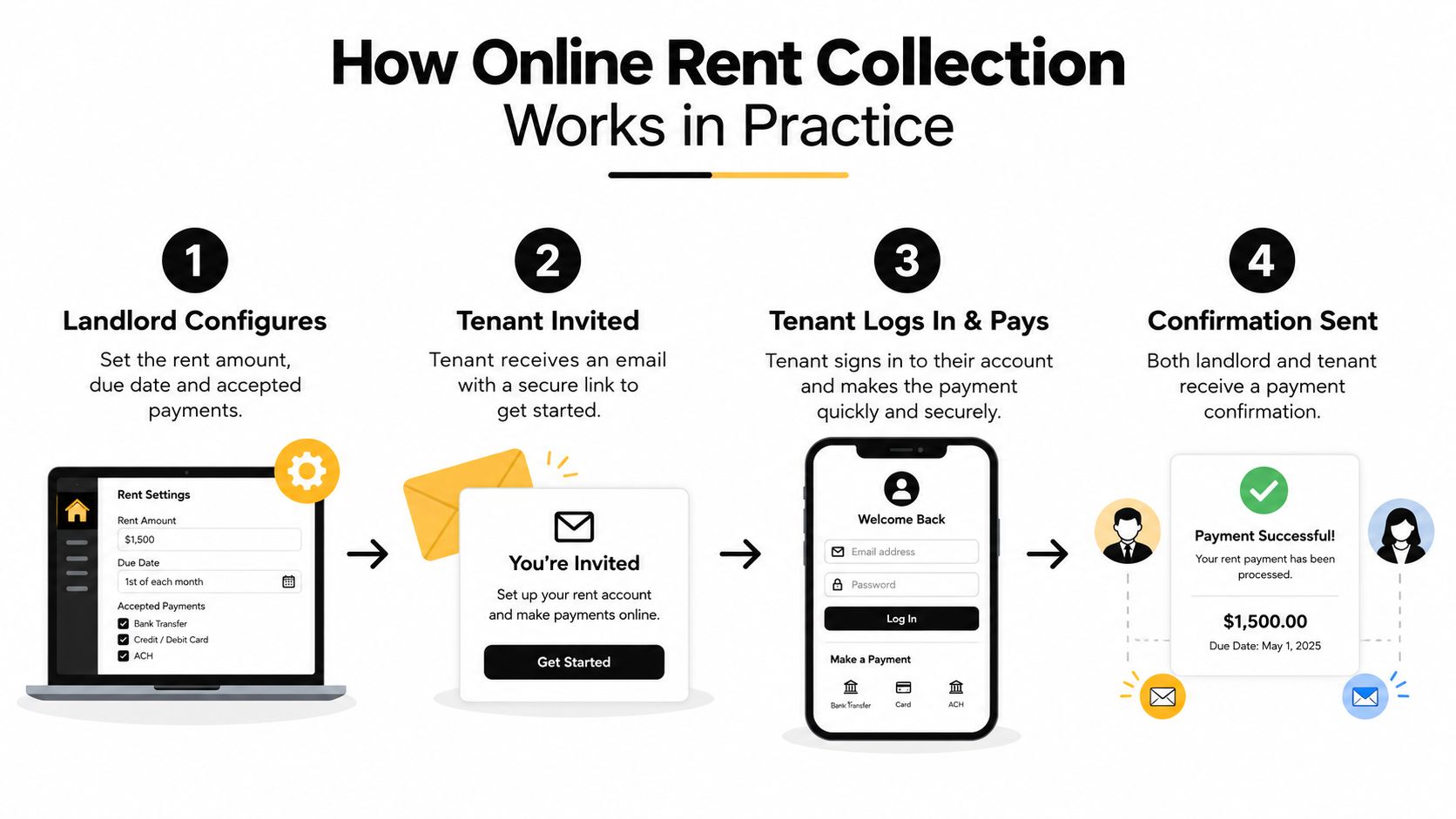
Compare that with a paper check. The tenant writes it, the landlord retrieves it, deposits it, waits for processing, identifies the unit, and updates the ledger. If the check is late or missing, the landlord follows up manually. A portal doesn't eliminate every payment problem, but it moves routine steps into a shared record.
For a practical implementation checklist, review this guide to collecting rent online.
Before activation, verify:
- Lease settings: Confirm the balance, due date, grace period, and late-fee language.
- Bank details: Check the destination account and verification process.
- Payment choices: Offer a method tenants can reasonably use, including a clear ACH option where available.
- Fee disclosure: Show who pays processing or convenience fees before the tenant submits payment.
- Receipts: Test the confirmation sent to both sides.
- Fallback process: Decide how you'll handle a returned payment, access problem, or tenant who needs an offline alternative.
Here's a short visual walkthrough of the tenant-facing experience:
The Maintenance Request Workflow End to End
A maintenance portal works best when it captures the details a landlord normally has to collect through several messages.
The tenant taps New Request, selects a category, describes the problem, uploads a photo, chooses an urgency level, and indicates whether the landlord or vendor may enter. The request receives a timestamp and appears in the landlord's dashboard with the unit, tenant, prior request history, and conversation thread.
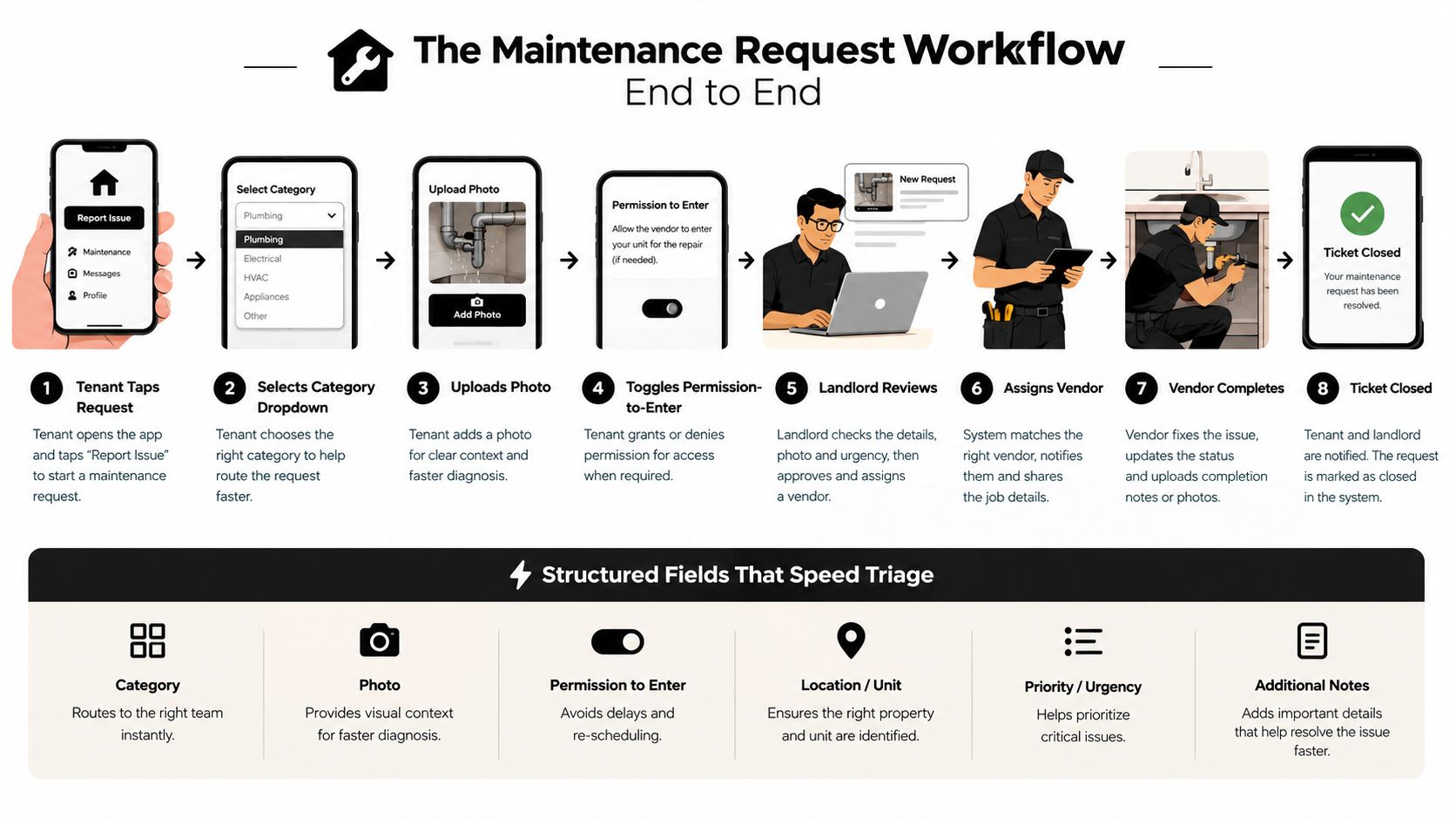
The landlord reviews the ticket, asks a clarifying question if needed, or assigns it directly to a vendor. The vendor receives the issue description, photo, access instructions, and location. As work progresses, the landlord can update the status, and the tenant can see whether the request is received, assigned, scheduled, or closed.
That sequence is far more reliable than a text-and-voicemail loop. In a structured workflow, the request details stay attached to the ticket rather than disappearing into a personal phone. Guidance on maintenance work orders illustrates the value of turning a resident report into an assignable job.
Consider a leaking kitchen faucet. The tenant selects plumbing, marks the issue as routine, uploads a photo, and permits entry. The landlord sees the unit and prior history, assigns a plumber, and sends the tenant a status update. If the vendor adds completion notes and a final photo, the closed ticket becomes part of the property's maintenance record.
Portals still have weak points. A form may force tenants to choose a category that doesn't fit, or hide the access setting behind several screens. Look for systems that let the landlord customize categories and instructions without technical work. The form should guide the tenant, not make the tenant become a property-maintenance expert.
The Adoption Trap Most Landlord Guides Miss
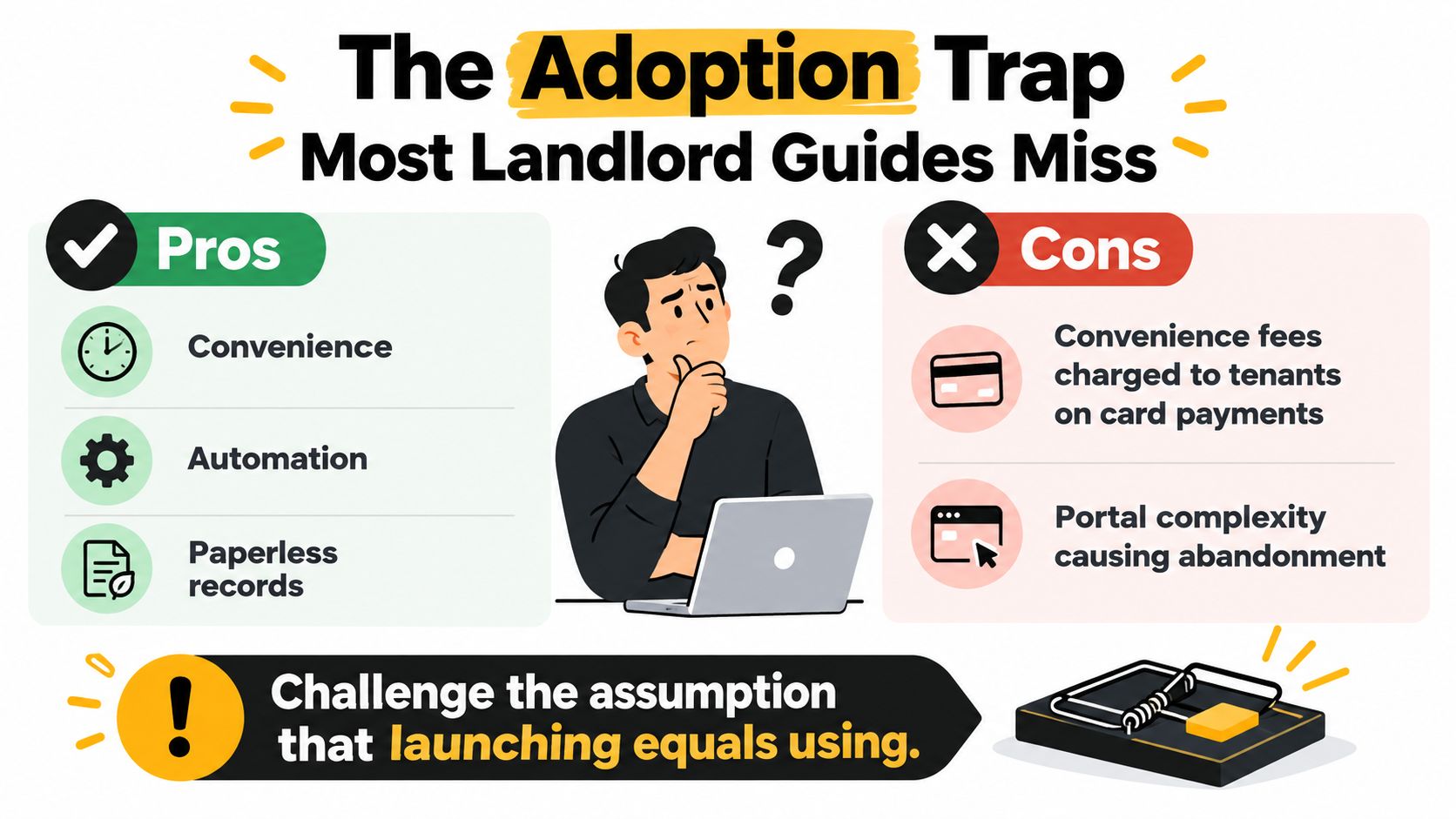
Launching a portal doesn't mean tenants will use it. Adoption usually fails at two ordinary points: the cost of paying online and the effort required to log in.
Payment fees can change a tenant's decision immediately. Coverage of online rent payment portal fees notes that card charges are often around 2% to 3%, while ACH may involve a flat fee. The same discussion warns that fees above 2.5% can discourage activation. A renter who sees a meaningful extra charge for the basic act of paying rent may rationally return to a check.
A landlord has several choices:
- Absorb the cost: Treat the fee as part of operating the property.
- Minimize the cost: Encourage ACH and make the lower-cost route easy to find.
- Cap the charge: Set a clear limit where the platform permits it.
- Keep an offline option: Don't make a tenant choose between an expensive payment and a missed deadline.
The second problem is the forgotten password. A tenant may register once, pay rent, and then ignore the portal until something breaks. Password resets, separate app downloads, and buried payment screens create friction that has nothing to do with the tenant's willingness to cooperate.
Adoption is a design problem before it's a tenant problem.
Use a direct payment link in reminders where the platform supports it. Explain the first login in a short email, offer a brief phone walkthrough, and keep the payment path visible. A single sign-on option, magic link, or simple account recovery process can make the difference between a portal that exists and one that becomes part of the renter's routine.
A portal should give renters useful reasons to return, including maintenance status, lease documents, announcements, and message history. Convenience matters, but transparent cost and low-friction access decide whether convenience survives contact with real life.
Measuring the Real ROI for Small Landlords
A landlord with a small portfolio doesn't need a complex software model to judge value. Start with the work you perform repeatedly, then compare the monthly time and cost before and after adoption.
Track these activities separately:
- Rent reminders and late follow-up
- Check collection and bank deposits
- Ledger updates and reconciliation
- Maintenance clarification messages
- Vendor assignment and status calls
- Document searches and resend requests
For each task, record the time spent during a typical month. Multiply the recovered hours by a conservative hourly value that reflects what your time is worth, not an inflated consulting rate. Then add direct savings you can verify, such as fewer trips, fewer manual entries, or reduced payment follow-up.
| Task | Manual Time/Month | Portal Time/Month | Hours Saved | Est. Monthly Value |
|---|---|---|---|---|
| Rent reminders and follow-up | Track your baseline | Track after rollout | Difference | Hours saved × hourly value |
| Check handling and deposits | Track your baseline | Track after rollout | Difference | Hours saved × hourly value |
| Maintenance triage | Track your baseline | Track after rollout | Difference | Hours saved × hourly value |
| Document retrieval | Track your baseline | Track after rollout | Difference | Hours saved × hourly value |
The table deliberately uses your own records rather than a promised benchmark. A landlord who still handles paper checks and receives maintenance reports by text may recover substantial administrative time. Someone who already uses bank transfers, a well-organized shared inbox, and an accounting system may see a smaller change.
Don't count every improvement as cash. A clear maintenance record can reduce confusion without producing an immediate bank deposit. A searchable lease can prevent an interruption rather than create revenue. Those benefits still belong in the decision, but label them accurately.
Measure the before-and-after workflow, not the feature count.
Subtract the portal subscription, processing costs you absorb, onboarding time, and any migration work. Keep the portal if the recovered time and operational clarity justify those costs for your situation. Reassess after the first full operating cycle, then again after tenants have used the maintenance and document features, not just the payment screen.
How to Choose and Roll Out a Tenant Portal
Choose a portal by testing the tasks you perform, not by counting icons in a sales demonstration. For a one-to-ten-unit portfolio, the right system should make routine work easier without creating a second administrative system to maintain.
Questions to ask before signing
- Payment costs: Ask whether the landlord or tenant pays ACH and card fees, and show the actual checkout experience.
- Maintenance detail: Confirm that renters can add photos, access instructions, urgency, and status updates.
- Mobile usability: Test the tenant experience on a phone, not only on a desktop.
- Documents: Check whether leases and disclosures can be stored, retrieved, and signed electronically.
- Screening: Review the depth of credit, criminal, eviction, and rental-history information if screening is part of your workflow.
- Accounting: Verify that payments and expenses can export cleanly to your bookkeeping process.
- Pricing: Look for transparent per-unit or subscription pricing, including setup and migration costs.
- Vendor handling: Make sure maintenance messages remain connected to the work order rather than splitting across unrelated inboxes.
A long contract, unclear tenant charges, or a maintenance module that can't preserve the conversation should make you cautious. Ask for a complete demonstration of one rent payment and one repair request, from tenant submission through landlord reconciliation.
Roll out the workflow in stages
Start with one building or one unit. Send a short welcome message explaining what the portal replaces, then walk the first tenant through registration and a basic task. Run a payment from start to finish and submit a sample maintenance request before inviting everyone else.
During the early rollout, keep an offline fallback. That doesn't undermine the portal. It gives you a way to support a tenant who has an access problem while you fix the process. At the end of the first month, ask where the tenant got stuck, whether fees were clear, and whether repair updates were easy to find.
A platform such as VerticalRent includes tenant-facing rent payment and maintenance request functions, including phone-based requests with photo attachments. Treat that as one option to evaluate alongside the fee model, records, integrations, and support you need.
Tenant Portal Questions Independent Landlords Ask Most
Who pays the portal fees? It depends on the provider and your settings. Some systems use a landlord subscription, while others add ACH or card charges. Review the tenant checkout screen and decide whether passing through a fee will undermine the adoption you want.
Is tenant data secure? Ask about encryption, access controls, audit records, independent security reviews, and where payment information is handled. Don't assume “secure” means every record is stored forever or that the platform replaces your responsibility to retain leases, notices, and accounting records appropriately.
Can I switch portals during a lease? Usually, the practical issue is preserving history. Export payment ledgers, maintenance records, messages, and documents before closing the old account. Check whether the new platform accepts CSV files and whether signed documents can be migrated with their associated dates and tenant records.
How do I help a less digital renter? Give the tenant a printed one-page guide with the invitation steps, payment route, support contact, and offline fallback. Offer a phone walkthrough, then keep a non-digital option available during the early transition instead of treating difficulty as refusal.
The goal isn't to force every interaction into software. It's to give renters a dependable self-service path while keeping a complete, usable record for the landlord.
VerticalRent gives independent landlords a tenant portal for online rent payments and photo-based maintenance requests, alongside screening, leases, and rental ledgers. Visit VerticalRent to review how its workflow could fit your small portfolio and test the parts that matter most in daily management.
Put this into practice
VerticalRent tools related to this guide
Legal Disclaimer
VerticalRent and its authors are not attorneys, CPAs, or licensed legal or financial advisors, and nothing on this site constitutes legal, tax, or professional advice. The information in this article is provided for general educational purposes only. Landlord-tenant laws, eviction procedures, security deposit rules, and tax regulations vary significantly by state, county, and municipality — and change frequently. Nothing on this site creates an attorney-client relationship. Always consult a licensed attorney or qualified professional in your jurisdiction before taking any action based on information you read here.
Co-founded VerticalRent in 2011, growing it from nothing to 100k landlords and renters. Sold it in 2019, then re-acquired it in 2026 to make it better than ever.


