DIY Landlord Property Management Playbook for 2026
DIY landlord property management for 1-10 units: screen tenants, write local leases, collect rent, dispatch repairs, and close books.

Individuals own most of the rental properties in the United States, even when larger firms hold more of the units. Harvard's Joint Center for Housing Studies, using the 2016 American Community Survey, counted 47.1 million rental units, about 35% of the housing supply. Individuals owned 74% of rental properties, and those properties were 48% of rental units.
That split is why diy landlord property management is a real operating job, not a hobby squeezed under an institutional playbook. You still lease, screen, collect rent, dispatch repairs, and keep the file. Nobody in a back office does it for you.
Two habits keep that job from turning into a weekend of guesswork. Treat an AI screening score as evidence you file, not a verdict you obey. Close each property's books every month so Schedule E is an export, not a reconstruction you attempt in March.
The Weekly Operating Cadence for One to Ten Units
You are still the person who answers the listing, reads the application, chases rent, calls the plumber, and files the taxes. In 2025, 72% of surveyed independent landlords managed between 1 and 4 rental units, according to Avail's survey of its active landlord users. The default operator is part-time. The calendar has to fit that.
A four-unit portfolio usually takes 4 to 6 hours in a normal week and 8 to 10 hours in a turnover week. Batch the work. Screen on one evening. Close the books on the first weekend after rent is due. Check the maintenance queue twice a week.
| Workflow | Trigger | Record you keep |
|---|---|---|
| Inquiries and showings | New lead or vacancy | Showing log and listing notes |
| Screening decision | Complete application | Criteria sheet, report, written reason |
| Lease | Approved applicant | Signed state and county lease |
| Rent and late fees | Due date and grace period | Receipt and ledger entry |
| Maintenance dispatch | Tenant request | Request, vendor, status, invoice, photos |
| Books close | Month end | Reconciled property ledger |
A week you can copy
Monday and Thursday, 20 minutes each: clear new repair requests and confirm which jobs are still open.
One weeknight, about 90 minutes: answer inquiries, book showings, and decide every complete application within 24 to 48 hours. A file that sits for a week is how good applicants disappear.
First weekend after the due date, about 45 minutes: match rent received to the ledger, post late fees that came due, and close the month.
Once a year per lease: send renewal terms 60 to 90 days before the end date and skim the compliance file for that unit.
Practical rule: if a task has no trigger and no saved record, it isn't done. A text you can't find later doesn't count.
Each later part of this playbook is one row of that table. Don't build a second system beside it.
How to Screen Tenants and Record the Decision
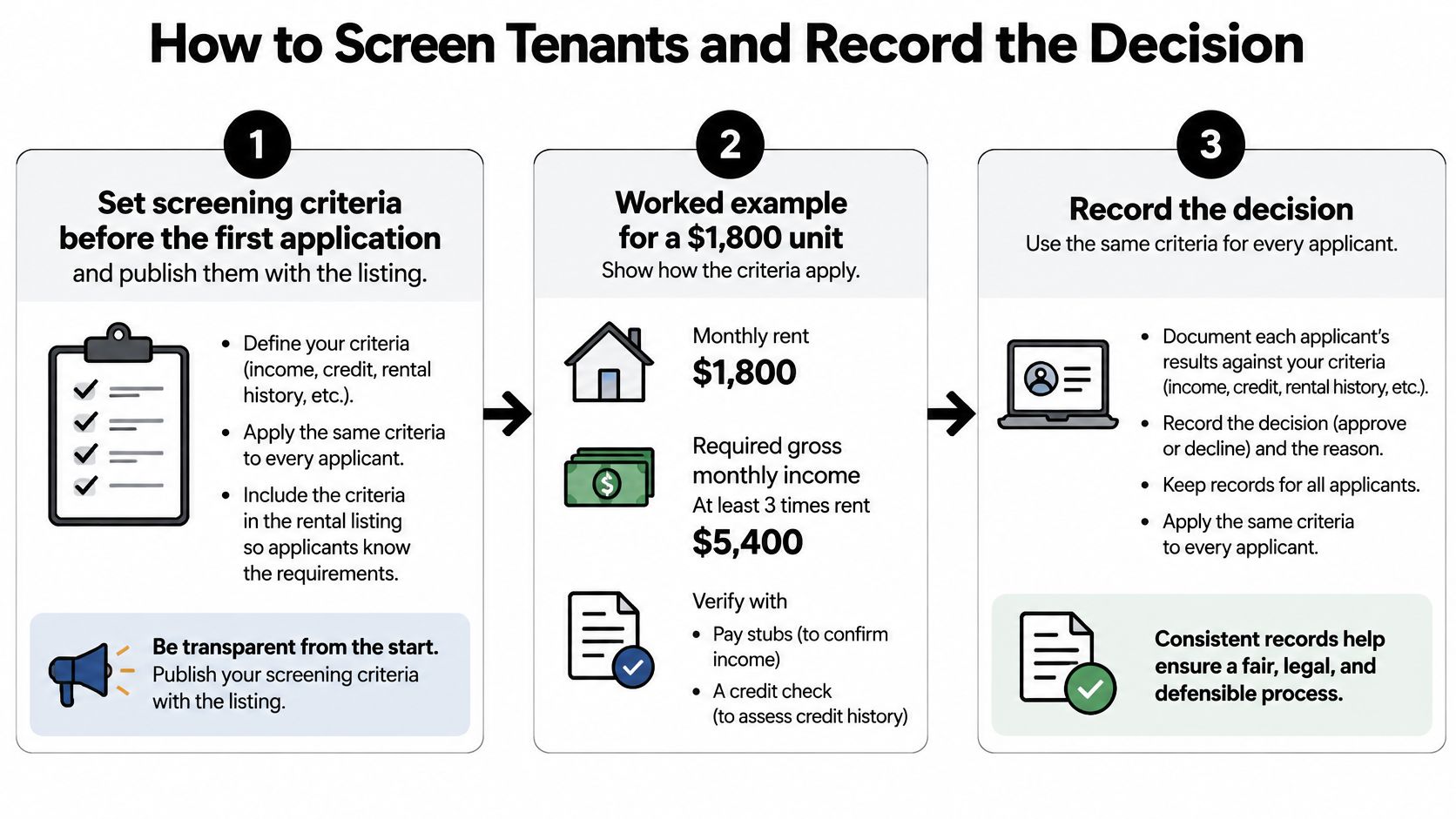
Write the criteria before the first application arrives, and publish them with the listing. Applicants should see the rules you will use.
Say the unit rents for $1,800. Your income rule is gross monthly income of at least 3 times rent, so $5,400. You verify that with pay stubs or a benefits letter, plus a call or email to the employer. You check rental history with prior landlords. You pull credit, criminal, and eviction reports only after written authorization.
A 2025 National Consumer Law Center report found that almost two-thirds of surveyed landlords received screening reports with an AI-generated score or recommendation. Three-quarters of surveyed housing attorneys, counselors, and advocates said private landlords rarely or never consider mitigating circumstances. Automation adds inconsistency when you treat the score as the decision.
HUD's position is blunt. The Fair Housing Act applies no matter which technology produced the number. Use written, publicly available criteria, and make your own determination.
Six steps before you say yes or no
- Confirm identity and consent. When you run a report, certify that you have the applicant's written authorization. No consent, no report.
- Verify facts apart from the score. Income documents and prior-landlord ratings are facts. The score is a prediction.
- Apply the same sheet to every complete file. Incomplete files wait. They don't get a softer rule.
- Override in writing when facts beat the score. A paid judgment, a report that names the wrong person, or a co-signer who meets the $5,400 income rule can outweigh an adverse score. Write which evidence you used.
- Send the adverse-action notice when report data drives a denial or a condition. Include the consumer reporting agency's contact information and tell the applicant how to dispute errors. If you deny because of eviction history, we generate that FCRA notice automatically, with the agency's contact details.
- Store the reason. "Didn't feel right" is not a file.
| Check | Default pass rule | What can override it | What you file |
|---|---|---|---|
| Income | Gross monthly income at least 3x rent | Documented housing voucher or qualified co-signer | Pay stubs or award letter |
| Credit | No recent unpaid housing-related collections | Paid or disputed item with proof | Report plus note |
| Eviction history | No recent judgment for nonpayment | Wrong person, sealed record, or satisfied judgment | Report plus dispute note |
| Criminal history | Only offenses relevant to tenancy risk | Age of offense, evidence of rehabilitation | Individualized written reason |
| Prior landlord | Rent paid and lease completed | Hostile or unverifiable reference replaced by ledger proof | Six-category reference or substitute docs |
Prior landlords can rate a tenant across six categories in about two minutes, with no signup on their side. If that reference is hostile or you can't reach anyone, substitute rent ledgers or bank proof, and say so in the note.
Two applicants with the same verified facts get the same outcome. If they don't, your criteria aren't written yet.
Lock the Applicant Data Lifecycle
Applicant records include credit, eviction, and identity information. Set rules for access, storage, and deletion before applications arrive, then follow the same process for every applicant.
Keep a written data-handling policy alongside your screening criteria. The FCRA screening requirements explain the rules for ordering reports and handling decisions based on report information. For each report, retain the applicant's written authorization and limit access to people who need the information to assess the application.
- Collect only information tied to your criteria. If a field has no stated purpose in your screening process, do not request it.
- Limit report access. Name who can open a report, and keep credentials private.
- Share decisions, not full files. Avoid emailing complete credit reports; store them in the applicant's property file.
- Protect exports. Encrypt downloaded files and keep them with the related application records.
- Set a deletion date only after checking retention rules. Confirm the minimum retention period for rental application records under applicable state law and federal fair-housing requirements. Keep the adverse-action notice and written reason for that full period, along with any other records the rules require.
- Record disclosures. Log who received applicant information, what was shared, and when.
- Write a breach response plan. Keep a short record of whom to notify, which records were affected, and how you will respond to deletion requests.
Once a quarter, review exceptions and outcomes for inconsistent handling. A short, consistent record makes it easier to explain both what information you used and why you kept it.
How to Create a State and County Lease
Say you copy a Texas lease for a unit in Cook County, Illinois. The security-deposit language and the notice periods are wrong. A signature doesn't repair a form written for another state.
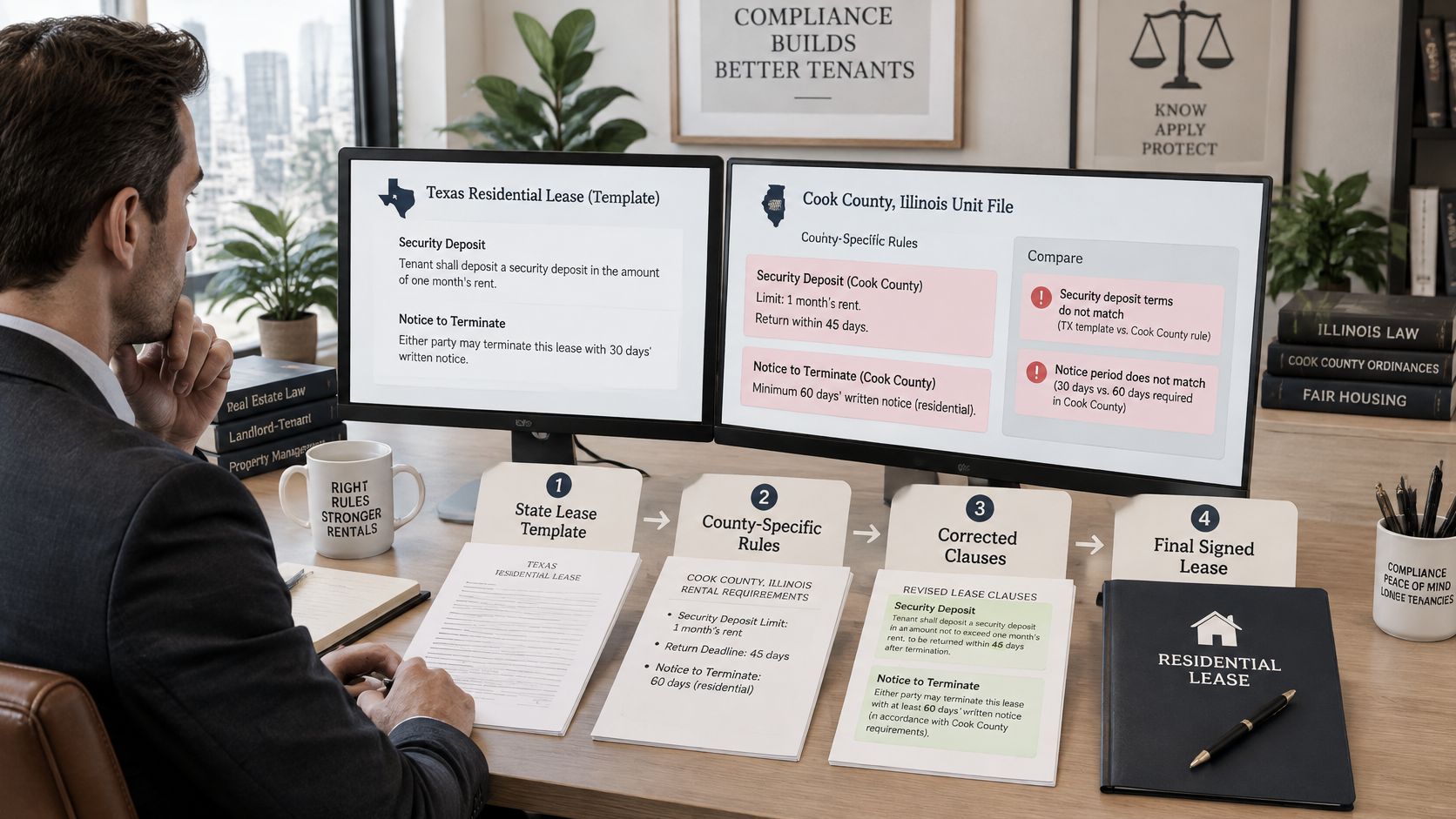
Build the lease in this order
- Confirm the property address, the state, and the county. Your home address doesn't set the law.
- Start from a lease written for that jurisdiction, not a generic national PDF.
- Fill the money terms: parties, rent amount, due date, term, and who holds the deposit.
- Add only local clauses the jurisdiction requires or allows. Deposit deadlines, entry notice, smoking, pets, and utilities belong here when local law speaks to them.
- Delete clauses that fight state habitability rules or fee caps.
- Let the applicant read it, sign electronically, and store the executed PDF next to the written screening reason.
Three clauses that start disputes
Late fees above the local cap. A flat fee that was fine on your last property can be illegal on this one. Check the cap before you type a number.
A deposit-return window copied from another state. Cook County doesn't inherit Texas deadlines. Use the window for the unit's county.
A waiver of your repair duty. Tenants can't sign away habitability. If the clause says they can, take it out.
Renewal without silence
75 days before expiration, send the new rent and any changed local addendum. If the current lease requires notice, don't let a month-to-month tenancy appear because nobody wrote anything.
Before you send the packet, tick one page:
- Jurisdiction matches the unit, not your mailbox.
- Money terms match what you advertised.
- Deposit holder, amount, and return window are local.
- Entry and maintenance duties are spelled out.
- Both parties will sign, and you'll keep the PDF with the decision file.
How to Collect Rent and Apply Late Fees
Set the money path before the first due date. Use $1,800 due on the 1st as the working case.
ACH should be the default. It's built for a payment that repeats, and it usually costs less than a card. Keep a card option for a tenant who can't send a bank transfer. A pending card charge is not the same thing as cleared rent, so read the timing before you call someone late.
| Method | Typical clear time | Cost pattern | Use it for |
|---|---|---|---|
| ACH bank transfer | 1-3 business days | Low or flat | Recurring monthly rent |
| Debit or credit card | Often same day to 2 business days | Percent of the payment | Tenants without easy ACH |
| Mailed check | Several days plus deposit lag | Your time | Fallback only, with a scan of the check |
Set the fee before anyone is late
- Put the due date, a 3 to 5 day grace period, and the late-fee formula in the lease. Confirm the formula is legal in that state, whether you use a flat amount or a small percent. There is no national cap you can copy.
- Remind twice. Once three days before the 1st, and again on the morning the grace period ends.
- Apply the fee once, after grace ends, unless the lease and local law both allow a daily fee. For this unit, a payment that clears on day 4 of a 5-day grace period owes $1,800 and no fee.
- Issue a receipt for every payment. A personal text is not the record. Every payment on our side generates a tenant receipt and posts to the income ledger.
- If rent is still unpaid after grace, send one written notice that states the balance, the fee, and the date it must be cured. Follow your state's notice rules before any eviction filing.
Two slips cause most of the arguments. Don't stack a late fee on a payment the tenant started inside the grace period while it was still clearing. Don't waive the fee for one household and enforce it on another unless a written policy says when a waiver is allowed, and you file the reason.
How to Dispatch Maintenance and Pay the Pro
A tenant reports a leaking water heater at 9 p.m. A text thread fails that job. There's no reliable timestamp, no photo of the leak, no named vendor, and no invoice you can file.
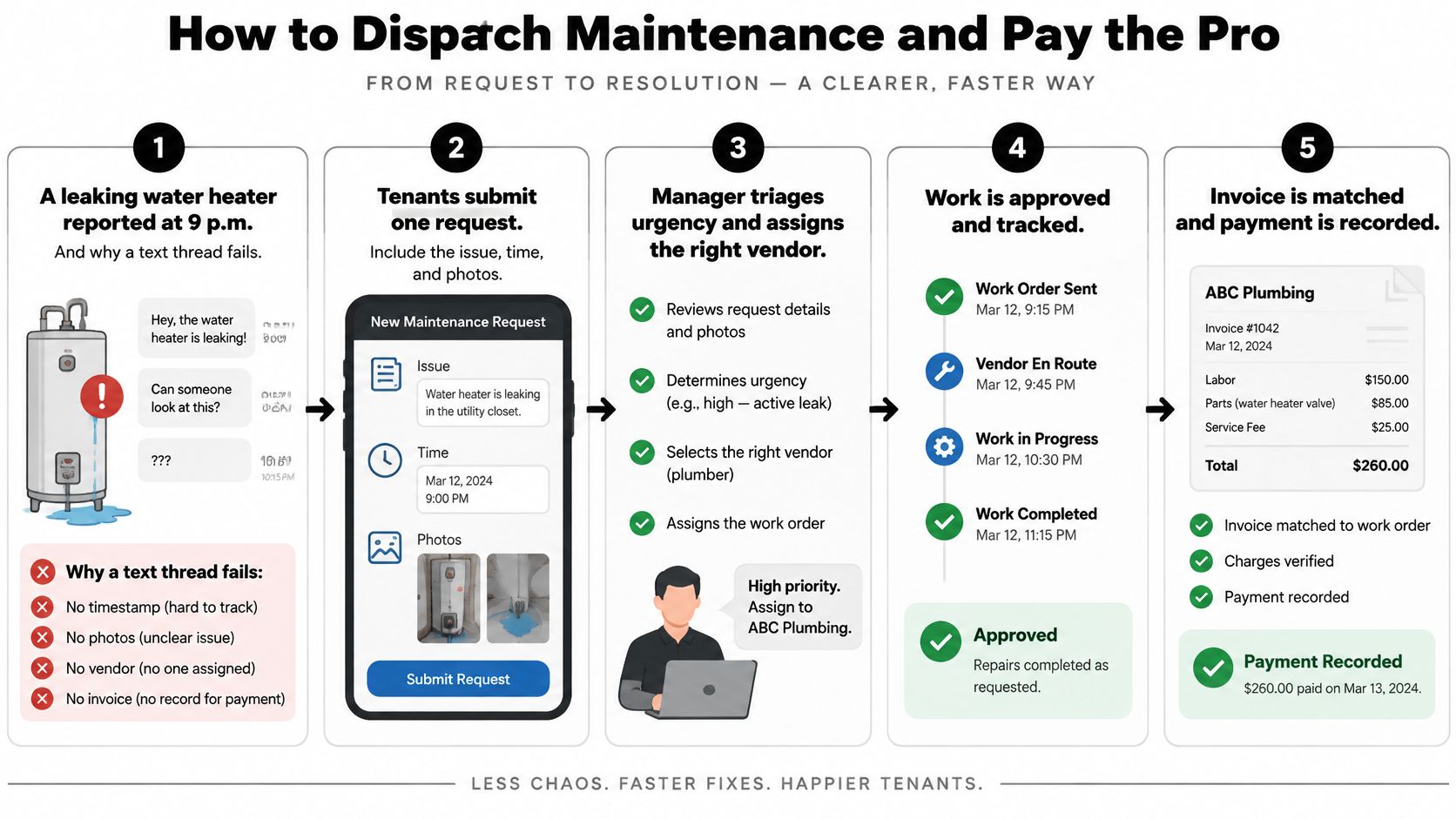
Use one maintenance work order path:
- The tenant submits one request with photos, urgency, and permission to enter.
- You triage the same day. Emergency means no heat, an active leak, a gas or electrical hazard, or a lockout. Urgent means a day or two. Routine means scheduled.
- Assign a known pro, or leave the job open for quotes. If you already trust a handyman, invite them. They create a free profile and you assign them from the request. Pros accept from My Jobs either way.
- Track Accepted, In Progress, and Complete, with photos when the work is done. Those status changes should reach you without another text chase.
- Pay from the invoice only after the completion photos match the request, then leave a rating.
A $240 drain cleaning shows the whole path. You mark it emergency, assign a plumber, they upload completion photos and the invoice, you pay by card, and you post a public rating. Tag the invoice as a repair you'll expense or a replacement you may capitalize, and keep it in the property file.
Exterior items pile up the same way. A short guide to roofing and window priorities for landlords helps you decide which of those jobs can't wait for the next turnover. Check the queue twice a week so a small leak doesn't become a habitability complaint.
How to Close the Books for Schedule E
Stop rebuilding the year in March. The IRS guidance on rental income, deductions, and recordkeeping says rental income and expenses are generally reported on Schedule E, and that receipts, canceled checks, and bills substantiate what you claim. A bank-feed line by itself is not that evidence. Missing paper can mean more tax and penalties if you're examined.
Our Schedule E rental income guide is the form-level companion. The monthly close below is what makes the form an export.
Close each property every month
- Keep a separate ledger per property. Schedule E is property by property before the totals combine.
- Record every rent payment and expense with date, vendor, category, payment method, and property.
- Attach the invoice, receipt, or canceled check. A downloaded bank line doesn't replace it.
- Reconcile beginning cash, money in, money out, and ending cash to the bank statement. Chase anything that doesn't match.
- Split repairs from capital improvements. A $180 faucet repair is a current expense. A $6,500 roof replacement is capitalized and depreciated. The invoice tag from the repair file is what lets you make that split without guessing.
- Export the month. Tax time becomes a rollup of twelve closes.
Say you run three properties and the rent lands in the same account you use for groceries. A $900 transfer never gets a property tag. At filing time you can't prove which building it belonged to, and a deduction you paid becomes one you can't support.
Categories that usually map to Schedule E lines are rent, advertising, insurance, legal and professional fees, management, mortgage interest, repairs, supplies, taxes, utilities, and depreciation.
Any transaction without a receipt or a property tag stays open until the next close, not until April. Give that exception 20 minutes. Then stop.
Put the Cadence on One Workspace
Five apps create five versions of the same file. One workspace keeps the six cadence rows in one place: listing, decision, lease, rent, repair, and the monthly export.
We've served independent landlords since 2011, and landlords use the platform in all 50 states. You can start with a free workspace for 1 door, no credit card, and setup in about 2 minutes. The Platinum landlord plan is $5 per month and includes 100 AI credits and 1 screening report per month.
Rent that already posts to the income ledger is what you reconcile at month end, so the close is a check rather than a rebuild. If you spend AI credits on a screening summary, you still write the reason. The score stays evidence. The note is the decision.
Do three things this week. Load one vacant or occupied door. Publish the screening criteria on that listing. Run the next application through the recorded decision path and save the written reason with the file.
VerticalRent is built for owners who screen, lease, collect, dispatch, and close the books themselves, with the written reason and the monthly ledger kept in one place. You can publish criteria, order a consented screening report, send a state and county lease, take ACH or card rent, and pay a pro from a completed work order. Start with one door and run your next applicant through that recorded path at VerticalRent.
Put this into practice
VerticalRent tools related to this guide
Legal Disclaimer
VerticalRent and its authors are not attorneys, CPAs, or licensed legal or financial advisors, and nothing on this site constitutes legal, tax, or professional advice. The information in this article is provided for general educational purposes only. Landlord-tenant laws, eviction procedures, security deposit rules, and tax regulations vary significantly by state, county, and municipality — and change frequently. Nothing on this site creates an attorney-client relationship. Always consult a licensed attorney or qualified professional in your jurisdiction before taking any action based on information you read here.
Co-founded VerticalRent in 2011, growing it from nothing to 100k landlords and renters. Sold it in 2019, then re-acquired it in 2026 to make it better than ever.


