Service Request App for Landlords: How It Works in 2026
Learn what a service request app does, which features landlords and vendors need, and how to set up tenant repair workflows safely.

A tenant texts at 11 p.m. about water leaking under the kitchen sink. You see the message the next morning, buried beneath unrelated texts, and call a plumber who has no photos, access instructions, or clear record of what the tenant reported. The repair may be straightforward, but the workflow has already created avoidable delays.
A service request app gives tenants, landlords, and vendors one place to report, assign, track, and document repairs. For a small rental portfolio, the key isn't just getting a request into the system. It's making sure the tenant knows what happens next, a person can override unsafe AI decisions, and every handoff leaves a record.
What a Service Request App Replaces
Without a shared system, the tenant sends a text, the landlord forwards a photo by email, and the plumber gets a hurried call with incomplete details. Nobody has a reliable view of who owns the next step or whether the job has been booked. An inbox stores messages, but it doesn't provide a clear repair status.
A service request app turns each report into a single trackable ticket with a category, priority, photos, assigned vendor, status history, and payment record. Think of the ticket like a parcel tracking number: tenants and landlords can see where the job stands without starting another round of “Did anyone call the plumber?”
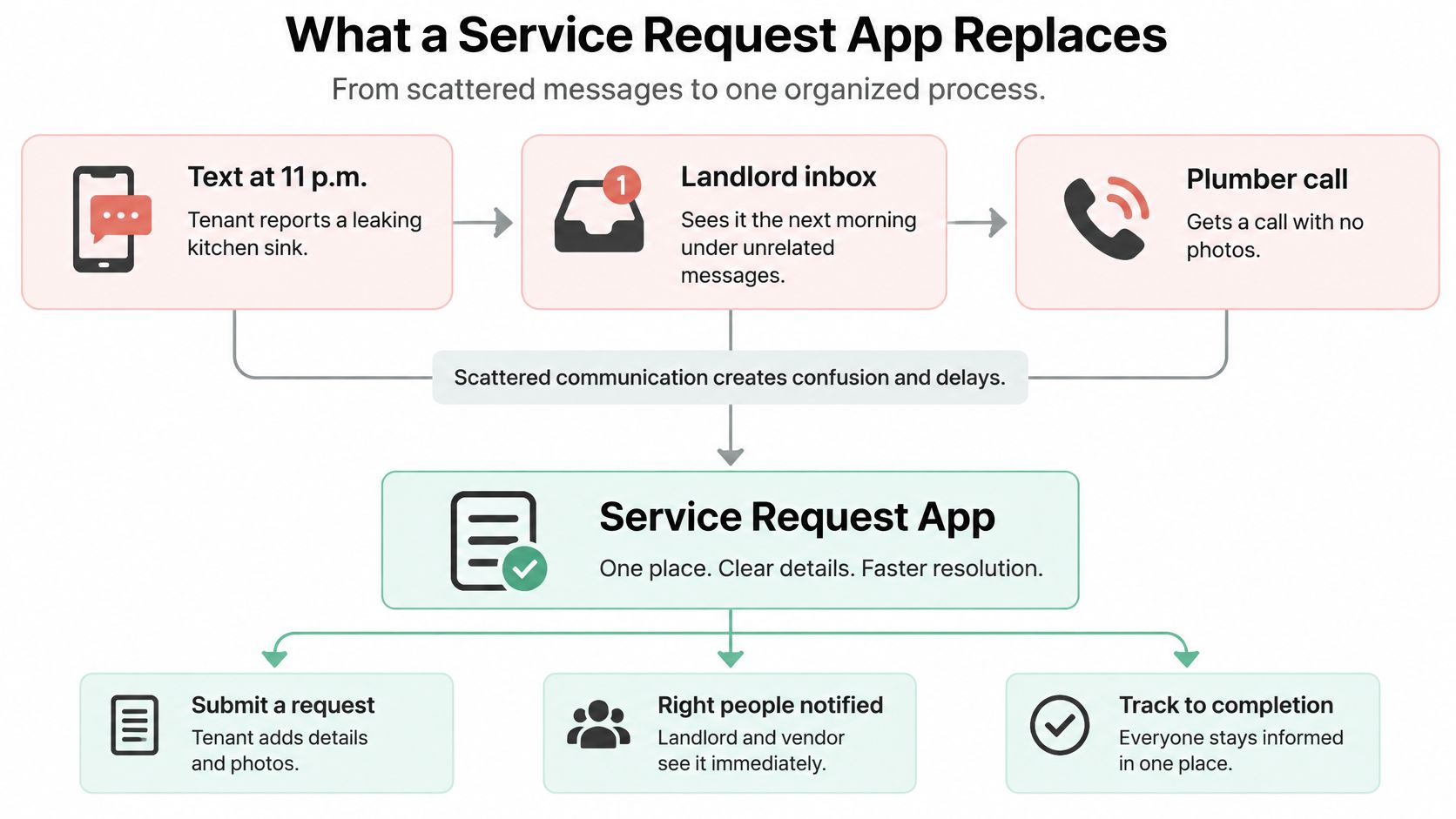
The three users have different jobs:
- Tenants describe the issue, upload photos, share access windows, and check progress.
- Landlords assess priority, assign or approve vendors, and review the completed work.
- Vendors review available jobs, quote or accept work, record completion, and invoice.
That shared record is useful even when a landlord manages only a few units. It keeps a small portfolio from depending on one person's memory of which text came in first or whether a contractor confirmed the appointment.
Practical rule: If requests arrive through several channels, or you can't say how long an open repair has been waiting, the workflow is the problem, not just the volume.
A service request app doesn't replace a direct phone call for a gas smell, flooding, or another immediate emergency. Call the appropriate emergency contact first, then record the issue in the app so the repair still has a traceable history.
Core Features Landlords and Vendors Actually Use
A useful feature list starts with what each person needs to do, not how many buttons an app can display. This table follows the work from the tenant's first report through payment and expense records.
| Feature | Used by | What it does | Why it matters |
|---|---|---|---|
| Tenant request form | Tenant | Captures description, photos, location, and access windows | Cuts back-and-forth texts before a visit |
| Category and priority tags | Landlord | Sorts issues by trade, such as plumbing, electrical, HVAC, or appliance, and sets priority | Emergencies surface first |
| Status history | Landlord and tenant | Logs every change with a timestamp | Gives proof of response |
| Vendor directory and assignment | Landlord | Assigns a known vendor or opens the job | Removes call-around time |
| Quote and job acceptance | Vendor | Lets pros quote open jobs in their service area and accept from a job list | Helps vendors control their workload |
| Photo and completion record | Vendor | Stores before-and-after photos and completion notes | Protects both sides in a dispute |
| Invoice and payment | Landlord and vendor | Creates an invoice from the job and supports card or ACH payment | Ends chasing payments |
| Expense export | Landlord | Records repair costs by property | Feeds tax filing |
Categories make the intake usable. In Hemlane's dataset, which analyzed categorized rental maintenance work orders through 2024, plumbing accounted for 25.4% of those work orders, according to Hemlane's rental maintenance request analysis. A plumbing tag can route a common repair to the right vendor faster than a generic “maintenance” label. Build categories around the trades you use, then add issue types your vendors can distinguish reliably.
If you need an example of the type of trade service a vendor category can represent, this overview of plumbing maintenance for rental properties offers context on the work a plumbing provider may handle. The app should still let you assign a trusted professional directly. In VerticalRent, maintenance requests are categorized and prioritized automatically with Platinum AI, while landlords remain in control of vendor assignment.
Before buying, compare plan limits feature by feature. One app may include invoices in its basic plan and charge for expense exports or AI triage. For a small portfolio, require intake with photos, visible status history, and a reliable way to assign a vendor first. Those three capabilities prevent the most common operational gaps; the selection criteria later in this guide can help you assess the rest.
How a Repair Moves From Report to Payment
A tenant reports a leak after work hours. The request is only the start: the landlord still needs to confirm receipt, assess priority, arrange access, and keep the tenant informed until the repair is complete. A clear maintenance work order system records those handoffs through payment.
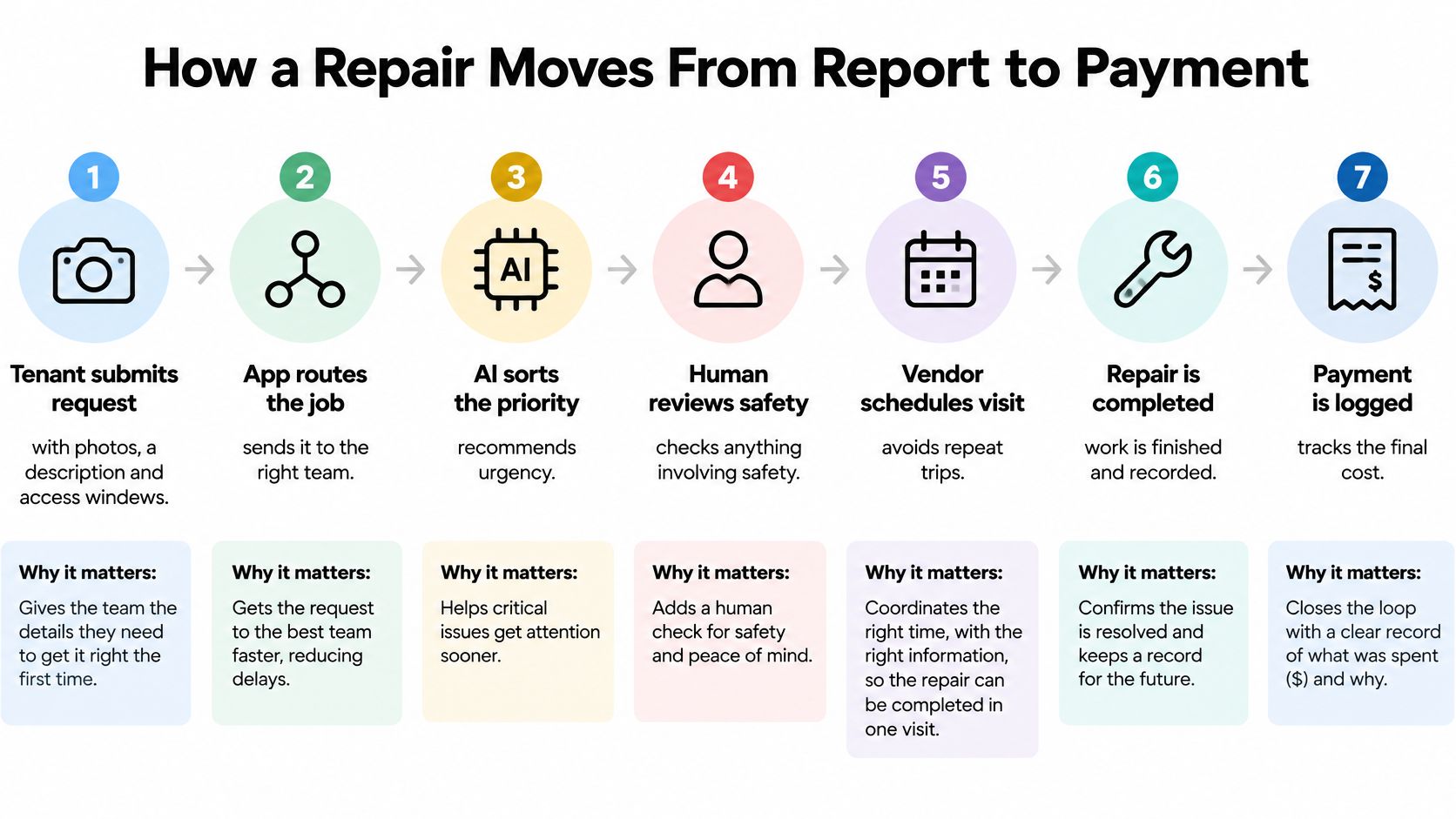
The tenant submits the request. They describe the problem, attach photos, and provide access windows. The details help the vendor prepare; missing access information can make the first visit unproductive.
The app acknowledges and timestamps it. A confirmation establishes that the report arrived and starts a measurable response clock. Make clear that submission confirmation is not an appointment.
The request is triaged. A person or AI-assisted tool can suggest a category and priority, with the reason recorded. A reported leak and a loose cabinet handle need different assessments. Human review remains important when details are unclear or the issue may be urgent.
The landlord assigns a vendor or opens the job for quotes. An open request is not an automatic dispatch. In VerticalRent, landlords can assign a vendor directly or leave the request open for service professionals to quote. Pros accept the assignment from My Jobs.
The vendor accepts and schedules the visit. The tenant needs the appointment or a clear next action. If the vendor cannot take the job, the status should show that the landlord needs to reassign it. Keep the tenant updated during that handoff, rather than leaving the request apparently stalled.
The vendor records completion. The vendor marks the job complete, uploads photos, adds notes, and sends the invoice. In VerticalRent, pros complete those steps through the platform.
The landlord pays and the tenant confirms the fix. The landlord pays by card through VerticalRent, and Stripe emails a receipt after payment for a completed job. Tenant confirmation helps show whether the repair solved the issue or needs follow-up.
Track response separately from resolution
Response time and resolution time measure different things. Response can be measured from the initial report, while resolution depends on repair complexity and outside factors. A useful status sequence is submitted → acknowledged → triaged → assigned → scheduled → resolved. Set response expectations for acknowledgment and assignment, while allowing completion time to reflect the work required. A replacement part, a second visit, or a hidden cause can extend the repair.
Record the timestamp and owner at each transition, along with elapsed time, labor time, reassignment, escalation, and tenant confirmation. These records help managers compare median and 95th-percentile acknowledgment time, time to first assignment, time to completion, and SLA-breach rate. Track where requests stall, not just the overall average. An auditable priority reason and final diagnosis also help explain how a decision was made and what work followed.
The working rule is straightforward: every step has a timestamp and an owner. Communication after submission matters just as much as intake. Tenants should know whether the request is acknowledged, awaiting a vendor, scheduled, or completed.
AI Triage Without Missing a Safety Issue
AI should recommend a category and priority; a person should decide anything involving safety. Automated routing can sort clear routine requests, but a confident-sounding classification isn't proof that an electrical or habitability risk is safe to defer.
A resident-review analysis on maintenance communication and triage reports that negative maintenance sentiment increased 6.3% year over year, with timing contributing to frustration. That makes silent downgrades especially risky: faster routing can still damage trust if tenants can't see or challenge a decision.
| Symptom | Default priority | Human check |
|---|---|---|
| Gas smell | Emergency | Call the landlord and utility immediately; never wait for triage |
| Flooding or active water leak | Emergency | Same-hour human confirmation |
| No heat in freezing weather | Emergency | Confirm whether occupants face a health risk |
| Sparking outlet or burning smell | Emergency | Human review before any dispatch |
| Tenant can't use a facility such as stairs or a bathroom | Urgent | Human review and written documentation |
| No hot water | Urgent | Check whether other units are affected |
| Single clogged toilet | Urgent or routine | Automatic routing is acceptable after photo review |
| Dripping faucet | Routine | Automatic routing is acceptable |
| Cosmetic damage | Routine | Automatic routing is acceptable |
A well-designed system can normalize the tenant's text and attachments, extract details such as appliance, symptom, location, and access constraints, then recommend a category, priority, and vendor skill with a confidence level. High-confidence routine work may be routed to a vendor group for review; low-confidence or safety-sensitive reports go to a person first. VerticalRent's AI maintenance triage does not dispatch vendors automatically.
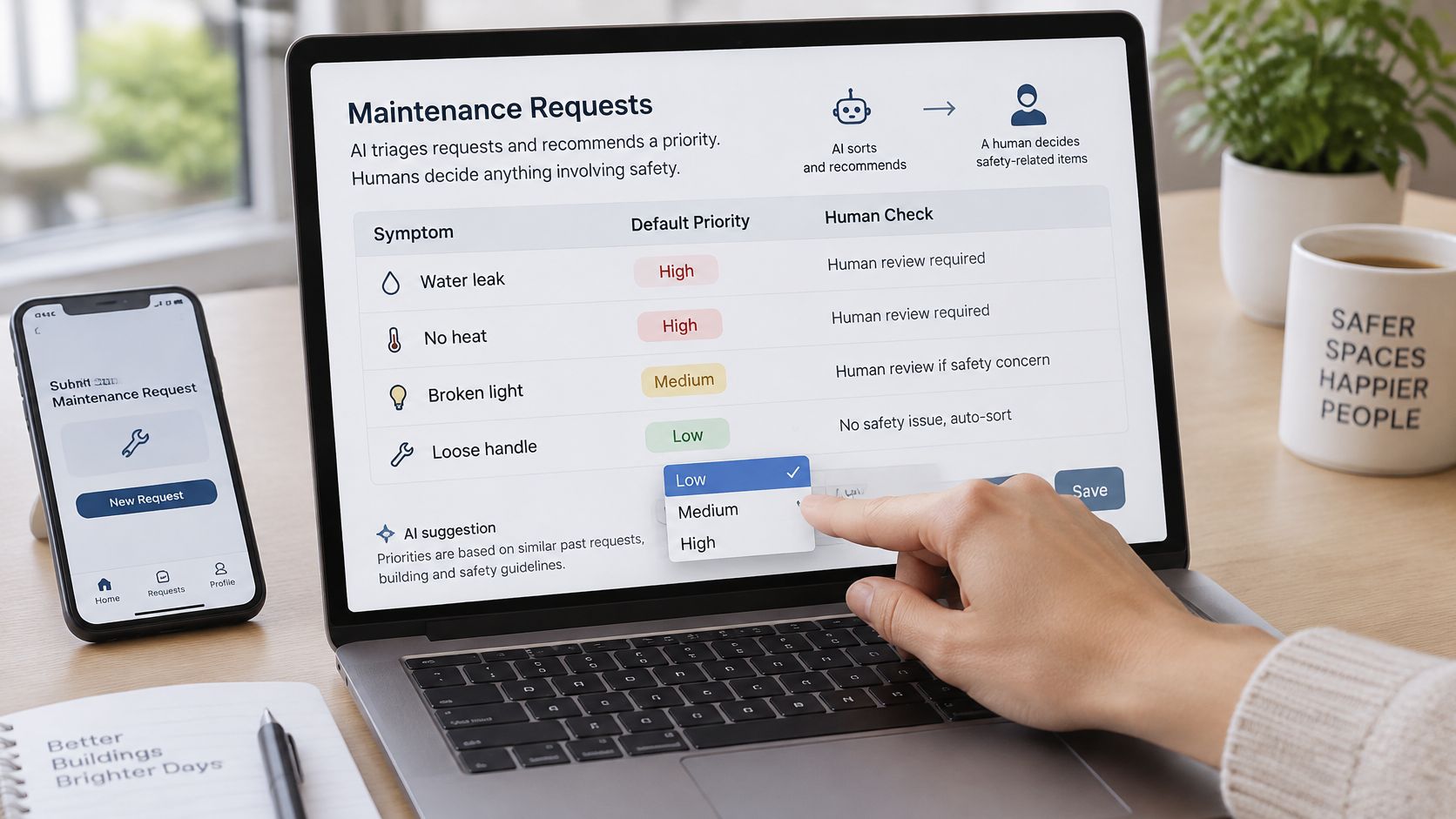
Keep the tenant's original words beside any AI summary. Ask follow-up questions about water, gas, and electrical symptoms; accept photos or video; and give tenants a way to challenge a classification. If a request is changed from emergency to routine, the history should show who changed it, when, and why.
For urgent plumbing cases, a local provider's guidance on urgent plumbing help for homeowners can help a landlord understand the kind of immediate response a plumbing emergency may call for. For a tenant who can't use a bathroom or stairs, record the date, reason, and relevant photo, then send the request for human review. The steps for handling emergency maintenance requests at 2 a.m. should also be clear to whoever is on call.
Before enabling automated routing, test it with ten past requests that include known emergencies. Confirm that each reaches a person promptly, and check that no emergency was downgraded without a visible, accountable override.
Response Times Tenants Notice Most
Tenants need more than a ticket number. They need confirmation that someone received the report, an explanation of what happens next, and an update if the repair is delayed. In a 2025 survey of landlords and tenants, only 41% of tenants said their landlord addressed maintenance issues within 48 hours, while 75% said issues were addressed within a week, according to the 2025 LRG Landlord Report. Those figures point to a practical distinction: promise timely communication, but don't promise a completion date you can't control.
The targets below are recommended defaults for independent landlords, not legal deadlines. Local habitability rules may set stricter requirements.
| Priority | Acknowledge within | Vendor assigned within | Update cadence |
|---|---|---|---|
| Emergency: gas, flooding, sparking, no heat in freezing weather | 1 hour | 2 hours | Every 2 hours until resolved |
| Urgent: no hot water, broken exterior lock, major clog | 4 hours | 24 hours | Daily |
| Routine: dripping faucet, cabinet door, cosmetic damage | 24 hours | 3 business days | At each status change |
A useful update says what happened, what happens next, the expected date, and what the tenant needs to do. Send it before a target passes, not after the tenant has to ask. If a part is delayed, give a new expected date and record the reason in the status history.
- Emergency confirmation: “We've received your report of a water leak. Please call the emergency contact now and avoid the affected area. I'm contacting a plumber and will update you within two hours.”
- Parts delay: “The vendor needs a replacement part and can't complete the repair today. The current expected visit date is Tuesday. I'll update you if the delivery date changes.”
- Awaiting tenant sign-off: “The vendor marked the repair complete and uploaded photos. Please reply to confirm the fixture works, or tell us what still needs attention.”
For time-sensitive work outside ordinary repairs, such as arranging painting help before an important event, clear expectations matter just as much: state the scope and the next confirmed step rather than leaving the tenant to guess.
Every open request needs a visible next action and a date.
Selection Criteria for Choosing an App
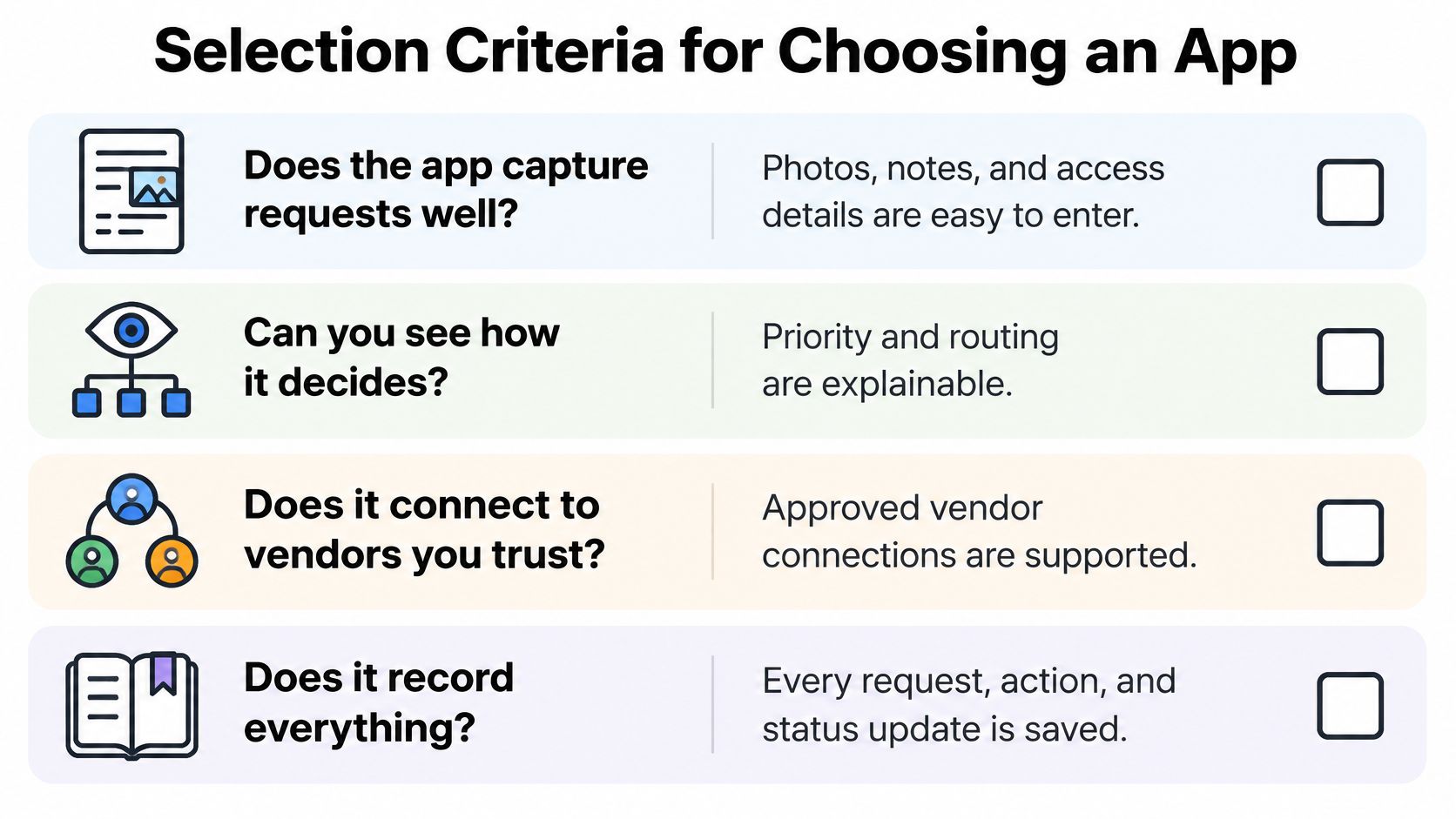
Judge an app with four questions: Does it capture requests well? Can you see how it decides? Does it connect to vendors you trust? Does it record everything? A polished dashboard won't compensate for a missing tenant photo, an untraceable priority change, or a vendor handoff that lives in a separate text thread.
| Criterion | What good looks like | Red flag |
|---|---|---|
| Tenant intake | Photos, access windows, and guided fields | Single free-text box only |
| Triage transparency | Stored priority reason and a human override | Priority changes with no record |
| Vendor network | Verified profiles with license and insurance details | Anyone can accept a job with no checks |
| Status history | Timestamp and owner for every change | Status shows only open or closed |
| Costs and fees | Clear plan limits and per-job fee disclosed | Fees appear only at checkout |
| Records and exports | Expense export by property and monthly report | No export, or data locked in |
| AI evaluation | Per-category accuracy and emergency false-negative rate | Only a single overall accuracy claim |
Costs need a close look. Some apps put intake and vendor profiles in the free plan but charge for AI triage or exports. VerticalRent's free Service Pro plan includes a profile, quotes, jobs, invoices, and payouts; Service Pros pay a 3% platform fee on each completed job. For landlord workflows, check which features are included in the plan you're considering and whether a vendor's fee affects your costs.
When reviewing AI categorization, ask for macro-F1 by category, confusion matrices, emergency false-negative rates, and confidence calibration, not just an overall accuracy claim. Macro-F1 scores every category equally, so a rare but dangerous class, such as gas odor, can't disappear inside a strong overall score. The enterprise ticket-routing research describes natural-language processing used to route more than one million live client tickets annually across 67 support missions. The useful lesson for property maintenance isn't to automate every decision. It's to test whether classification improves routing without missing high-severity cases.
Also test integrations before committing. Confirm whether the app exports to your accounting software, sends tenant updates by text and email, and syncs vendor calendars. Manual re-entry erases much of the time saved by centralizing requests. This guide to vendor management best practices can help you consider how the app fits your existing contractor relationships.
Score each criterion from one to three based on your portfolio, then eliminate any app that fails a must-have. For a landlord managing a small number of units, require a timestamped history, a tenant-visible status view, and a human override for every priority.
Launch Your Request Workflow in 30 Days
A short rollout lets you catch missing categories and unclear handoffs before every tenant depends on the new process. Use one property as a pilot, keep emergency contacts accessible, and check the records before moving the rest of the portfolio.
Week one: Map your repair work. List your properties, the trades you use, and your last twenty repairs. Build categories from those actual jobs, such as plumbing, electrical, HVAC, or appliances, rather than importing a generic list that doesn't match your vendors.
Week two: Choose the app and invite trusted vendors. Start with contractors you already use, so the first assignments have familiar contacts. In VerticalRent, a landlord can invite a trusted service pro, who creates a free profile and can then be assigned from a maintenance request.
Week three: Set priorities and messages. Configure emergency, urgent, and routine rules, then write an emergency confirmation and a parts-delay update in your own voice. Make sure the tenant can see the request status and the next expected update.
Week four: Test one property. Submit three requests yourself, including one simulated emergency. Check that the right person receives each alert and that every status change has an owner and timestamp before you roll out to the rest of your units.
Keep the operating basics visible after launch:
- Post emergency contacts for gas and flooding in each unit, and keep them there.
- Export records monthly so repair history and costs remain accessible.
- Review resolution times monthly to find delays between report, assignment, and completion.
- Keep vendor license and insurance details on file for the professionals you use.
Choose the repair workflow that generates the most calls and start there this month; move the rest of the portfolio only after the pilot passes.
VerticalRent brings tenant maintenance requests, AI-assisted triage, vendor assignment, status tracking, and repair records into one rental-management platform. If you're ready to replace scattered repair messages with a workflow tenants and vendors can follow, visit VerticalRent and explore how its tools fit your properties.
Put this into practice
VerticalRent tools related to this guide
Legal Disclaimer
VerticalRent and its authors are not attorneys, CPAs, or licensed legal or financial advisors, and nothing on this site constitutes legal, tax, or professional advice. The information in this article is provided for general educational purposes only. Landlord-tenant laws, eviction procedures, security deposit rules, and tax regulations vary significantly by state, county, and municipality — and change frequently. Nothing on this site creates an attorney-client relationship. Always consult a licensed attorney or qualified professional in your jurisdiction before taking any action based on information you read here.
Co-founded VerticalRent in 2011, growing it from nothing to 100k landlords and renters. Sold it in 2019, then re-acquired it in 2026 to make it better than ever.


