Preventive Maintenance Scheduling Software for 2026
Discover how preventive maintenance scheduling software helps small landlords reduce costs, track tasks, and extend property life.


If you own a few rentals, you already know the pattern. Nothing happens for two days, then everything shows up at once. A tenant says the bathroom fan is loud. Another says the back stair light is out. You remember, too late, that the furnace filter change was supposed to happen weeks ago.
That's the reason small landlords need preventive maintenance scheduling software. Not because you want to run a miniature facilities department. Because you need one place to hold recurring tasks, incoming requests, vendor notes, and proof that the work got done.
The category has gotten a lot bigger, which tells you this isn't some niche tool anymore. The global preventive maintenance software market was estimated at USD 2.2 billion in 2025 and is projected to reach USD 10.9 billion by 2035, with North America holding 36.2% of the market and the U.S. estimated at USD 0.75 billion in 2025 according to Market.us preventive maintenance software market data. For small landlords, that matters for one reason. You now have more lightweight options than you did a few years ago.
The Sunday Night Maintenance Pile-Up Every Small Landlord Knows
It's Sunday, a little after 9 p.m. You're at the kitchen table with your regular job still in your head, and your phone lights up three times in six minutes.
Unit B says the boiler is dripping again. Unit D wants to know when someone is coming to check the bathroom leak from last week. Then you see the sticky note you left yourself about the furnace filter that was supposed to be changed in October.
That's how maintenance falls apart in a 1 to 10 unit portfolio. Not because you don't care. Because the whole system lives in your head, in text messages, in old emails, and on scraps of paper that only make sense until life gets busy.
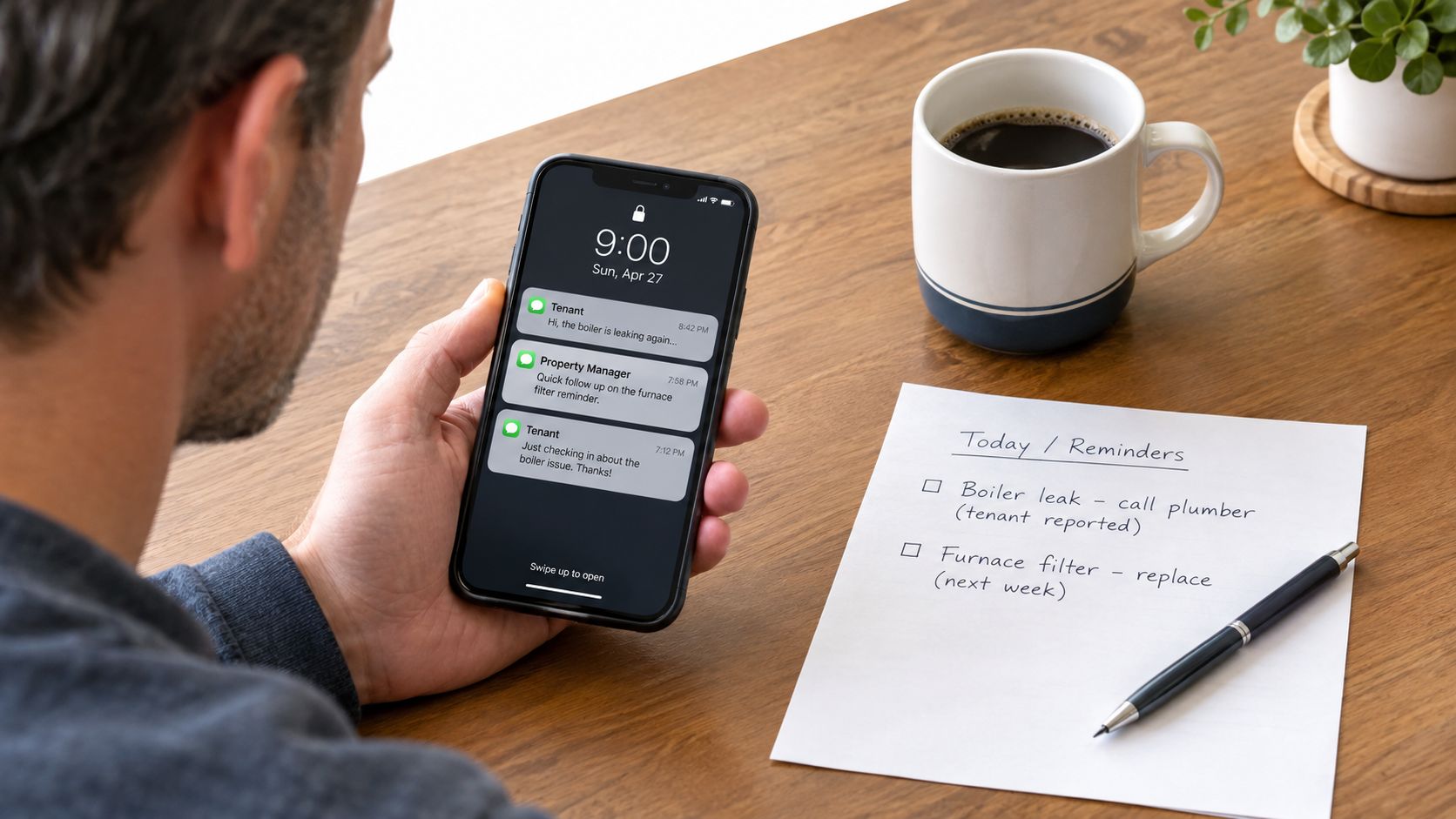
A small landlord doesn't have a maintenance coordinator. You are the coordinator. You're also the leasing person, bookkeeper, collections department, and emergency line.
That's why paper systems fail. Requests get buried, recurring jobs get missed, and emergency calls eat the whole week. If that sounds familiar, read VerticalRent's take on why paper maintenance request tracking systems always fail. It's the same story in almost every small portfolio.
What the software fixes first
The best preventive maintenance scheduling software does three simple things right away:
- Queues recurring work: furnace filters, smoke detector checks, gutter cleaning, water heater flushing
- Centralizes incoming requests: one inbox instead of text chains and voicemail
- Shortens vendor handoff: you send one clear work order instead of making three calls
Practical rule: If a task happens more than once a year, it should never live only in your memory.
Most landlords don't need a huge CMMS rollout. They need a clean weekly system that stops preventable issues from becoming expensive nights and awkward tenant messages.
What Preventive Maintenance Scheduling Software Actually Does
Preventive maintenance scheduling software is a digital task and workflow system for maintenance that repeats. That's the plain-English version.
You load your units, major systems, and recurring jobs. The software creates due tasks, sends reminders, logs completion, and keeps a record tied to the property or unit. It also catches the other side of the work, tenant requests and vendor coordination, so you're not running two separate systems.
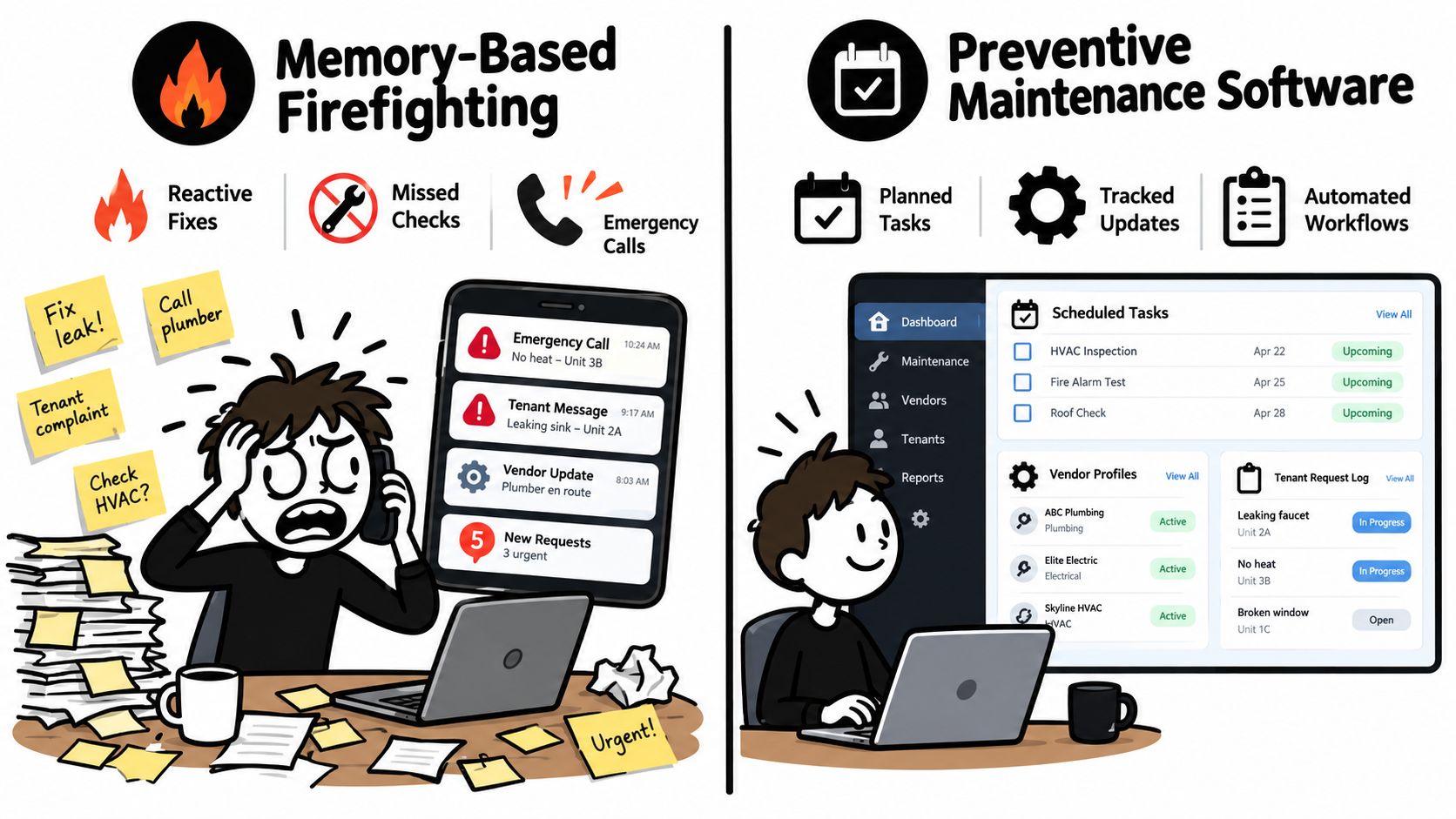
Preventive is different from reactive
Reactive maintenance means you wait for something to fail, then deal with it under pressure. That works fine until it doesn't. In a small rental portfolio, reactive maintenance usually means after-hours calls, rushed vendor scheduling, tenant frustration, and sloppy documentation.
Preventive maintenance is simpler. You decide that certain things happen on a schedule or by use. Examples:
- Every six months: HVAC service
- Quarterly: smoke detector testing
- Twice a year: gutter cleaning
- Before winter: exterior checks and weather sealing
That's the practical bridge between chaos and control.
Why schedules matter more than reminders
A lot of landlords think a calendar app is enough. It isn't. A reminder tells you something is due. A real system tells you what's due, who handles it, what happened last time, what photos were uploaded, and whether the vendor closed the job.
For owners who want the broader category explained, this guide on what CMMS maintenance software is is worth reading. For scheduling workflow itself, OnRoute's write-up on field service scheduling best practices is useful because it covers the basic dispatch habits that stop jobs from bouncing around all day.
A technical point matters here. Better maintenance schedules don't come from blasting out fixed recurring work orders forever. They improve when the schedule matches real conditions, history, and low-impact timing. A peer-reviewed manufacturing study showed better results when maintenance was scheduled during opportunistic windows using historical data and optimization logic, reducing personnel required while still completing tasks, as described in this peer-reviewed scheduling study. You don't need factory-grade software to use that lesson. You just need to stop treating every task like it should happen on the same rigid date forever.
Must-Have Features for a 1-10 Unit Portfolio
A small landlord should buy for time saved per week, not feature count. If a tool looks impressive in a sales demo but adds clicks to simple jobs, skip it.
The six features that actually matter
| Feature | Why It Matters at 1-10 Units | Watch Out For |
|---|---|---|
| Recurring task automation | Keeps seasonal and repeated work from living in your memory | Calendar-only setups that can't handle seasonal changes |
| Tenant-triggered work orders | Gets requests into one system fast | Portals that are too clunky for tenants to use |
| Automated reminders | Cuts no-shows and back-and-forth with tenants and vendors | Reminder settings that fire too early or too often |
| Vendor dispatch tools | Lets you send a job with notes, access info, and photos | Systems that assume you have an in-house maintenance team |
| Weekly reporting | Shows overdue work and spending trends without spreadsheets | Dashboards built for enterprise teams, not owner-operators |
| Mobile access with photos | Lets you close loops from the driveway, basement, or supply aisle | Desktop-first systems with weak mobile workflow |
What each feature should do in real life
Recurring task automation should let you set work by month, season, or lease event. Spring exterior checks and fall HVAC service should be easy to build once and leave alone.
Tenant-triggered work orders matter because renters won't behave like maintenance staff. They need a simple link, text flow, or form. If your software expects tenants to learn a complicated portal, requests will go back to text messages.
Automated reminders need to go to both sides. The tenant should get the visit window. The vendor should get the address, unit, lockbox or entry instructions, and your cutoff for confirming.
A tool that reminds only you isn't enough. The whole point is reducing the number of follow-up messages you have to send manually.
Vendor dispatch should support a preferred list. You want your plumber, HVAC tech, appliance person, and handyman already loaded with phone, email, service area, insurance notes, and job history.
Reporting doesn't need to be fancy. For a small portfolio, one weekly glance should show overdue tasks, repeat issues by unit, spend trends, and open jobs waiting on someone else.
Mobile access is a must. A lot of inspections happen while standing in a wet basement or next to an outdoor condenser. You need photos, notes, and task completion from your phone.
One practical option in this category is VerticalRent, which includes tenant-submitted maintenance requests, AI triage, recurring maintenance events, vendor assignment, and job closure requirements like photos and invoices. That setup fits small landlords better than industrial systems that assume a full maintenance department.
Step-by-Step Setup Template for Your First 30 Days
Most landlords overbuild this part. Don't.
Your first month should create a working system, not a perfect one. Start with the units, the major equipment, your repeat jobs, and your core vendors. Everything else can wait.
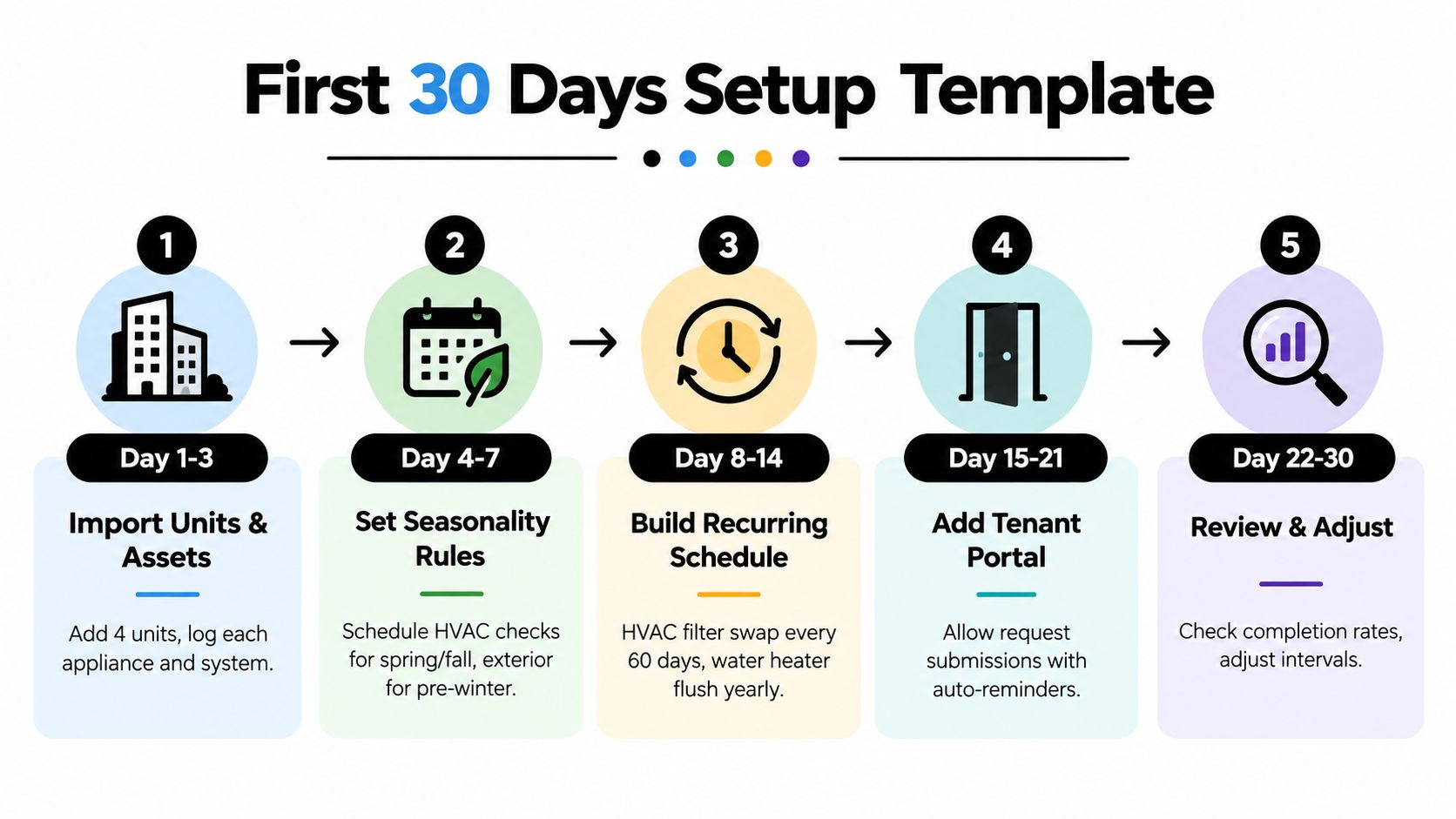
Days 1 through 7
Import units and contacts
Add each unit, tenant contact, lease dates, and basic property notes.Create a short asset list
Don't catalog every hinge. Start with HVAC, water heater, refrigerator, range, smoke detectors, plumbing shutoffs, and exterior systems you maintain.Set seasonality rules
Add spring, summer, fall, and pre-winter jobs. This matters more than people think because seasonal tasks are the first ones landlords forget.
Days 8 through 14
Build your starter recurring schedule. Keep it short and useful:
- HVAC filter swap
- Smoke detector test
- Gutter clean
- Water heater flush
- Dryer vent clear
If a tool supports meter-based or usage-based schedules, great. If not, calendar-based is still good enough for most small portfolios. The main thing is getting out of memory mode.
Here's a technical point worth knowing. Static intervals aren't always the best intervals. A reliability-based maintenance model showed that the best preventive timing changes based on failure patterns and the cost gap between planned replacement and breakdown replacement, which is why asset-specific intervals beat one-size-fits-all schedules in stronger systems, as discussed in this reliability-based interval optimization study.
Days 15 through 30
Add vendor categories next. You want at least:
- Plumber
- HVAC
- Electrician
- Handyman
- Appliance repair
Then manually load the first week of tasks and watch what happens. You catch bad cadence, bad reminder timing, and missing notes.
A simple first-month flow looks like this:
- Day 15: activate tenant request intake
- Day 18: test a mock work order from your own phone
- Day 21: dispatch one real or test vendor job
- Day 25: review overdue tasks and adjust lead times
- Day 30: tighten frequencies based on actual completions
This video is a decent visual walkthrough before you start clicking around in software.
Don't set every recurring task too early. You'll create alert fatigue for yourself and your vendors, then ignore the system you just paid for.
The other common mistake is missing lead-time buffers. If a job needs tenant notice and vendor confirmation, don't make the task due on the same day you first see it.
KPIs and ROI Examples That Justify the Subscription
You don't need a fancy dashboard to judge whether preventive maintenance scheduling software is paying off. Track five things and you'll know quickly whether the tool is useful or just another login.
The only KPIs most small landlords need
Preventive completion rate
Are your recurring jobs getting finished?Mean time to vendor dispatch
How fast do you move from request to assignment?Emergency-to-preventive ratio
Are you reducing panic jobs over time?Tenant satisfaction trend
Are complaints about delays and missed follow-ups dropping?Cost per maintained unit
Are you spending in a way that feels predictable instead of random?
Simple ROI math that's honest
A lot of software sales pages try to prove ROI with inflated drama. Skip that. Use your own incident history.
Here's the spreadsheet logic I recommend:
Annual software cost + setup time cost versus avoidable emergency repairs + admin hours saved + fewer duplicate vendor visits
If you avoid even one ugly maintenance surprise, the subscription often makes sense. Not because the software is magic. Because it stops basic misses.
| Scenario | Skipped Task Cost | Software Annual Cost | Net Savings |
|---|---|---|---|
| Missed HVAC service leads to larger repair | Higher than planned service visit | Annual subscription | Positive if one major avoidable repair is prevented |
| Ignored water heater maintenance shortens usable life | Earlier replacement and emergency coordination | Annual subscription | Positive if replacement timing improves |
| Deferred dryer vent cleaning turns into bigger repair | Repair cost plus tenant disruption | Annual subscription | Positive if recurring safety tasks stop slipping |
I'm being blunt on purpose. If you own four or six units, you don't need a mathematically perfect ROI model. You need a believable answer to one question. Does this tool prevent enough forgotten work to save me time and at least one expensive mistake?
For most small landlords, that's the right threshold.
How AI Triage and Vendor Dispatch Fit Into Your Workflow
AI can help here. It just shouldn't take the wheel on day one.
A smart workflow starts when a tenant submits a request. The software reads the message, tags the issue, suggests urgency, pulls up the likely vendor type, and drafts the dispatch note. That's useful. It cuts admin time without removing your judgment.
Where AI earns its keep
The practical value is in the middle of the process:
- Categorizing requests: leak, appliance, electrical, access issue
- Ranking urgency: now, today, this week
- Suggesting vendors: based on prior jobs or trade type
- Drafting messages: issue summary, address, entry notes, photo attachments
If you want a more detailed look at this workflow, VerticalRent has a helpful piece on AI maintenance triage for landlords trying to stop being on call around the clock.
Where you still need a human
Don't let software fully auto-dispatch unless your process is already tight and repetitive.
You still need to decide things like:
- Permission to enter: has the tenant approved access?
- Pets on site: will a vendor walk into a loose dog situation?
- Tenant sensitivity: is this a technical issue or a relationship issue?
- True emergency status: a ceiling stain and an active leak are not the same thing
Let the software route and draft. Keep the send button in your hand until the pattern is proven.
That approval-gated model is the right fit for small landlords. Full automation sounds slick, but one bad dispatch at the wrong hour will wipe out the convenience fast.
Migration Paths, Pricing, and Cost Trade-Offs
Most landlords switch from one of three systems. A spreadsheet. A notes app. Or a messy stack of old invoices and text threads.
The move doesn't need to be dramatic. It just needs to be controlled.
Three migration paths that work
| Tier | Per-Unit Cost | Setup Fee | Tenant Portal | AI Dispatch Add-On | Best For |
|---|---|---|---|---|---|
| Basic | Lower end of typical small-landlord pricing | Often none | Sometimes included, sometimes extra | Usually not included | Owners replacing reminders and paper notes |
| Standard | Mid-range per-unit pricing | May include light onboarding | Often included | Sometimes optional | Owners who want tenant intake plus vendor coordination |
| Premium small-portfolio tier | Higher end of normal small-landlord pricing | May include setup help | Usually included | Often available | Owners who want automation and tighter workflows |
Use one of these rollout styles:
Full switch in one weekend
Best if your portfolio is tiny and your current records are clean.Phased migration
Move active tenants first, then fold in vacant units and lease renewals.Parallel run for a short period
Keep the old reminders as backup while the new system proves itself.
What small landlords should expect to pay
The small-landlord market is still uneven. Some tools charge by user, which is usually dumb for owner-operators. Some charge by unit, which makes more sense. Some hide basic features behind add-ons.
For this segment, a reasonable expectation is:
- Per-unit pricing: about $3 to $8 per unit per month
- Setup fees: about $0 to $150
- Tenant portal add-on: about $5 to $10 per month
- AI dispatch add-on: about $20 to $40 per month
A practical all-in expectation for a small portfolio is $25 to $80 per month. If a vendor pushes you above $15 per unit, I'd treat that as a red flag unless the software is replacing several other paid tools at once.
The hidden costs owners forget
The cash price isn't the only cost.
You'll also spend:
- Initial setup time: often 4 to 6 hours
- Vendor onboarding effort: getting your core trades into the system
- One awkward transition month: old reminders and new reminders both firing
That's normal. Budget for it and move on.
Your First-Week Checklist and What to Skip
You can do the bones of this in five days if you stop trying to build a perfect operating system.
Day 1, import units and tenant contacts. Day 2, set lease start dates and add your first recurring jobs. Day 3, load your trusted vendors and note their response windows. Day 4, turn on tenant request intake and test it yourself. Day 5, schedule the next chunk of preventive work and make sure reminders fire the way you expect.
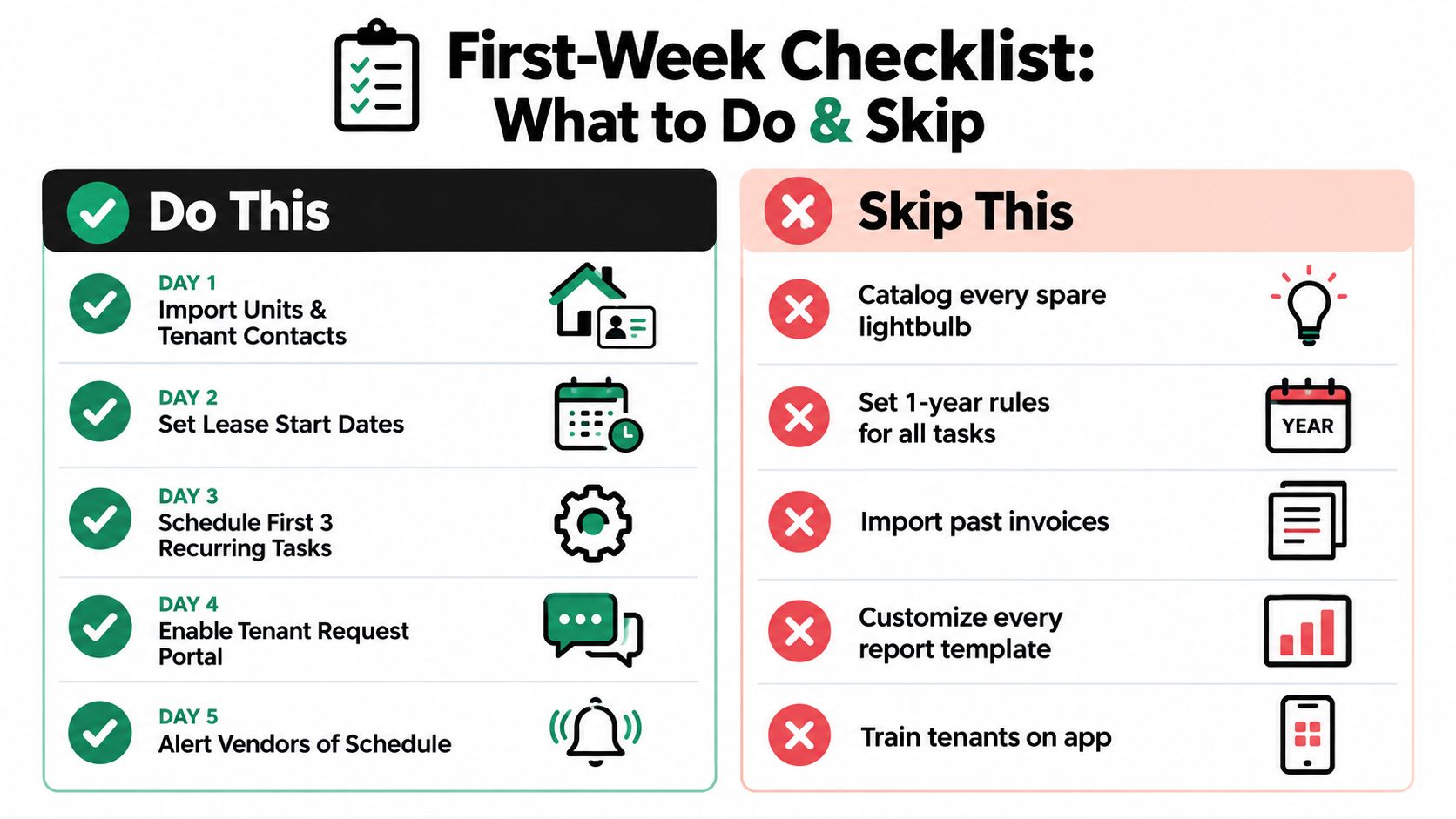
Do this before Friday
- Import the basics: units, tenant contacts, and lease dates
- Build a short recurring task library: HVAC filter, smoke detector battery, gutter clean, water heater flush, dryer vent clear
- Add only core vendors: start with two or three people you already trust
- Test the tenant intake flow: use your own phone and submit a mock issue
- Schedule the next 90 days: enough runway to prove the system works
Skip this nonsense
- Don't customize work order templates for hours
- Don't enable multi-property hierarchies you won't use
- Don't pay for inspection modules on day one
- Don't import years of old invoices
- Don't catalog tiny items that never drive a maintenance decision
One last reality check. Industry adoption is still uneven. Earlier survey data showed broad preventive maintenance use but also widespread run-to-failure habits, and a 2025 survey of 1,320 U.S. and Canadian professionals found predictive maintenance use at about 27%, down from 30% in 2024, according to this roundup of maintenance adoption rates. That tells you something useful. Most owners and operators are still figuring this out. You do not need a perfect system. You need one that gets used every week.
The market is also moving beyond basic recurring calendars toward condition-based scheduling. Neutral reporting says predictive maintenance is the fastest-growing application segment, projected at 13.6% CAGR from 2026 to 2034, and it also notes that industrial IoT sensor costs have reportedly fallen 70% since 2020, according to DataIntelo market reporting on maintenance scheduling software. For a 1 to 10 unit landlord, that doesn't mean you should rush to buy sensors for everything. It means you should choose software that can stay simple now and get smarter later.
Small landlords should also pay attention to mobile adoption and rollout maturity. One industry analysis says more than 60% of maintenance work orders are now created, managed, and closed on mobile devices in manufacturing and utilities, and another says over 80% of maintenance work is expected to be logged on mobile devices by 2026. The same maturity report says nearly 30% of organizations still rely on breakdown repairs, 28% use static Excel schedules, and only one in five has fully automated preventive maintenance driven by equipment usage or runtime data, based on this CMMS market trends and predictions analysis. The takeaway is simple. Keep your setup mobile, basic, and usable. Fancy software nobody opens is dead weight.
VerticalRent gives independent landlords one place to handle recurring maintenance, tenant-submitted requests, AI triage, vendor dispatch, and job documentation without dragging you into enterprise complexity. If you want a simpler maintenance workflow that fits a small portfolio, take a look at VerticalRent and see whether it matches how you run your rentals.
Put this into practice
VerticalRent tools related to this guide
Legal Disclaimer
VerticalRent and its authors are not attorneys, CPAs, or licensed legal or financial advisors, and nothing on this site constitutes legal, tax, or professional advice. The information in this article is provided for general educational purposes only. Landlord-tenant laws, eviction procedures, security deposit rules, and tax regulations vary significantly by state, county, and municipality — and change frequently. Nothing on this site creates an attorney-client relationship. Always consult a licensed attorney or qualified professional in your jurisdiction before taking any action based on information you read here.
Co-founded VerticalRent in 2011, growing it from nothing to 100k landlords and renters. Sold it in 2019, then re-acquired it in 2026 to make it better than ever.


