7 Rent Ledger Examples for Landlords
Explore 7 rent ledger examples, from simple leases to deposits and late fees, plus reconciliation tips and Schedule E reporting guidance.


You've collected rent, but the bank statement doesn't tell the whole story. A tenant may have paid part of the month's charge, added a late fee, sent a security deposit, or received a credit for an earlier overpayment. If those entries sit together without clear labels, you'll have to reconstruct what happened when you reconcile the account, answer a tenant's question, or prepare year-end records.
A useful rent ledger separates charges, payments, credits, deposits, fees, and balances. It records dates and payment methods consistently, shows which period each payment covers, and gives you a traceable record from the tenant transaction to the bank activity. The IRS says rental real estate income and expenses are reported on Schedule E and requires taxpayers to keep records supporting those entries, which makes consistent, property-level bookkeeping important for landlords (IRS Schedule E guidance).
The seven rent ledger examples below connect each structure to a practical workflow, from basic rent collection and prorated move-ins to late fees, deposits, communication records, reconciliation, and portfolio reporting. Start with the simplest format that reflects your actual transactions. Tax treatment, security-deposit handling, notice requirements, and late-fee rules still need review against qualified professional advice and applicable state or local requirements.
1. Basic Monthly Rent Ledger Template
A basic ledger works well when you manage a small number of units and most payments arrive in full and on schedule. Its purpose is simple: show what the tenant owed, what the tenant paid, when the payment arrived, and what remains outstanding.
Use one ledger for each tenant and property. A practical spreadsheet might include these columns:
- Tenant and property: Identify the person, unit, and property address.
- Charge date: Record when the rent or other charge became due.
- Rent due: Enter the full scheduled rent charge.
- Date received: Record when the money reached your account.
- Amount received: Enter the payment amount, including partial payments on separate lines.
- Payment method: Note ACH, card, check, cash, or another method.
- Running balance: Show whether the account is paid, in arrears, or in credit.
- Notes: Document returned payments, tenant messages, or an agreed payment arrangement.
A tenant-level ledger is different from a bank feed. The bank may show that money arrived, but the ledger should explain which rent charge that money satisfied. Independent bookkeeping guidance recommends updating the record after each transaction and reconciling it monthly to bank deposits so discrepancies are found within the same billing cycle (rent payment tracking guidance).
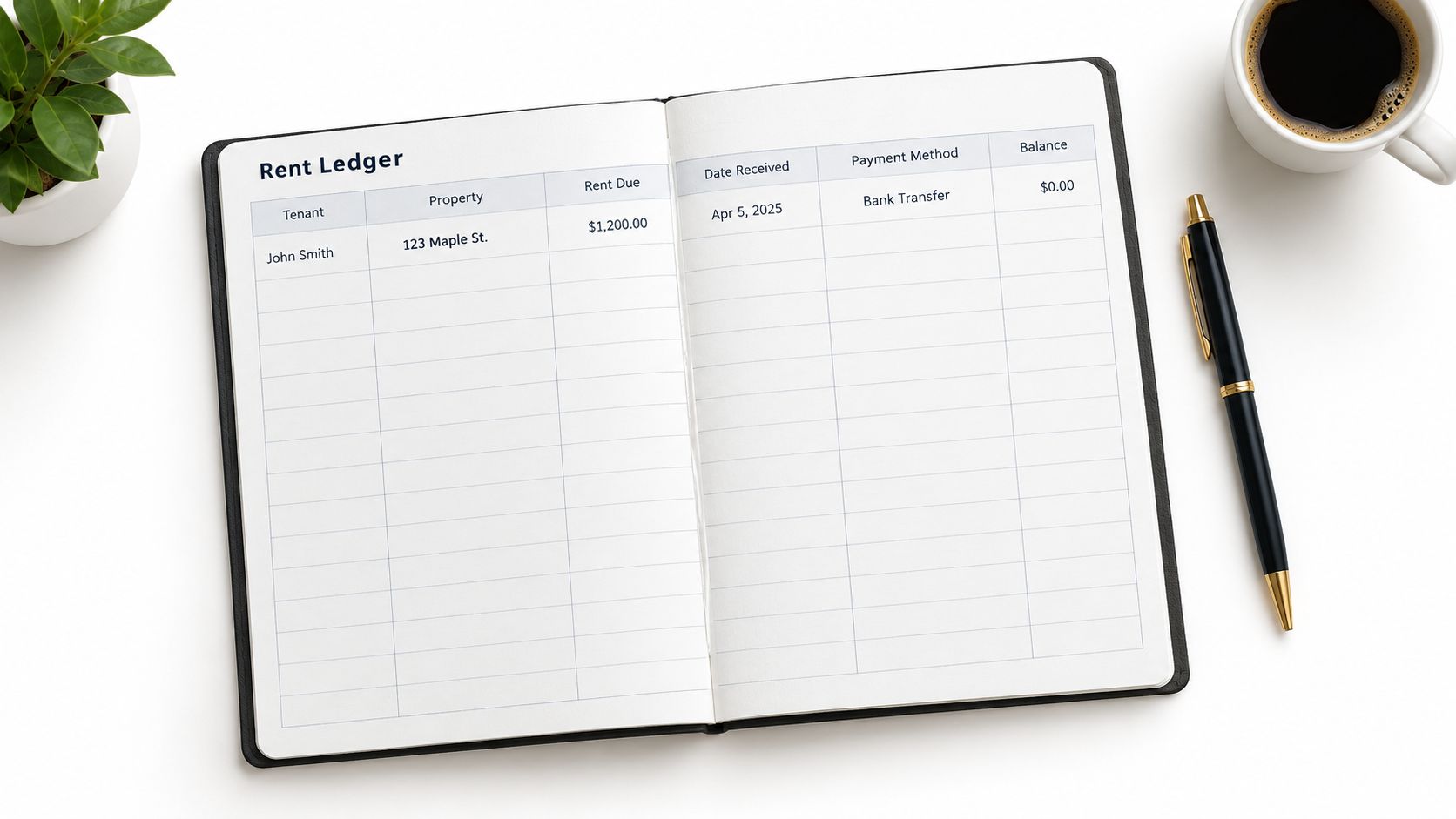
Annotated example
Suppose the monthly charge is entered on the first day of the rental period. The tenant pays part of it on the due date and the remainder later. Don't overwrite the original charge or replace it with the final payment. Keep the charge and each payment visible, then let the balance show what remains after every entry.
That structure helps you answer basic questions quickly. Was the rent paid in full? Which date did the money arrive? Did a payment cover the current period or an earlier balance? For a spreadsheet workflow, conditional formatting can flag unpaid balances, while a notes column preserves context that formulas can't provide.
Landlords using VerticalRent can review its tenant ledger explanation alongside a digital workflow that records payments collected through the platform. Whether you use Excel, Google Sheets, or software, back up the file and preserve the receipts, invoices, and payment confirmations supporting the entries.
2. Multi-Property Rent Ledger with Expense Tracking
A tenant ledger tells you what happened in one account. A property ledger tells you how a rental property performed after income and expenses are grouped together. That distinction becomes important as soon as you manage multiple units, because one combined list can make it difficult to identify which property produced an income entry or incurred a repair cost.
A workable spreadsheet setup uses a portfolio summary plus a separate tab for each property. Each property tab can contain rent charges, payments, late fees, owner contributions, maintenance, utilities, insurance, taxes, and other properly categorized transactions. Keep the tenant-level payment history intact, then summarize it by property rather than replacing the detailed record.
Practical rule: Every expense should be traceable to a property, a date, a vendor, and supporting documentation.
The IRS says landlords generally report rental real estate income and expenses on Schedule E, Part I. Its instructions also identify depreciation as a rental expense category supported by calculations from Form 4562, so a rent ledger that expands into property accounting needs clear categories and supporting records (IRS rental real estate recordkeeping guidance).
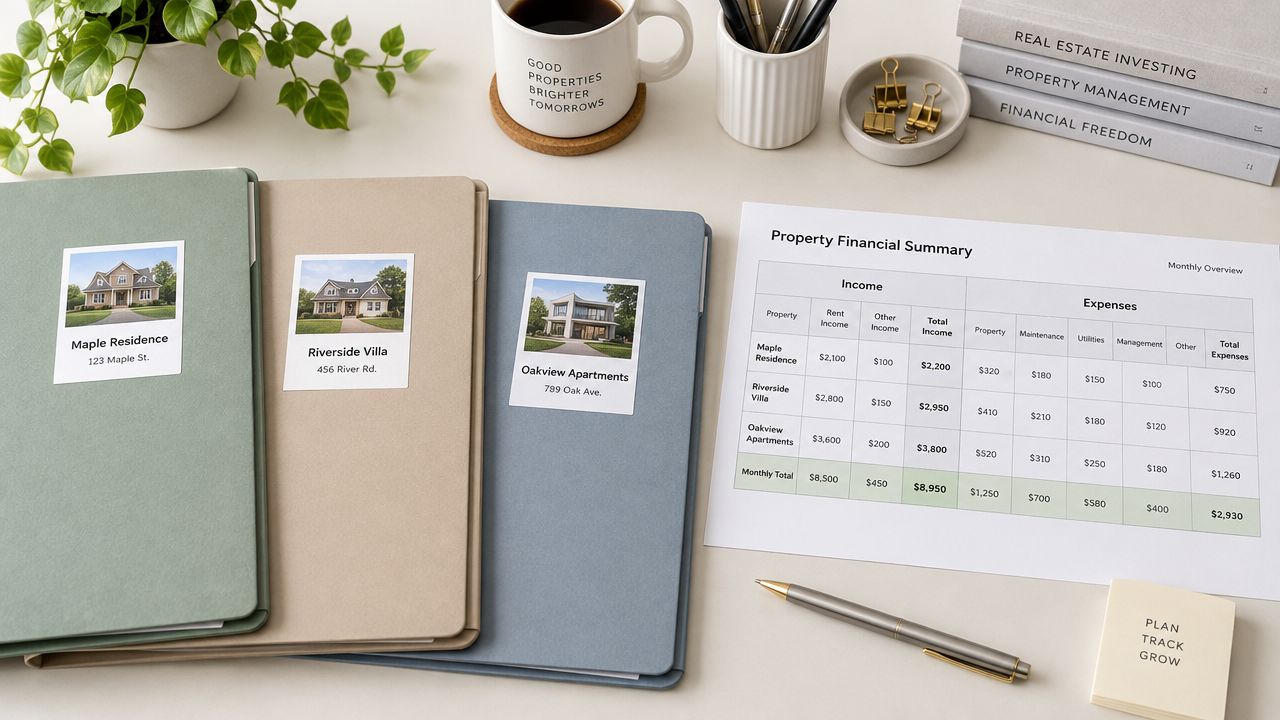
Example structure
For a maintenance payment, record the property, vendor, invoice date, payment date, amount, category, and reference to the stored invoice. For rent, preserve the tenant, unit, charge period, payment method, and payment date. The portfolio summary can then total rental income and expenses without losing the transaction detail needed to investigate an exception.
Use formulas to total each category, but review the results manually. A formula can add entries accurately while still including a transaction assigned to the wrong property. Monthly reconciliation, organized receipts, and property-specific folders reduce that risk.
VerticalRent's income and expense ledger overview describes a per-property record that can connect collected rent and expenses with year-end reporting. If you use a platform, check how it handles transfers, shared expenses, reimbursements, and corrections before relying on its summary reports.
3. Rent Ledger with Late Fee and Payment Plan Tracking
Late payments require more than a single “late” label. Your ledger should show the original rent charge, the date the payment was due, the date money arrived, the late-fee assessment, any waiver, and the balance carried forward. If the tenant pays through an arrangement, each installment should appear as its own transaction.
Start by separating policy, assessment, payment, and communication. The lease should state the due date, any grace period, and the circumstances under which a fee may apply. The ledger should then show what you assessed under that policy. A separate notes field can record when you notified the tenant, whether the tenant requested an accommodation, and whether you waived or adjusted a fee.
A mixed-payment example
Assume a tenant owes the regular monthly rent but sends only part of the amount. Record the full charge first. Apply the payment according to the lease and applicable law, then carry the unpaid portion into the balance column. If a late fee is validly assessed, post it as a separate charge rather than adding it invisibly to the rent line.
A later installment should not erase the earlier history. It should reduce the outstanding balance and include the payment date, method, and allocation. This creates a chronological record that can support a conversation, an arrears notice, or a formal proceeding, although the legal sufficiency of any record depends on the jurisdiction and circumstances.
- Fee status: Show assessed, paid, waived, reversed, or disputed.
- Plan terms: Record each agreed installment and due date.
- Notice history: Link reminders and written notices to the relevant ledger entry.
- Exception notes: Explain returned payments, hardship arrangements, or corrections.
Review local rules before charging fees. Consistency matters, but consistency doesn't make an unlawful charge valid. Keep the ledger factual and preserve the underlying lease, notices, receipts, and messages with it.
4. Deposit and Security Ledger Integrated with Rent
Security deposits should never disappear into a general rent total. They serve a different purpose, may be subject to separate handling rules, and can require a distinct accounting when the tenancy ends. Your integrated ledger can show the deposit transaction, but it should identify the deposit as a separate category from rent income and ordinary fees.
A clear deposit section includes the amount received, date received, payer, property, account or reference information, permitted interest treatment where applicable, deductions, refunds, and the date the final accounting was sent. At move-in, pair the financial entry with a condition report and dated photos or video. At move-out, connect each deduction to an itemized explanation and supporting repair or cleaning documentation.
Example workflow
A tenant pays the first rent charge and a deposit in the same transfer. Record the transfer in the bank reconciliation, but split the accounting into separate ledger lines. The rent line reduces the rent balance. The deposit line increases the deposit liability or designated deposit record. It shouldn't inflate rental income just because both amounts arrived together.
If the tenant leaves with an unpaid rent balance or documented damage, record the deduction separately and retain the relevant evidence. Don't use a vague note such as “repairs.” Identify the work, date, vendor or cost record, and the amount applied, subject to the rules governing permissible deductions.
- Separate category: Label deposits distinctly from rent, late fees, and reimbursements.
- Condition evidence: Store move-in and move-out documentation with the tenancy record.
- Deduction support: Retain invoices, receipts, photographs, and written explanations.
- Local compliance: Confirm deposit account, interest, notice, and return requirements where the property is located.
Deposit rules differ substantially by jurisdiction. Avoid copying a generic timeline or assuming that a rule from another state applies to your property. A deposit ledger supports transparency, but it doesn't replace legal review.
5. Digital Rent Ledger with Automatic Bank Reconciliation
A digital ledger changes the workflow from manual transcription to exception review. When a tenant pays through an integrated platform, the payment can populate the tenant and property record, while the bank connection helps you compare the recorded transaction with the deposit that cleared.
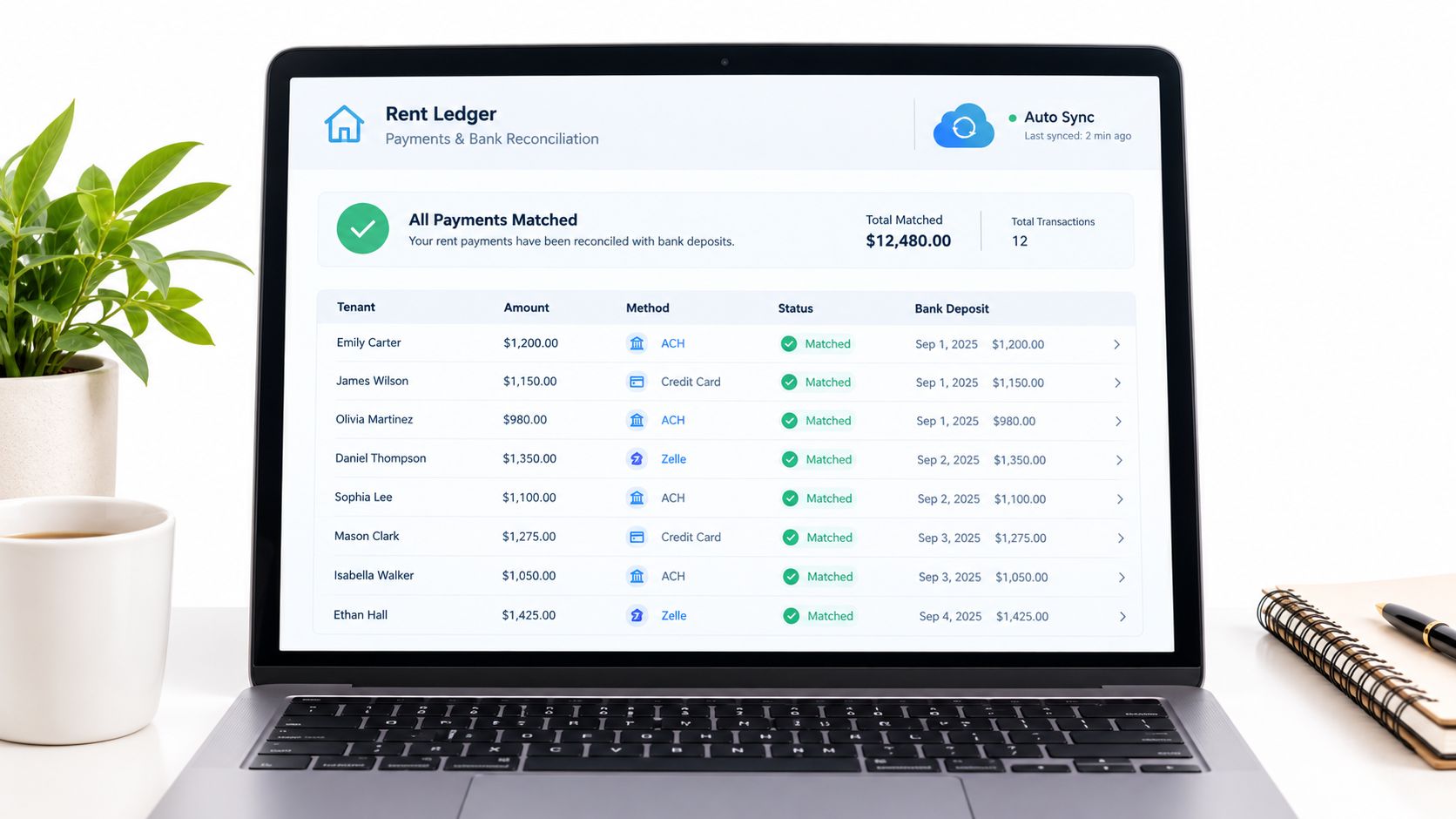
The strongest setup still needs human oversight. A payment may be reversed, grouped with another transaction, routed through a processor net of fees, or received outside the platform. Your reconciliation process should identify unmatched deposits, duplicate entries, returned payments, and transactions assigned to the wrong tenant or property.
Example matching process
First, compare the ledger's payment date, amount, tenant, property, and method with the bank activity. Next, investigate anything that doesn't match. If several tenant payments arrive in a single processor deposit, keep the individual tenant entries and document how the combined deposit was allocated. If the bank amount differs because of a processing fee, record the gross collection and the fee according to your accounting workflow rather than forcing the ledger to equal the net deposit.
Choose a system with access controls, transaction history, and an audit trail. Protect accounts with strong passwords and two-factor authentication, and retain exports or backups outside the platform. Automation reduces repetitive entry, but it won't decide whether a correction is substantively accurate.
Landlords comparing payment collection with accounting software can review this QuickBooks guide for rental properties. VerticalRent also describes online ACH and card collection, automated reminders, late-fee logging, and income and expense records that can be used for reporting. Confirm the specific fields and export behavior before building your year-end process around them.
6. Rent Ledger with Tenant Communication and Dispute Documentation
A payment record becomes much more useful when it preserves the conversation that explains an exception. If a tenant says a payment was sent, requests time to cure an arrears balance, disputes a late fee, or agrees to a repayment schedule, the ledger should point to the written evidence without becoming an informal diary.
Keep the financial entries objective. Record the date, communication method, participants, topic, and outcome. Store the original email, message export, notice, receipt, or attachment in a secure tenancy folder. For text messages, preserve the date and time shown by the system, and don't rely on a cropped screenshot that removes the surrounding context.
A good dispute record lets another person follow the transaction without needing your memory.
Example documentation
The tenant sends a message saying a partial payment covers the current rent charge. You should record the amount and date as a payment, then note the tenant's stated allocation separately. If you accept a different allocation, confirm that decision in writing and preserve the confirmation. If you don't agree, state the balance and the basis for your position in a professional written response.
Follow verbal conversations with a neutral written summary. Avoid emotional language, speculation, or comments unrelated to the account. Communication records should support the ledger, not replace it. The charge, payment, balance, and applicable agreement still need their own columns.
A rent-payment app such as Divvy's app for splitting rent payments may be relevant when several people contribute to a household payment, but landlords should still verify who is responsible under the lease and how the platform identifies the payer. Confidentiality also matters. Limit access to sensitive tenant information, retain records according to your legal and business requirements, and obtain professional advice before using a ledger as evidence in a legal action.
7. Comparative Rent Ledger Dashboard for Multiple Properties
A dashboard turns detailed ledger entries into a management view. It shouldn't replace the tenant-level record. Instead, it should summarize standardized fields across properties and periods so you can investigate differences without treating a high-level trend as proof of what happened in an individual account.
Use consistent labels for rent charged, rent collected, late fees, credits, vacancies, expenses, and unresolved balances. Include a property identifier on every source transaction. Then add notes for operational changes, such as a new payment process, a lease amendment, a repair interruption, or a change in management responsibility.
Build the comparison carefully
Begin with the source ledgers, not a manually typed summary. A property dashboard can show collection status, outstanding balances, income by property, and expense categories, but each displayed value should trace back to dated entries and supporting documents. Compare matching periods and use the same definitions throughout. A property with a partial-month move-in shouldn't be compared with a full-period charge without explaining the difference.
Color coding can help you find exceptions, but it shouldn't determine the accounting treatment. Review unusual credits, deposits, reversals, and late fees manually. Share reports with co-investors or advisers only after checking that tenant-identifying information isn't exposed unnecessarily.
A useful dashboard answers practical questions:
- Which property needs attention: Find unresolved balances or unmatched bank activity.
- What changed operationally: Add notes beside shifts caused by payment methods, turnover, or repairs.
- Which records support the summary: Retain a direct path to the tenant ledger and source documents.
- What belongs in tax reporting: Separate rental income and deductible expense categories from deposits and other non-income items.
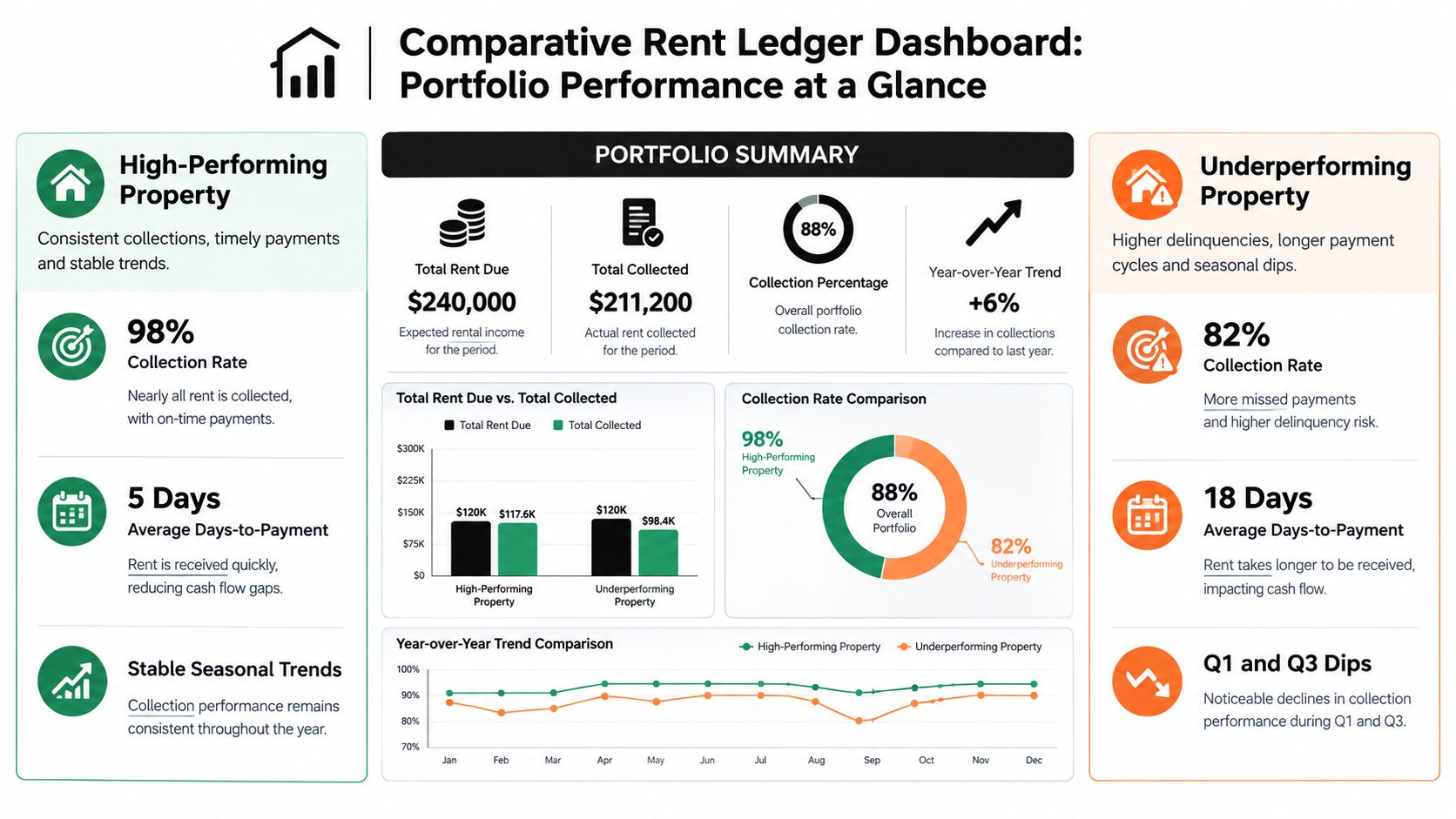
Use the dashboard for review and planning, then return to the underlying records before making a correction, sending a notice, or preparing a filing.
7-Point Rent Ledger Comparison
| Ledger Type | Implementation Complexity (🔄) | Resource Requirements (⚡) | Expected Outcomes (📊) | Ideal Use Cases (💡) | Key Advantages (⭐) |
|---|---|---|---|---|---|
| Basic Monthly Rent Ledger Template | Low 🔄 | Minimal, spreadsheet, monthly reconciliation ⚡ | Simple month-by-month payment tracking; tax-ready totals 📊 | Independent landlords with 1–5 units 💡 | Easy to use, minimal data entry, quick snapshot of payments ⭐ |
| Multi-Property Rent Ledger with Expense Tracking | Medium–High 🔄🔄 | Detailed records, spreadsheet skills or accounting software ⚡⚡ | Per-property income/expense P&L and Schedule E support 📊 | Landlords managing 3–10 units; property managers 💡 | Comprehensive financial view; simplifies tax prep and comparisons ⭐ |
| Rent Ledger with Late Fee and Payment Plan Tracking | Medium 🔄🔄 | Timely updates, knowledge of state laws, possible automation ⚡⚡ | Accurate late-fee calculations, payment-plan tracking, dispute evidence 📊 | Landlords with chronically late-paying tenants 💡 | Clear enforcement documentation; consistent fee application protects landlord ⭐ |
| Deposit and Security Ledger (Integrated with Rent Ledger) | Medium 🔄🔄 | Separate accounts, legal compliance tracking, documentation ⚡⚡ | Compliance with deposit laws, itemized deduction records, dispute protection 📊 | All landlords, especially those with frequent turnovers or strict jurisdictions 💡 | Protects against litigation; documents deposit handling and returns ⭐ |
| Digital Rent Ledger with Automatic Bank Reconciliation | Medium (initially) 🔄🔄 | Payment processor integration, cloud platform, internet, subscription ⚡⚡⚡ | Real-time reconciliation, reduced manual errors, audit-ready records 📊 | Tech-forward landlords and managers scaling portfolios 💡 | Eliminates manual entry, saves time, improves accuracy and scalability ⭐ |
| Rent Ledger with Tenant Communication and Dispute Documentation | Medium 🔄🔄 | Consistent documentation processes, secure storage, time investment ⚡⚡ | Full audit trail of communications tied to payments; stronger legal position 📊 | Landlords handling disputes, evictions, or frequent payment issues 💡 | Provides evidence of communications and agreements; professional dispute records ⭐ |
| Comparative Rent Ledger Dashboard (Multiple Properties & Periods) | High 🔄🔄🔄 | Robust data collection, analytics tools or BI software, setup time ⚡⚡⚡ | Portfolio-level trends, seasonal patterns, benchmarking and strategic insights 📊 | Experienced investors and managers with 5+ properties making strategic decisions 💡 | Identifies top/bottom performers and informs pricing, screening, or sell/hold decisions ⭐ |
Turn Ledger Entries Into Reliable Reports
The best rent ledger is the one that makes every transaction understandable without a reconstruction exercise. Start by identifying every scheduled charge, then record each payment, credit, fee, deposit, reversal, and adjustment as its own entry. Use consistent dates, amounts, payment methods, tenant identifiers, property identifiers, and descriptions.
Keep rent separate from deposits and other funds. A deposit can arrive with rent in one transfer, but it shouldn't be blended into the rent balance or treated automatically as rental income. Late fees should appear as separate charges. Partial payments should reduce the appropriate balance while leaving the original charge and payment history visible. A prorated move-in entry should explain the period covered and the basis for the charge.
Reconciliation is the control that connects the ledger to reality. Match recorded payments against bank activity, investigate unmatched or duplicated transactions, and document processor fees, returned payments, transfers, and corrections. Don't wait until tax preparation to discover that an entry was assigned to the wrong property. Review exceptions while the transaction and communication are still easy to verify.
Your documentation should also travel with the ledger. Keep leases, invoices, receipts, condition reports, notices, payment confirmations, and written communications organized by tenant and property. The IRS requires records supporting items reported on Schedule E, and landlords with more than three rental properties must attach as many Schedule E forms as needed, combining the totals on one form. That structure makes property-level records especially important for owners managing multiple units (IRS Schedule E instructions).
Each example serves a different reporting layer. The basic ledger preserves tenant-level payment history. The late-fee and deposit formats clarify special transactions. The property ledger groups income and expenses for Schedule E preparation. The digital and dashboard formats support reconciliation and portfolio review. VerticalRent's income and expense ledger can connect online rent collection with per-property records and Schedule E-oriented reporting, subject to your review and professional tax guidance.
Start with the basic template. Add paid-to dates, late-fee fields, deposit records, or communication references only when your transactions require them. As your portfolio becomes harder to reconcile manually, consider automated collection and reporting through a platform such as VerticalRent, while continuing to review exceptions and retain supporting documents.
VerticalRent offers online ACH and card rent collection, automated reminders and late-fee logging, and an income and expense ledger that records transactions by property for reporting workflows. Visit VerticalRent to see how its tools can help you build a clearer rent ledger and reduce manual reconciliation.
Put this into practice
VerticalRent tools related to this guide
Legal Disclaimer
VerticalRent and its authors are not attorneys, CPAs, or licensed legal or financial advisors, and nothing on this site constitutes legal, tax, or professional advice. The information in this article is provided for general educational purposes only. Landlord-tenant laws, eviction procedures, security deposit rules, and tax regulations vary significantly by state, county, and municipality — and change frequently. Nothing on this site creates an attorney-client relationship. Always consult a licensed attorney or qualified professional in your jurisdiction before taking any action based on information you read here.
Co-founded VerticalRent in 2011, growing it from nothing to 100k landlords and renters. Sold it in 2019, then re-acquired it in 2026 to make it better than ever.


